
turnto / social-commerce
turnto/social-commerce
Social commerce platform to collect, manage, and display ratings and reviews to enhance your Magento store
Overview
This repository contains a Magento 2 extension that connects Magento 2 with TurnTo's Social Commerce service. Compatible with Magento Community and Enterprise, versions 2.1.x - 2.3.x.
Installation Instructions
Install using Composer (recommended)
-
Run these commands in your root Magento installation directory:
composer require turnto/social-commerce bin/magento module:enable --clear-static-content TurnTo_SocialCommerce bin/magento setup:upgrade bin/magento cache:flush -
If you are deploying the extension to a production environment, follow the devdocs.magento.com deployment instructions
-
Configure the module to connect to your TurnTo account. Please see the General Configuration section bellow.
Install by copying files
-
Create an
app/code/TurnTo/SocialCommercedirectory in your Magento installation. -
Download the latest "Source code" from this page: https://github.com/turnto/magento2-turnto-socialcommerce/releases
-
Extract the file and copy the contents of the TurnTo_SocialCommerce-*** directory into the
app/code/TurnTo/SocialCommercedirectory. -
Run following commands from your root Magento installation directory:
bin/magento module:enable --clear-static-content TurnTo_SocialCommerce bin/magento setup:upgrade bin/magento cache:flush -
If you are deploying the extension to a production environment, follow the devdocs.magento.com deployment instructions
-
Configure the module to connect to your TurnTo account. Please see the General Configuration section bellow.
Documentation
General Configuration
It is imperative that you add you your TurnTo site key and auth key. TurnTo Site keys allow the Magento extension to connect to your TurnTo account.
You can find your Site Key and Auth Key in the TurnTo portal or by contacting your TurnTo Customer Success team.
After installing the extension, login to the backend and configure the extension in STORES > Configuration > TURNTO SOCIAL COMMERCE > Configuration. Here is a screenshot of the extension as of version 3.2.2 (click to zoom):

CRON Configuration
This extension depends on the Magento CRON being configured in order to work properly. Reference the Magento DevDocs for details on how to configure the Magento CRON.
Catalog Feed Export to TurnTo
If the Enable Automated Feed Submission configuration option is set to Yes, on a nightly basis, Magento will export a feed of all products to TurnTo. This feed will include links to product images. In order for this link to be accurate, you will need to do the following:
- Login to the backend.
- Go to STORES > Configuration > GENERAL > Web
- Do the following (if you have multiple store views, follow these steps for each "Store View" scope):
- For the Base URLS > Base URL for User Media Files field, ensure a value is entered. If the field is blank, enter this value:
{{unsecure_base_url}}media/ - For the Base URLS (Secure) > Secure Base URL for User Media Files field, ensure a value is entered. If the field is blank, enter this value:
{{secure_base_url}}media/
Here is a screenshot of an example configuration:
- For the Base URLS > Base URL for User Media Files field, ensure a value is entered. If the field is blank, enter this value:
[image: Media Url Configuration]
If your store has 10,000 or more items in the catalog:
If your catalog has 10,000 or more items, the size of the export file can reach over 6Mb. Please check your php.ini or your htaccess files to ensure
that upload_max_filesize and post_max_size are set to a large enough value. We recommend setting them both to 10M.
Rating Import from TurnTo
If the Enable Reviews configuration option is set to Yes:
-
The reviews that display on product detail pages will be loaded directly from TurnTo. Exactly how the review data gets pull from TurnTo is determined by the Setup Type setting.
-
The reviews that display on product listing pages will be loaded from the "Review Count" and "Rating" product attributes. Those attributes get updated on a CRON job that runs hourly. The CRON job will request an XML feed from TurnTo and will update those product attributes. If you encounter issues where those attributes are not updated like you'd expect, you can manually review the contents of the XML feed that Magento is retrieving from TurnTo by creating a url that matches this pattern:
http://www.turnto.com/static/export/<SITE KEY>/<AUTHORIZATION KEY>/turnto-skuaveragerating.xmlwhere<SITE KEY>and<AUTHORIZATION KEY>are the values you entered into the corresponding fields in the TurnTo configuration fields in the admin. The XML file is generated by TurnTo twice daily (at 3AM EST and 11AM EST), so once you approve a new review for a product, you'll need to wait a while to see the changes reflected in the XML file.
Custom Configuration
Note: This is an advanced configuration option and should only be configured by a developer.
If you'd to customize the turnToConfig JS object that gets output whenever TurnTo is used on the frontend, you can do so by adding a JS object to the STORES > Configuration > TURNTO SOCIAL COMMERCE > Configuration > Custom Configuration field. You must enter a valid JS object into this field, as the contents of the JS object that you enter will get merged with the contents of the existing turnToConfig object. Event Callbacks are one example of what you might want to add to this config field. Here is an example of a valid value that could be added to the Custom Configuration field:
{
    reviewTitleInstruction: 'Summary for your review',
    eventHandlers: {
         reviewSubmit: function(evt) {
            // your code here
         }
    }
}
These are the following locations where the turnToConfig object gets output on the frontend:
- Product detail pages (reviews, Q&A, checkout comment display widget, visual gallery widget)
- Checkout comments on checkout confirmation page
- Pinboard widget
- Mobile landing page
When you add values to this configuration field, it is critical that you enter a valid JS object and that you test to ensure you didn't cause any JS errors.
Visual Content and Checkout Comment Pinboards
The TurnTo extension implements a custom widget that allows an admin to insert "Visual Content" pinboards or "Checkout Comment" pinboards. To insert this widget, edit a CMS page or CMS block and click the "Insert Widget…" button and select "TurnTo SpeedFlex". You'll then be able to configure and insert the widget using these options:
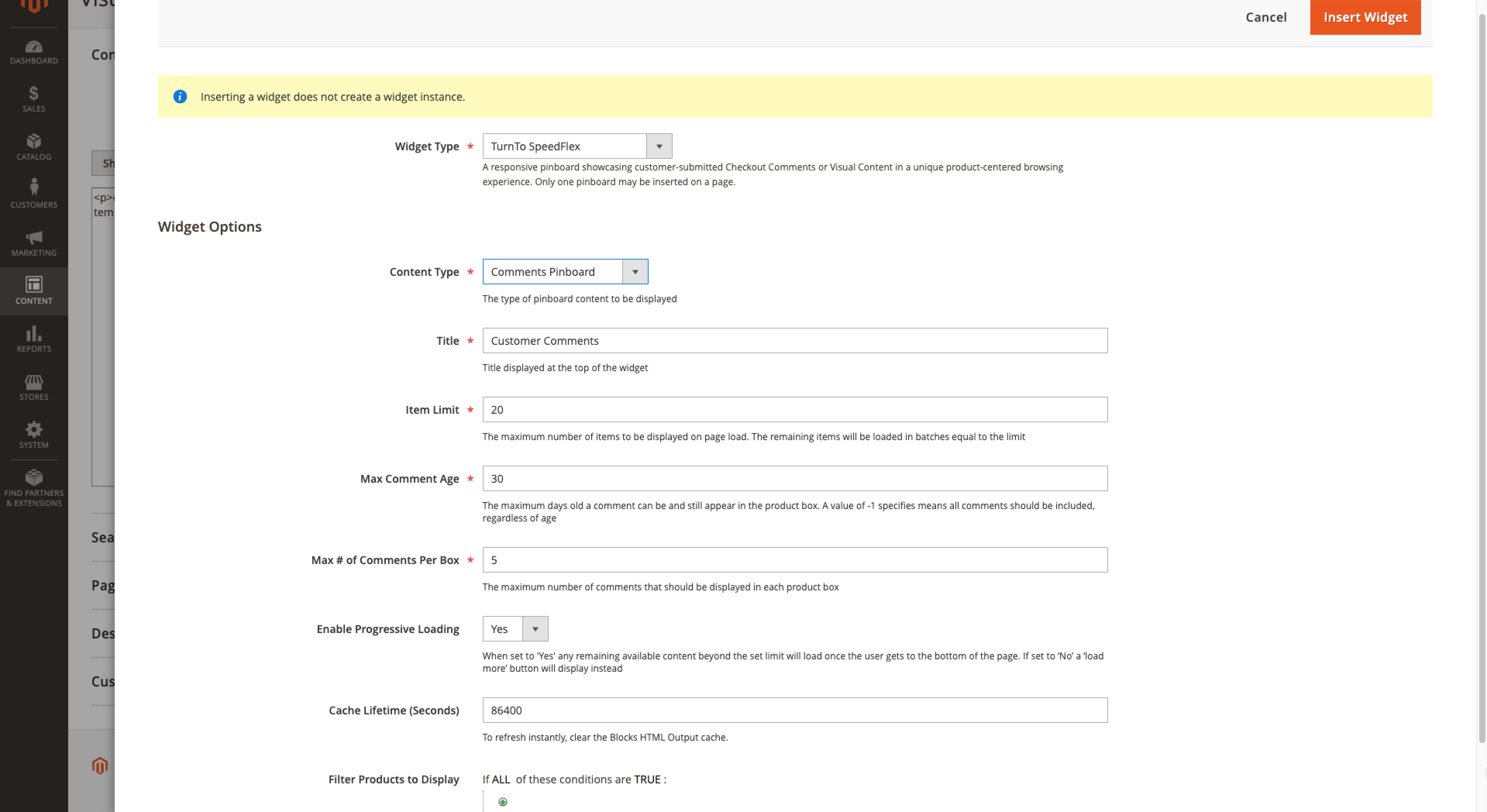
Visual Content Gallery Row Widget
The TurnTo extension implements a custom widget that allows a user to toggle a gallery row of user submitted images on the product page. To enable this widget, go to Stores -> Configuration -> TurnTo SocialCommerce -> Configuration -> Visual Content -> Enable PDP Gallery Row and set the value to "Yes."

Troubleshooting
- General - If you experience issues with the extension, review the errors in the
var/log/turnto.logfile, as that is where all TurnTo errors are logged. - Issue when "Minify JavaScript Files" is enabled - If you're using Magento's "Minify JavaScript Files" feature, see this page for details on how to get it working with this extension.
- How to review product feed that is sent to TurnTo - See this Github issue: #27
About TurnTo Social Commerce
TurnTo is the fastest-growing provider of customer content solutions to top merchants and brands. With a unique suite of 4 innovative products that work beautifully together - Ratings & Reviews, Community Q&A, Visual Reviews, and Checkout Comments - TurnTo produces more content of more different types, delivering greater conversion lift, better SEO, and deeper merchandising insights.
TurnTo clients enjoy a world-class Ratings & Reviews platform, a Q&A system designed to maximize customer engagement and help shoppers find fast answers from a variety of sources, a highly engaging source of real-time customer content with Checkout Comments, and a permissions-cleared source of customer photos and videos through Visual Reviews. TurnTo offers integrations with major eCommerce platforms and is built for the new world, reimagined for mobile, visual content, and messaging. ECommerce leaders like Saks Fifth Avenue, Newegg, Sur La Table, and GNC, and brands like Cole Haan, Jockey, and Clarins rely on TurnTo for their customer-voice programs.
License
This project is licensed under the Open Software License 3.0 (OSL-3.0). See included LICENSE file for full text of OSL-3.0
##3.1.1 (2019-12-17)
- Fixed bug that caused setup:di:compile to fail
##3.1.0 (2019-12-17)
- Added checkout comment pinboards (documentation)
- Added visual content pinboards (documentation)
- Added the Magento and TurnTo module version to turnToConfig object (documentation)
##3.0.4 (2019-10-16)
- Module now searches for Magento 2 root and appends it to export file paths. This fixes some read/write errors for servers running in a non-standard configuration.
##3.0.3 (2019-10-10)
- Added version to composer.json
##3.0.2 (2019-08-02)
- Fixed historical order feed cron job upload.
##3.0.1 (2019-05-14)
- Added Magento 2.3 Compatibility
##3.0.0 (2019-05-07)
- New version release for compatibility with JS widget v5
2.1.3 (2019-04-18)
- Updated README and made new version number for Magento Marketplace Release
2.1.2 (2018-10-24)
- Fix issue with catalog export when stock item could not be found
2.1.1 (2018-07-02)
- Fix issue with custom configuration default value
2.1.0 (2018-06-08)
- Handle special characters not supported by turnto (#44)
2.0.0 (2018-04-13)
- Improve HttpClient logging for debugging errors during retrieval of embedded content (#38)
- Add support for using child SKU instead of parent SKU option in 2.2.x (#29)
- Fix order export failing due to sorting on incorrect order column (#33)
- Fix stock availability status not being set for catalog export (#39)
- Fix issue where admin configured "Custom Configuration" was not getting output on product detail pages (#41)
- Refactored TurnTo javascript config generation to centralized Block
- Developers can now intercept config generation through Magento plugins to customize functionality
1.3.0 (2018-01-19)
- Added documentation explaining how reviews are pulled from TurnTo
- Fixed issue where category pages don't display proper review count/rating until manual reindex is performed (#31) and (#23)
- Increase frequency of importing reviews from TurnTo (#30)
- Fixed DI compilation error on Magento 2.2.x (#30)
1.2.0 (2017-12-12)
- Add Single Sign On functionality to the mobile landing page (#24)
1.1.2 (2017-10-18)
- Add option to include/exclude order items from historical feed based on whether they've been shipped (#20)
- Misc bug fix (#21)
1.1.1 (2017-10-04)
- Add option have a "from" date when exporting historical orders (#18)
- Make it possible for a developer to group reviews for similar products by modifying g:item_group_id value in the catalog feed (#17)
- Fix catalog/order feed export issue (#16)
- Misc bug fixes
1.1.0 (2017-09-24)
- Add SSO (Single Sign On) feature (#14)
- Add support for using child/variant SKUs instead of parent SKUs (#8)
1.0.4 (2017-07-28)
- Add user-supplied turnToConfig JS to all places it is used (#5)
- Fix errors when attempting to import ratings (#4)
- Fix error when historical orders are exported with products that have been deleted (#3)
- Increase CRON history lifetime to provide more robust debugging information
1.0.3 (2017-06-29)
- Allow admins to add custom values to the turnToConfig object (see docs)
- Fix issue where reviews were not showing on product listing or search result pages (#7)
1.0.2 (2017-06-13)
- Fix product image url in catalog feed export
1.0.1 (2016-08-24)
- Fixed composer install for Magento 2.0. Works on 2.0 and 2.1 now.
1.0.0 (2016-08-09)
- Initial Release
| Version | Stability | QA Status | Released |
|---|---|---|---|
| 3.9.1 | stable | Fail | 2026-06-05 15:31:29 |
| 3.9.0 | stable | Fail | 2026-05-18 14:36:49 |
| 3.8.8 | stable | Not tested | 2025-10-09 20:52:17 |
| 3.8.7 | stable | Not tested | 2025-05-07 19:22:12 |
| 3.8.6 | stable | Not tested | 2024-06-18 21:08:58 |
| 3.8.5 | stable | Not tested | 2024-05-07 15:19:38 |
| 3.8.4 | stable | Not tested | 2024-01-25 15:31:48 |
| 3.8.3 | stable | Not tested | 2023-07-13 15:11:31 |
| 3.8.2 | stable | Not tested | 2023-03-16 13:46:59 |
| 3.8.1 | stable | Not tested | 2021-11-18 19:49:33 |
| 3.8.0 | stable | Not tested | 2021-10-25 20:51:57 |
| 3.7.9 | stable | Not tested | 2021-10-05 16:53:45 |
| 3.7.8 | stable | Not tested | 2021-06-29 22:54:38 |
| 3.7.7 | stable | Not tested | 2021-06-29 20:02:50 |
| 3.7.6 | stable | Not tested | 2021-06-28 17:50:19 |
| 3.7.5 | stable | Not tested | 2021-06-24 17:00:47 |
| 3.7.4 | stable | Not tested | 2021-06-16 15:45:40 |
| 3.7.3 | stable | Not tested | 2021-05-12 18:25:06 |
| 3.7.2 | stable | Not tested | 2021-05-06 21:48:06 |
| 3.7.1 | stable | Not tested | 2021-05-04 20:21:04 |
| 3.7.0 | stable | Not tested | 2021-03-29 19:13:41 |
| 3.6.10 | stable | Not tested | 2021-02-17 20:17:35 |
| 3.6.9 | stable | Not tested | 2021-02-12 22:31:17 |
| 3.5.8 | stable | Not tested | 2021-02-05 19:11:30 |
| 3.6.7 | stable | Not tested | 2021-01-26 19:34:42 |
| 3.6.6 | stable | Not tested | 2021-01-19 17:01:17 |
| 3.6.5 | stable | Not tested | 2021-01-14 18:57:57 |
| 3.6.4 | stable | Not tested | 2021-01-11 18:49:46 |
| 3.6.3 | stable | Not tested | 2021-01-08 18:46:39 |
| 3.6.2 | stable | Not tested | 2021-01-08 00:04:45 |
| 3.6.1 | stable | Not tested | 2021-01-05 23:29:28 |
| 3.6.0 | stable | Not tested | 2020-12-28 15:47:50 |
| 3.5.6 | stable | Not tested | 2020-11-13 23:11:11 |
| 3.5.5 | stable | Not tested | 2020-11-13 17:45:18 |
| 3.5.4 | stable | Not tested | 2020-11-13 17:06:05 |
| 3.5.3 | stable | Not tested | 2020-11-06 18:48:35 |
| 3.5.2 | stable | Not tested | 2020-10-20 21:59:04 |
| 3.5.1 | stable | Not tested | 2020-10-15 18:56:26 |
| 3.5.0 | stable | Not tested | 2020-10-08 16:16:48 |
| 3.4.4 | stable | Not tested | 2020-09-22 20:19:32 |
| 3.4.3 | stable | Not tested | 2020-09-15 22:19:23 |
| 3.4.2 | stable | Not tested | 2020-08-11 18:52:05 |
| 3.4.1 | stable | Not tested | 2020-08-11 18:36:35 |
| 3.4.0 | stable | Not tested | 2020-08-10 17:37:15 |
| 3.3.2 | stable | Not tested | 2020-08-03 17:26:40 |
| 3.3.1 | stable | Not tested | 2020-08-03 16:53:44 |
| 3.3.0 | stable | Not tested | 2020-07-07 22:56:37 |
| 3.2.2 | stable | Not tested | 2020-05-18 15:52:47 |
| 3.2.1 | stable | Not tested | 2020-03-31 22:10:51 |
| 3.2.0 | stable | Not tested | 2020-03-31 20:19:25 |
| 3.1.1 | stable | Not tested | 2019-12-18 00:06:33 |
| 3.1.0 | stable | Not tested | 2019-12-17 21:04:36 |
| 3.0.5 | stable | Not tested | 2019-11-21 19:26:41 |
| 3.0.4 | stable | Not tested | 2019-10-17 15:09:55 |
| 3.0.3 | stable | Not tested | 2019-10-10 20:47:17 |
| 3.0.2 | stable | Not tested | 2019-08-04 17:55:14 |
| 3.0.1 | stable | Not tested | 2019-05-14 19:45:06 |
| 3.0.0 | stable | Not tested | 2019-05-07 20:59:19 |
| 2.1.3 | stable | Not tested | 2019-04-18 22:04:55 |
| 2.1.2 | stable | Not tested | 2018-10-24 15:58:45 |
| 2.1.1 | stable | Not tested | 2018-07-02 21:22:17 |
| 2.1.0 | stable | Not tested | 2018-06-08 16:08:08 |
| 2.0.0 | stable | Not tested | 2018-05-02 18:47:19 |
| 1.3.0 | stable | Not tested | 2018-01-19 17:00:10 |
| 1.2.0 | stable | Not tested | 2017-12-12 15:56:49 |
| 1.1.2 | stable | Not tested | 2017-10-18 15:16:05 |
| 1.1.1 | stable | Not tested | 2017-10-04 21:03:54 |
| 1.1.0 | stable | Not tested | 2017-09-24 17:12:56 |
| 1.0.4 | stable | Not tested | 2017-07-28 15:56:12 |
| 1.0.3 | stable | Not tested | 2017-06-29 20:21:44 |
| 1.0.2 | stable | Not tested | 2017-06-13 23:14:08 |
| 1.0.1 | stable | Not tested | 2016-08-24 15:18:00 |
| 1.0.0 | stable | Not tested | 2016-08-09 12:52:07 |
Requires 19
| Package | Constraint |
|---|---|
| ext-simplexml | * |
| magento/framework | 102.0.*||103.0.* |
| magento/module-backend | 101.0.*||102.0.* |
| magento/module-catalog | 103.0.*||104.0.* |
| magento/module-checkout | 100.3.*||100.4.* |
| magento/module-config | 101.1.*||101.2.* |
| magento/module-configurable-product | 100.3.*||100.4.* |
| magento/module-cron | 100.3.*||100.4.* |
| magento/module-customer | 102.0.*||103.0.* |
| magento/module-eav | 102.0.*||102.1.* |
| magento/module-review | 100.3.*||100.4.* |
| magento/module-rule | 100.3.*||100.4.* |
| magento/module-sales | 102.0.*||103.0.* |
| magento/module-store | 101.0.*||101.1.* |
| magento/module-swatches | 100.3.*||100.4.* |
| magento/module-ui | 101.1.*||101.2.* |
| magento/module-url-rewrite | 101.1.*||102.0.* |
| magento/module-widget | 101.1.*||101.2.* |
| php | ^7.1||~8.0.0||~8.1.0||~8.2.0||~8.3.0||~8.4.0||~8.5.0 |
No QA results yet
QA pipelines haven't run for this version. Status appears here once the vendor publishes a tagged release that gets ingested.
No license declared
This package's composer.json doesn't declare a license, homepage, or authors. Check the source repository for terms of use.
Turn an existing module into recurring revenue.
If you already maintain a Magento 2 module on GitHub or GitLab, listing it on Packagento takes about five minutes. We mirror your tags, handle distribution signing, and route paid licenses through Stripe Connect, so you can keep shipping the way you already do.