
zepgram / module-rest
Technical module to industrialize API REST call with dependency injection pattern using Guzzle library
Zepgram Rest
Overview
Zepgram Rest is a technical module designed to streamline the development of REST API integrations in Magento 2 projects.
Utilizing the Guzzle HTTP client for dependency injection, this module offers a robust set of features aimed at reducing
boilerplate code, improving performance, and enhancing debugging capabilities. By centralizing REST API interactions and
leveraging Magento's built-in systems, Zepgram Rest simplifies the implementation process for developers.
Features
Zepgram Rest provides several key features to aid Magento developers in creating and managing RESTful services:
- Avoid Code Duplication: Minimize repetitive code with a straightforward setup in di.xml. Implement your REST API integrations with just one class creation, streamlining the development process.
- Centralized Configuration: Manage all your REST web services configurations in one place, ensuring consistency and ease of maintenance.
- Built-in Registry and Cache: Take advantage of Magento's native cache mechanisms and dedicated registry to boost your API's performance and security. This feature helps in efficiently managing data retrieval and storage, reducing the load on your server.
- Generic Logger: Debugging is made effortless with an inclusive logging system. Enable the debug mode to log detailed information about your API calls, including parameters, requests, and responses, facilitating easier troubleshooting.
- Data Serialization: Declare whether your requests and results should be JSON serialized or not. This flexibility prevents the need for multiple serializer implementations, accommodating various API requirements with ease.
Installation
composer require zepgram/module-rest
bin/magento module:enable Zepgram_Rest
bin/magento setup:upgrade
Guideline with ApiPool
- Create a RequestAdapter class for your service extending abstract class
Zepgram\Rest\Model\RequestAdapter,
this class represent your service contract adapter:- public const SERVICE_ENDPOINT: define the service endpoint
- dispatch(DataObject $rawData): initialize data that you will adapt to request the web service
- getBody(): implement body request
- getHeaders(): implement headers
- getUri(): implement uri endpoint (used to handle dynamic values)
- getCacheKey(): implement cache key for your specific request (you must define a unique key)
- Create a system.xml, and a config.xml with a dedicated configName:
- section:
rest_api - group_id:
$configName - fields:
base_uritimeoutis_debugcache_ttl
- section:
- Declare your service in di.xml by implementing
Zepgram\Rest\Service\ApiProvideras VirtualClass, you can configure
it by following the ApiProviderConfig - Declare your RequestAdapter and ApiProvider in
Zepgram\Rest\Service\ApiPoolInterface:- Add a new item in
apiProviders[]:- The key is your custom RequestAdapter full namespace
- The value is your ApiProvider as a VirtualClass
- Add a new item in
- Inject ApiPoolInterface in the class that will consume your API and use
$this->apiPool->execute(RequestAdapter::class, $rawData)where:- RequestAdapter::class represents the request adapter declared in
apiProviders[] - $rawData is an array of dynamic data that will be dispatch in
dispatch()method
- RequestAdapter::class represents the request adapter declared in
Basic guideline implementation
Instead of declaring your class in Zepgram\Rest\Service\ApiPoolInterface you can also directly inject
your ApiProvider in a dedicated class:
<?xml version="1.0"?>
<config xmlns:xsi="http://www.w3.org/2001/XMLSchema-instance"
        xsi:noNamespaceSchemaLocation="urn:magento:framework:ObjectManager/etc/config.xsd">
    <!-- rest api -->
    <virtualType name="CustomApiProvider" type="Zepgram\Rest\Service\ApiProvider">
        <arguments>
            <argument name="requestAdapter" xsi:type="object">Zepgram\Sales\Rest\FoxtrotOrderRequestAdapter</argument>
            <argument name="configName" xsi:type="string">foxtrot</argument>
        </arguments>
    </virtualType>
    <type name="My\Custom\Model\ConsumerExample">
        <arguments>
            <argument name="apiProvider" xsi:type="object">CustomApiProvider</argument>
        </arguments>
    </type>
</config>
<?php

declare(strict_types=1);

namespace My\Custom\Model\Api;

use Zepgram\Rest\Exception\InternalException;
use Zepgram\Rest\Exception\ExternalException;
use Zepgram\Rest\Service\ApiPoolInterface;
use Zepgram\Rest\Service\ApiProviderInterface;
use Zepgram\Sales\Api\OrderRepositoryInterface;

class ConsumerExample
{
    public function __construct(
        private OrderRepositoryInterface $orderRepository,
        private ApiProviderInterface $apiProvider
    ) {}

    /**
     * @param int $orderId
     * @return array
     */
    public function execute(int $orderId): array
    {
        // get raw data
        $order = $this->orderRepository->get($orderId);
        // send request
        $result = $this->apiProvider->execute(['order' => $order]);

        return $result;
    }
}
Configuration
Store config
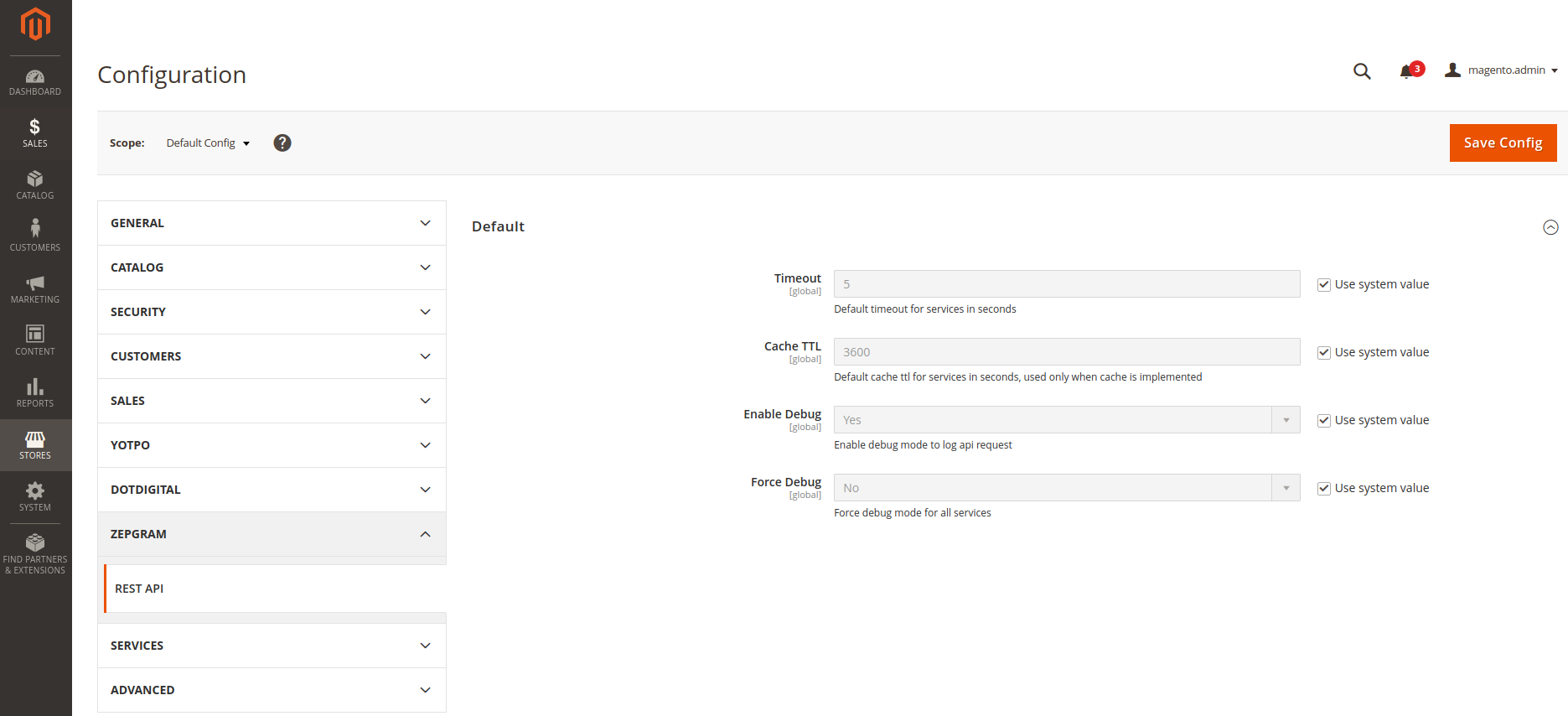
If you do not declare specific configuration, the request will fall back on default configuration.
To override the default config, you must follow this system config pattern: rest_api/%configName%/base_uri
XML config
You can configure your service with Zepgram\Rest\Service\ApiProvider by creating a
VirtualClass and customize its injections for your needs by following the below configuration:
| Variable name | Type | Default value | Is Optional | Description |
|---|---|---|---|---|
| configName | string | default | no | Value to retrieve group id from system config |
| requestAdapter | object | RequestAdapter | no | Adapter class to build and customize the request |
| validator | object | null | yes | Validate the service contract |
| method | string | GET | yes | Request method |
| isJsonRequest | boolean | true | yes | Parse request array to json |
| isJsonResponse | boolean | true | yes | Parse response string to array |
| isVerify | boolean | true | yes | Enable SSL certificate verification |
Implementation
Here is a simple implementation example with a service called Foxtrot using the order object as rawData:
FoxtrotOrderRequestAdapter.php
<?php

declare(strict_types=1);

namespace Zepgram\Sales\Rest;

use Magento\Framework\DataObject;
use Magento\Sales\Api\Data\OrderInterface;
use Zepgram\Rest\Model\RequestAdapter;

class FoxtrotOrderRequestAdapter extends RequestAdapter
{
    /** @var string */
    public const SERVICE_ENDPOINT = 'v1/order/';

    /** @var OrderInterface */
    private $order;

    /**
     * {@inheritDoc}
     */
    public function dispatch(DataObject $rawData): void
    {
        $this->order = $rawData->getOrder();
    }

    /**
     * {@inheritDoc}
     */
    public function getBody(): array
    {
        return [
            'orderId' => $this->order->getEntityId(),
            'customer' => $this->order->getCustomerEmail(),
            'orderTotal' => $this->order->getGrandTotal(),
            'version' => '1.0',
        ];
    }

    /**
     * {@inheritDoc}
     */
    public function getCacheKey(): ?string
    {
        return $this->order->getEntityId();
    }
}
system.xml
<?xml version="1.0"?>
<config xmlns:xsi="http://www.w3.org/2001/XMLSchema-instance"
        xsi:noNamespaceSchemaLocation="urn:magento:module:Magento_Config:etc/system_file.xsd">
    <system>
        <section id="rest_api">
            <group id="foxtrot" translate="label" type="text" sortOrder="10" showInDefault="1" showInWebsite="0"
                   showInStore="0">
                <label>Foxtrot</label>
                <field id="base_uri" translate="label" type="text" sortOrder="1" showInDefault="1" showInWebsite="0"
                       showInStore="0" canRestore="1">
                    <label>Base URI</label>
                </field>
                <field id="timeout" translate="label" type="text" sortOrder="1" showInDefault="1" showInWebsite="0"
                       showInStore="0" canRestore="1">
                    <label>Timeout</label>
                </field>
                <field id="cache_ttl" translate="label" type="text" sortOrder="5" showInDefault="1" showInWebsite="0"
                       showInStore="0" canRestore="1">
                    <label>Cache TTL</label>
                </field>
                <field id="is_debug" translate="label" type="select" sortOrder="10" showInDefault="1" showInWebsite="0"
                       showInStore="0" canRestore="1">
                    <label>Enable Debug</label>
                    <source_model>Magento\Config\Model\Config\Source\Yesno</source_model>
                </field>
            </group>
        </section>
    </system>
</config>
config.xml
<?xml version="1.0"?>
<config xmlns:xsi="http://www.w3.org/2001/XMLSchema-instance" xsi:noNamespaceSchemaLocation="urn:magento:module:Magento_Store:etc/config.xsd">
    <default>
        <rest_api>
            <foxtrot>
                <base_uri>https://foxtrot.service.io</base_uri>
                <timeout>30</timeout>
                <cache_ttl>7200</cache_ttl>
                <is_debug>1</is_debug>
            </foxtrot>
        </rest_api>
    </default>
</config>
di.xml
<?xml version="1.0"?>
<config xmlns:xsi="http://www.w3.org/2001/XMLSchema-instance"
        xsi:noNamespaceSchemaLocation="urn:magento:framework:ObjectManager/etc/config.xsd">
   <!-- rest api -->
   <virtualType name="FoxtrotOrderApiProvider" type="Zepgram\Rest\Service\ApiProvider">
      <arguments>
         <argument name="requestAdapter" xsi:type="object">Zepgram\Sales\Rest\FoxtrotOrderRequestAdapter</argument>
         <argument name="configName" xsi:type="string">foxtrot</argument>
      </arguments>
   </virtualType>
   <type name="Zepgram\Rest\Service\ApiPoolInterface">
      <arguments>
         <argument name="apiProviders" xsi:type="array">
            <item name="Zepgram\Sales\Rest\FoxtrotOrderRequestAdapter" xsi:type="object">FoxtrotOrderApiProvider</item>
         </argument>
      </arguments>
   </type>
</config>
OrderDataExample.php
<?php

declare(strict_types=1);

namespace Zepgram\Sales\Model;

use Zepgram\Rest\Exception\InternalException;
use Zepgram\Rest\Exception\ExternalException;
use Zepgram\Rest\Service\ApiPoolInterface;
use Zepgram\Sales\Api\OrderRepositoryInterface;
use Zepgram\Sales\Rest\FoxtrotOrderRequestAdapter;

class OrderDataExample
{
    public function __construct(
        private OrderRepositoryInterface $orderRepository,
        private ApiPoolInterface $apiPool
    ) {}

    /**
     * @param int $orderId
     * @throws MyAweSomeTechnicalException
     * @throws MyAwesomeBusinessException
     */
    public function execute(int $orderId): void
    {
        try {
            // get raw data
            $order = $this->orderRepository->get($orderId);
            // send request
            $result = $this->apiPool->execute(FoxtrotOrderRequestAdapter::class, ['order' => $order]);
            // handle result
            $order->setFoxtrotData($result);
            $this->orderRepository->save($order);
        } catch (InternalException $e) {
            $context['context_error'] = 'Magento request is wrong, foxtrot order service could not handle it'
            // service rejected request for business reason: do something (log, throw, errorMessage..)
            throw MyAwesomeBusinessException(__('Bad request error'), $e);
        } catch (ExternalException $e) {
             $context['context_error'] = 'We could not reach foxtrot order service'
             // service is unavailable due to technical reason: do something (log, throw, errorMessage..)
             $this->logger->error($e, $context);
             throw MyAwesomeTechnicalException(__('Foxtrot server error'), $e);
        }
    }
}
Log & Sensitive Data
This module includes a built-in Monolog Processor: SensitiveDataProcessor.php
Depending on your MAGE_MODE environment variable, data will be automatically obfuscated if log key contains those keys:
passwordusernameusertokenkeysecrethashhmacshasignauthorizationjwtaccessauthssopassphrasesshpincvvccvcvccard
This class can be customized with di.xml by:
- Activating the processor with parameter
$isEnabled, otherwise it will only be enabled ifMAGE_MODE === 'production' - Adding custom keys by using
$sensitiveKeysparameter - Overriding the default keys by using
$overrideSensitiveKeysparameter - Modify the placeholder for sensitive data by setting
$redactionPlaceholder
Issues & Improvements
If you encountered an issue during installation or with usage, please report it on this github repository.
If you have good ideas to improve this module, feel free to contribute.
No changelog yet
The vendor hasn't published a changelog. Tagged releases appear in the Versions tab.
| Version | Stability | QA Status | Compatibility | Released |
|---|---|---|---|---|
| 3.0.0 | stable | Fail | Not compatible Details | 2026-03-04 14:37:45 |
| 2.1.1 | stable | Not tested | Not yet tested Details | 2026-01-15 11:30:10 |
| 2.1.0 | stable | Not tested | Not yet tested Details | 2025-06-25 14:39:02 |
| 2.0.3 | stable | Not tested | Not yet tested Details | 2024-11-24 21:23:39 |
| 2.0.2 | stable | Not tested | Not yet tested Details | 2024-05-06 10:56:44 |
| 1.1.5 | stable | Not tested | Not yet tested Details | 2024-05-06 10:51:30 |
| 1.1.4 | stable | Not tested | Not yet tested Details | 2024-05-03 17:53:35 |
| 2.0.1 | stable | Not tested | Not yet tested Details | 2024-05-03 17:48:37 |
| 2.0.0 | stable | Not tested | Not yet tested Details | 2024-02-19 11:43:41 |
| 1.0.5 | stable | Not tested | Not yet tested Details | 2023-11-17 18:05:07 |
| 1.1.3 | stable | Not tested | Not yet tested Details | 2023-11-17 18:04:11 |
| 1.1.2 | stable | Not tested | Not yet tested Details | 2023-09-20 08:47:09 |
| 1.0.4 | stable | Not tested | Not yet tested Details | 2023-09-20 08:33:24 |
| 1.0.3 | stable | Not tested | Not yet tested Details | 2022-10-03 14:52:49 |
| 1.0.2 | stable | Not tested | Not yet tested Details | 2022-09-27 14:27:52 |
| 1.1.1 | stable | Not tested | Not yet tested Details | 2022-09-27 14:04:09 |
| 1.1.0 | stable | Not tested | Not yet tested Details | 2022-04-01 22:45:41 |
| 1.0.1 | stable | Not tested | Not yet tested Details | 2021-12-31 10:10:50 |
| 1.0.0 | stable | Not tested | Not yet tested Details | 2021-12-29 13:31:58 |
| 0.0.2 | stable | Not tested | Not yet tested Details | 2021-12-27 15:01:00 |
| 0.0.1 | stable | Not tested | Not yet tested Details | 2021-11-05 00:59:22 |
Requires 6
| Package | Constraint |
|---|---|
| php | ^8.2 |
| guzzlehttp/guzzle | ^7.0 |
| monolog/monolog | ^3.0 |
| magento/framework | ^103.0.8 |
| zepgram/module-base | ~0.0.1 |
| zepgram/module-json-schema | ^0.2.0 |
Compatibility
Each Magento release line is installed on its supported PHP versions, then the module is built (DI compilation + static-content deploy) and its unit and integration suites are run. The matrix shows the lines and PHP versions the module is confirmed to install and run on. Code-quality results further down (phpstan, phpcs, …) are reported separately and never affect compatibility.
Code Quality
Advisory checks against the module's source. Static analysis runs once across the whole module; PHPStan re-runs per Magento + PHP version because resolvable symbols differ between releases. These NEVER affect the Compatibility badge. A phpcs finding can't make a module incompatible.
Static analysis
Coding standards (phpcs), mess detection (phpmd), copy-pasted code (cpd), PHP cross-version compatibility, composer.json validity. Each runs once for the whole module.
| Tool | Status | Findings | Summary |
|---|---|---|---|
| PHPCS | Warning | 2 | 2 warnings (ruleset: Magento2) |
| PHPMD | Warning | 25 | 25 rule violations (UndefinedVariable:22, IfStatementAssignment:1, CyclomaticComplexity:1, UnusedFormalParameter:1) |
| Cpd | Pass | 0 | |
| Composer validate | Info | 1 | valid; 1 advisory note (composer validate --strict) |
Tests
Unit and integration suites, run for each applicable Magento and PHP version. A test failure speaks to the module's behaviour, not its compatibility with a Magento line, so it is reported here separately and never reddens the compatibility matrix.
Unit tests
| Magento | PHP 8.2 | PHP 8.3 | PHP 8.4 | PHP 8.5 |
|---|---|---|---|---|
| 2.4.7 | N/A | N/A | ||
| 2.4.8 | N/A | N/A | ||
| 2.4.9 | N/A | N/A |
Integration tests
| Magento | PHP 8.2 | PHP 8.3 | PHP 8.4 | PHP 8.5 |
|---|---|---|---|---|
| 2.4.7 | N/A | N/A | ||
| 2.4.8 | N/A | N/A | ||
| 2.4.9 | N/A | N/A |
Security
Security checks run directly against the module: an audit of its declared dependencies for known vulnerabilities (composer audit) and a scan of its source for malware and web-shell signatures. Each runs once. A malware detection fails the version outright.
More from zepgram
View vendorSimple autoloader to integrate the Symfony Dotenv component into Magento2
Magento2 module to disable search engine and fulltext indexing for category search
This module is a powerful tool for developers who want to process large data sets in a short amount of time
Turn an existing module into recurring revenue.
If you already maintain a Magento 2 module on GitHub or GitLab, listing it on Packagento takes about five minutes. We mirror your tags, handle distribution signing, and route paid licenses through Stripe Connect, so you can keep shipping the way you already do.