
phpro / mage2-module-scheduler
Cron Scheduler for Magento 2

Cron Scheduler for Magento 2
This module allows merchants and developers to easily view and manage Magento cron jobs in the backend of Magento 2.
Installation
composer require phpro/mage2-module-scheduler
How to use
Timeline
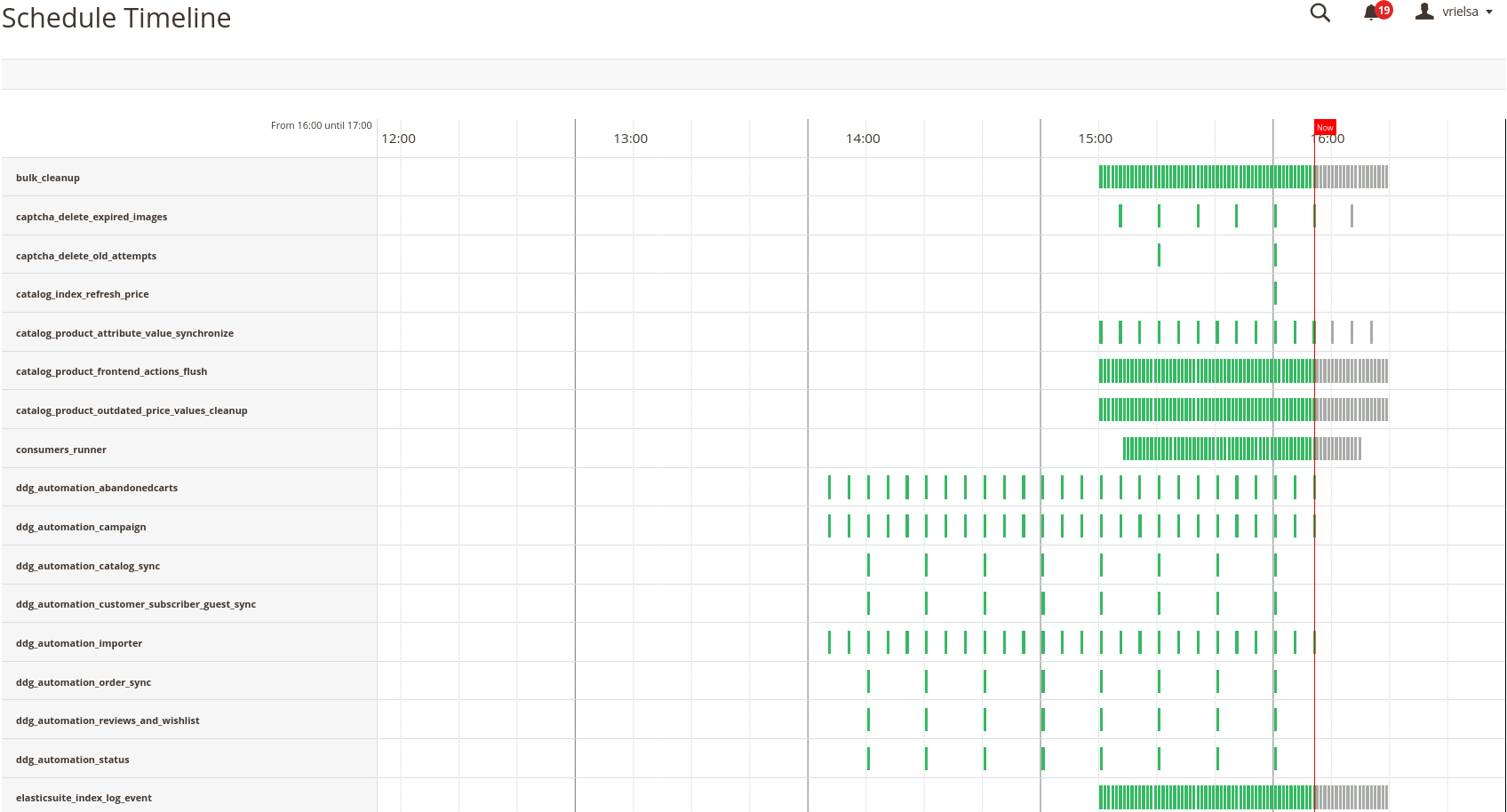
A timeline of the Magento jobs can be found under System / Cron Schedule / Schedule Timeline.
On this timeline we can easily:
- see when a job executed
- see when a job is successful, these are marked green
- see when a job has failed, these are marked red
- see at what time a job should be executed, these are marked gray
Schedule list
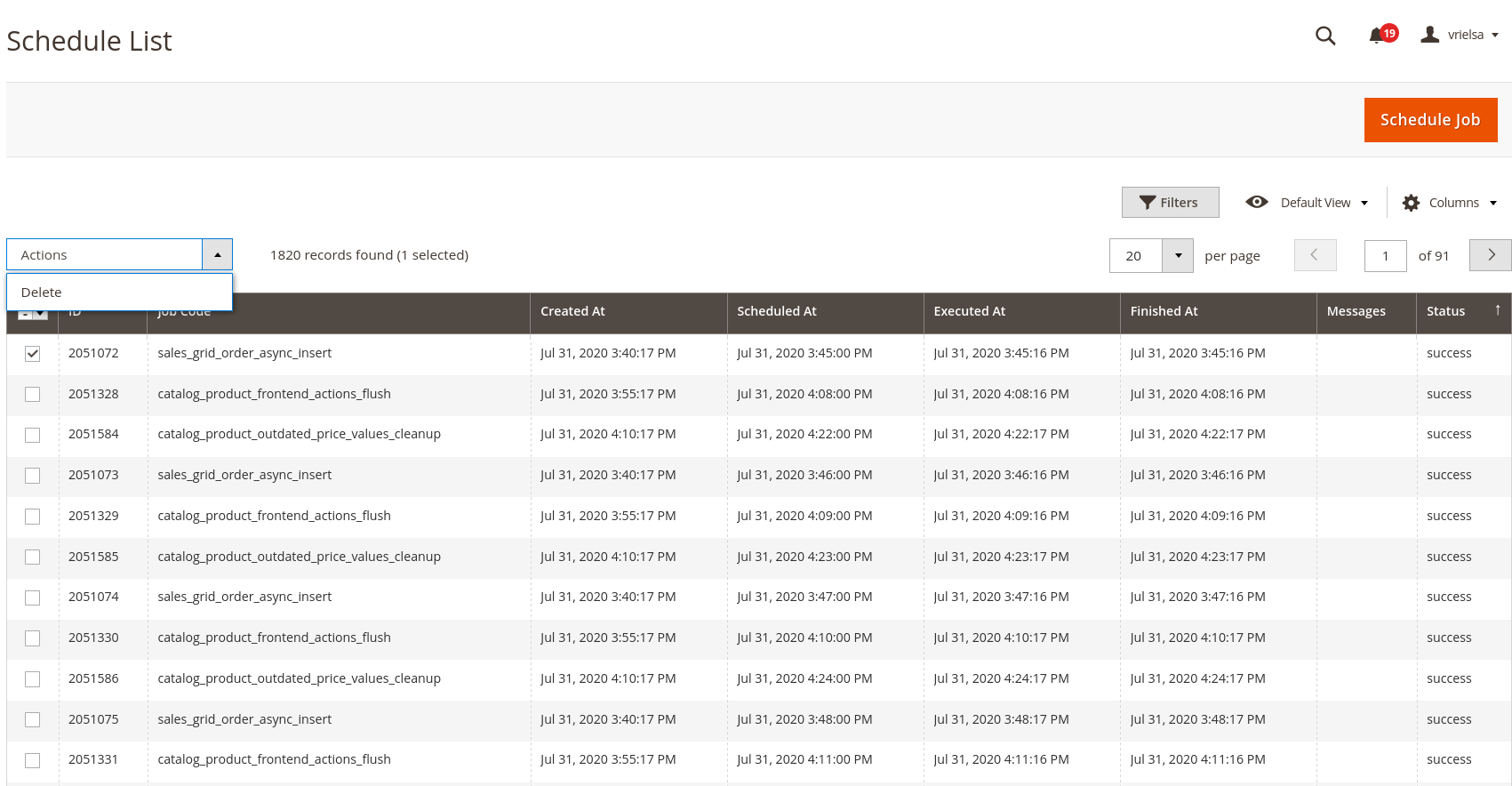
The timeline view is very similar to the list view, which we can find under System / Cron Schedule / Schedule list. With the schedule list you can easily:
- schedule new jobs (by clicking on the 'Schedule job' button)
- delete jobs (by selecting them and selecting 'Delete' from the actions dropdown)
- filter jobs (ex. filter by cron status)
Job Configuration
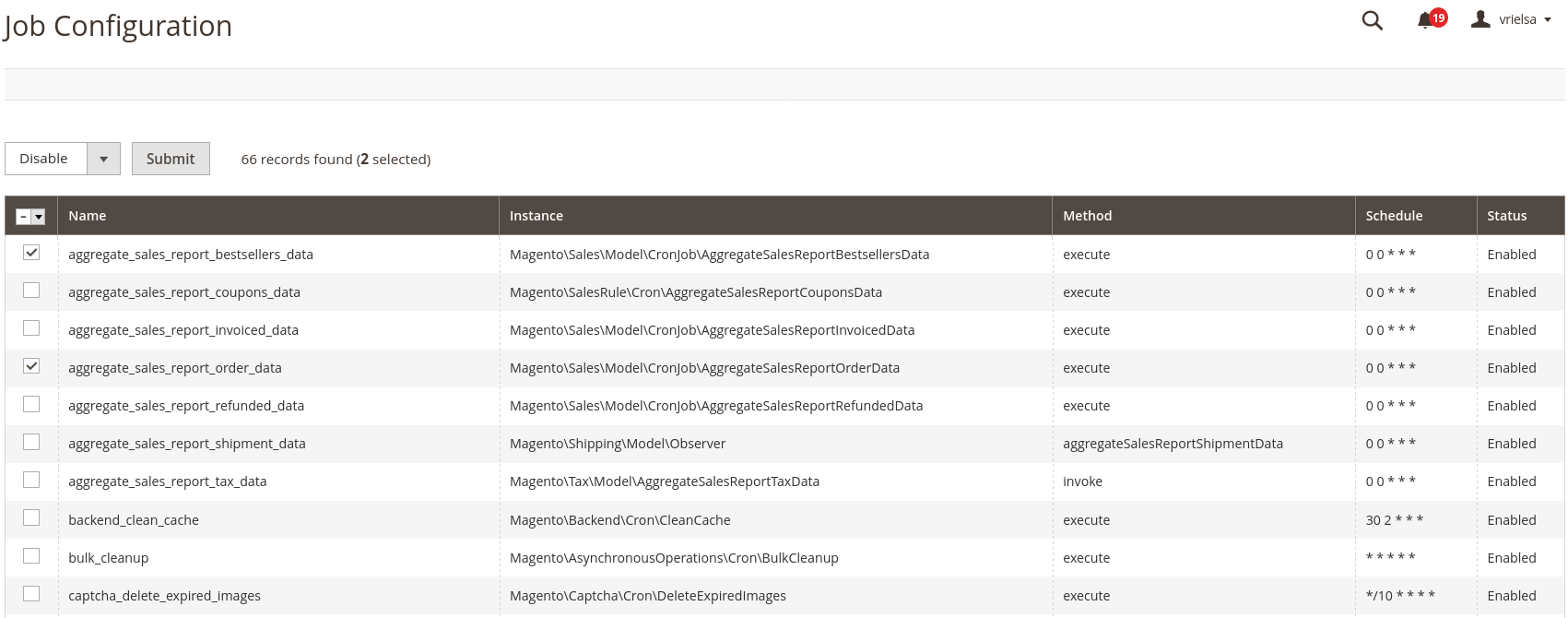
We can easily disable cron jobs by using the System / Cron Schedule / Job Configuration view from which we can easily select and disable a cron job. Disabling a cron will prevent it from being scheduled.
Features
- Visualisation of the cron jobs by list and timeline view
- Add / remove jobs to the schedule
- Control which jobs can be scheduled by Magento
- Remove stalled jobs in 'running' status after a configured amount of time
- Clean up ran or failed cron jobs
Configuration
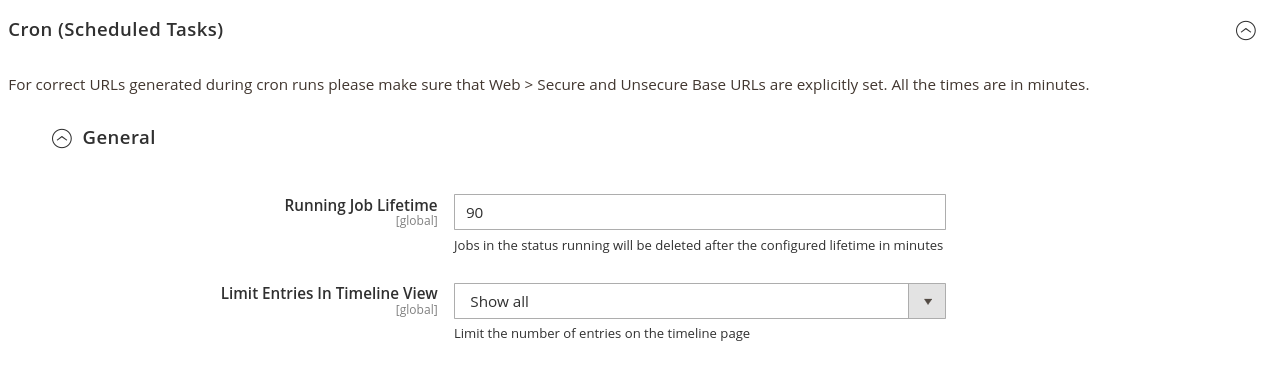
The configuration for this module can be found under Stores / Configuration / Advanced / System / Cron
Running Job Lifetime:
The value for this field is in minutes. With it, you can determine when a job will be removed when its status is running.
Limit Entries In Timeline View:
With this we limit which cron jobs are visible in the timeline view. By default, we can select the following values:
- Show All
- Show past 24 hours
- Show past 12 hours
- Show past 6 hours
Changelog
[8.0.2]
Added
- db_schema_whitelist.json has been added
Fixed
- Fixed configuration not being loaded by default due to incompatibilities with Adobe Commerce. Cron Groups config by default is overriding the 'cron' path for system config.
- Fixed the module loading the full cron collection to grab the last. This has been changed to a query that returns 1 result. This can improve performance in the backend of large shops.
- We added an index on the 'created_at' field of cron_schedule to speed up loading the recent cron job message.
[8.0.1]
Added
- Possibility to disable 'Cron Not Running' admin notification. Disabling it increases general performance of the backend.
[8.0.0]
Added
- Support PHP 8.x
- Drop Support Magento versions < 2.4.4
[6.0.0]
Added
- Made it possible to limit the number of successful jobs on the timeline
- Magento 2.4 compatibility
- Dropped support magento versions < 2.3.x
Fixes
- Empty timeline when there are no jobs in the system yet
[5.0.0] - 2020-07-31
Added
- Notify the admin when the Magento cron is not running
- Jobs can be removed in the Schedule List view
- Jobs are sorted alphabetically
- Made it possible to disable cron jobs
- Number of jobs in the Timeline View can be limited to prevent out of memory errors
- Timeline view of the cron schedule in the admin panel
- Configuration view of the jobs in the admin panel
- Visualisation of the cron schedule list in the admin panel
- Made it possible to add jobs to the schedule
| Version | Stability | QA Status | Compatibility | Released |
|---|---|---|---|---|
| 8.0.2 | stable | Fail | Not yet tested Details | 2023-06-29 12:15:00 |
| 8.0.1 | stable | Not tested | Not yet tested Details | 2023-05-05 14:50:40 |
| 8.0.0 | stable | Not tested | Not yet tested Details | 2022-06-27 09:39:31 |
| 7.0.1 | stable | Not tested | Not yet tested Details | 2020-11-24 12:45:26 |
| 7.0.0 | stable | Not tested | Not yet tested Details | 2020-10-30 12:18:27 |
| 6.0.0 | stable | Not tested | Not yet tested Details | 2020-08-28 16:49:47 |
| 5.0.0 | stable | Not tested | Not yet tested Details | 2020-07-31 12:19:51 |
Requires 5
| Package | Constraint |
|---|---|
| php | ^8.1 |
| magento/framework | ^103.0 |
| magento/module-backend | ^101.0|^102.0 |
| magento/module-cron | ^100.3 |
| magento/module-ui | ^101.1 |
Requires-dev 3
| Package | Constraint |
|---|---|
| magento/magento-coding-standard | * |
| phpro/grumphp-shim | ^1.0 |
| phpunit/phpunit | ~9.5.0 |
Compatibility
Each Magento release line is installed on its supported PHP versions, then the module is built (DI compilation + static-content deploy) and its unit and integration suites are run. The matrix shows the lines and PHP versions the module is confirmed to install and run on. Code-quality results further down (phpstan, phpcs, …) are reported separately and never affect compatibility.
Code Quality
Advisory checks against the module's source. Static analysis runs once across the whole module; PHPStan re-runs per Magento + PHP version because resolvable symbols differ between releases. These NEVER affect the Compatibility badge. A phpcs finding can't make a module incompatible.
Static analysis
Coding standards (phpcs), mess detection (phpmd), copy-pasted code (cpd), PHP cross-version compatibility, composer.json validity. Each runs once for the whole module.
Tests
Unit and integration suites, run for each applicable Magento and PHP version. A test failure speaks to the module's behaviour, not its compatibility with a Magento line, so it is reported here separately and never reddens the compatibility matrix.
Unit tests
Integration tests
| Magento | PHP 8.2 | PHP 8.3 | PHP 8.4 | PHP 8.5 |
|---|---|---|---|---|
| 2.4.7 | N/A | N/A | ||
| 2.4.8 | N/A | N/A | ||
| 2.4.9 | N/A | N/A |
Security
Security checks run directly against the module: an audit of its declared dependencies for known vulnerabilities (composer audit) and a scan of its source for malware and web-shell signatures. Each runs once. A malware detection fails the version outright.
More from phpro
View vendorTurn an existing module into recurring revenue.
If you already maintain a Magento 2 module on GitHub or GitLab, listing it on Packagento takes about five minutes. We mirror your tags, handle distribution signing, and route paid licenses through Stripe Connect, so you can keep shipping the way you already do.