
openpay / magento2-cards
Credit card payment integration for Magento 2
Openpay-Magento2-Cards
Extensión de pagos con tarjeta de crédito de Openpay para Magento2 (v2.4.2)
Instalación
Ir a la carpeta raíz del proyecto de Magento y seguir los siguiente pasos:
composer require openpay/magento2-cards:3.5.*
php bin/magento module:enable Openpay_Cards --clear-static-content
php bin/magento setup:upgrade
php bin/magento cache:clean
Actualización
En caso de ya contar con el módulo instalado y sea necesario actualizar, seguir los siguientes pasos:
composer clear-cache
composer update openpay/magento2-cards
bin/magento setup:upgrade
php bin/magento cache:clean
Screenshots
1. Administración. Configuración del módulo
Para configurar el módulo desde el panel de administración de la tienda diríjase a: Stores > Configuration > Sales > Payment Methods > Openpay
Características
- Procesar cargos de forma Directa, a través de 3D Secure y con Autenticación Selectiva.
- Configuración de cargo inmediatos o si serán únicamente pre-autorizaciones.
- Pago con puntos (solo si la tarjeta cuenta con esta característica).
- Permitir a los clientes guardar su tarjeta para futuras transacciones (se requiere que el cliente tenga una cuenta en la tienda).
- Ofrecer meses sin intereses (revisar condiciones y comisiones).
- Limitar las tarjetas soportadas.

2. Tienda. Pago utilizando una nueva tarjeta

3. Tienda. Pago utilizando una tarjeta guardada

4. Administración. Pre-autorizaciones
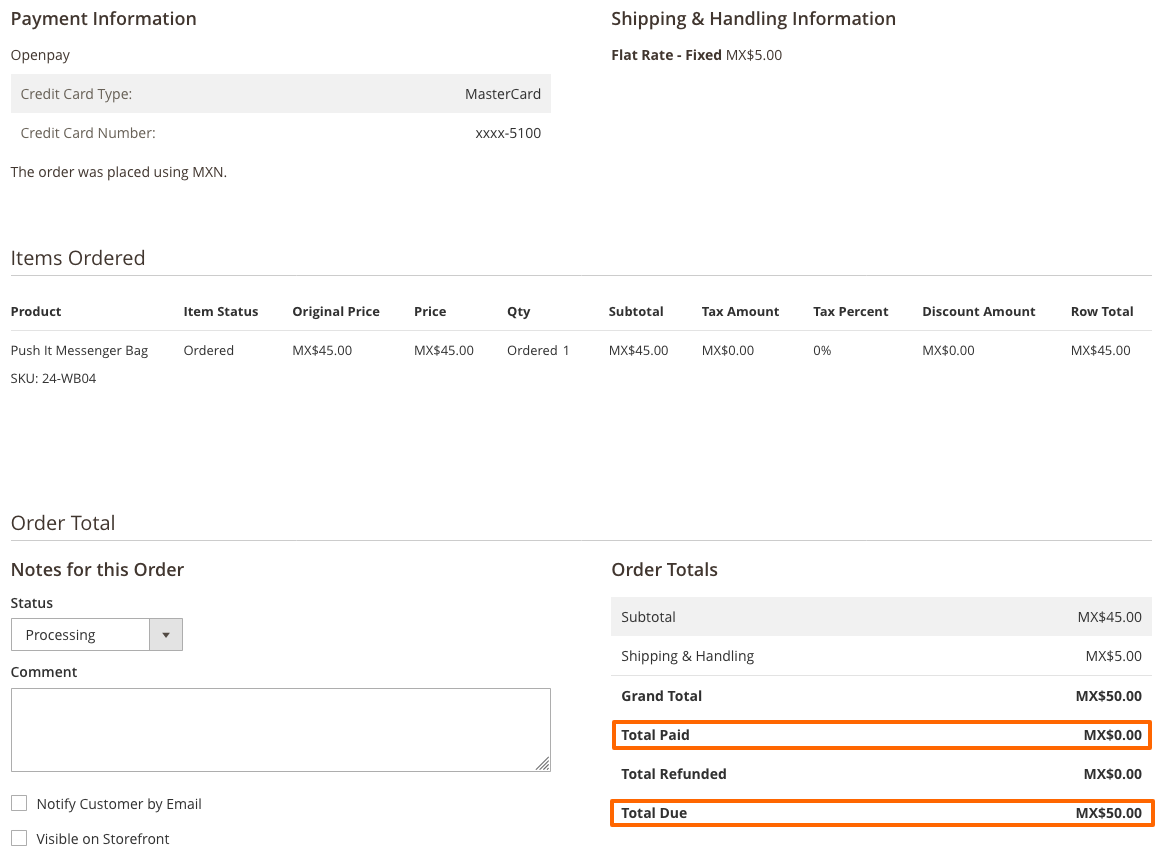
Cuando se tiene habilitada la opción de pre-autorizaciones, el monto de la transacción le será congelado al cliente en su tarjeta en espera de que el administrador de la tienda haga efectivo el cargo.
El detalle de una compra que haya sido únicamente pre-autorizada se mostrará con adeudo y un monto por pagar del total de la cuenta, tal como se muestra en la imagen siguiente:
Para hacer efectivo el cargo a la tarjeta el administrador deberá "facturar" la compra:
- Ingresar al detalle de la orden de compra
- Ir a la sección Factura (Invoice)
- Al final de la pantalla capturar el pago
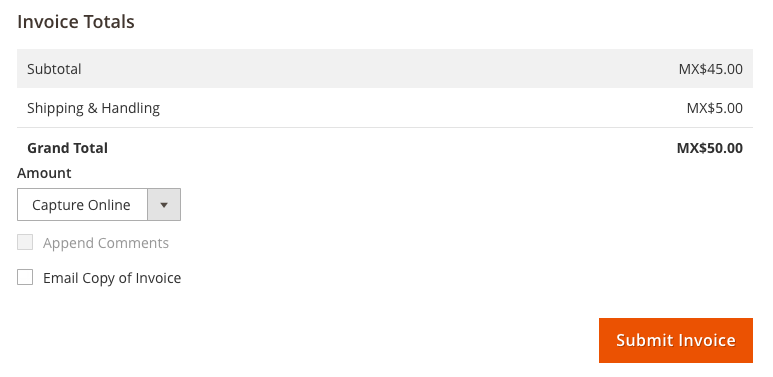
Una vez realizado esto, el cobro será realizado a la tarjeta relacionada a la compra.
NOTA: Importante considerar los siguientes puntos:
- Si el cargo no se ha hecho efectivo en los 7 días subsecuentes de la compra, el monto congelado en la tarjeta será liberado y no será posible aplicar el cobro.
- Cuando se genere la factura, es necesario seleccionar "Capture Online".
4. Administración. Reembolsos
Para efectuar un reembolso será necesario:
- Ingresar al detalle de la orden de compra
- Ir a la sección de Facturas (Invoices) e ingresar a su detalle
- Generar una Nota de Crédito (Credit Memo)
- Ingresar el monto a reemnolsar y ejecutar la acción

No changelog yet
The vendor hasn't published a changelog. Tagged releases appear in the Versions tab.
| Version | Stability | QA Status | Compatibility | Released |
|---|---|---|---|---|
| 3.5.15 | stable | Fail | Not yet tested Details | 2025-09-24 23:39:39 |
| 3.5.14 | stable | Not tested | Not yet tested Details | 2025-08-12 03:43:25 |
| 3.5.13 | stable | Not tested | Not yet tested Details | 2025-01-29 17:22:59 |
| 3.5.12 | stable | Not tested | Not yet tested Details | 2024-12-19 23:41:35 |
| 3.5.11 | stable | Not tested | Not yet tested Details | 2024-10-28 22:28:04 |
| 3.5.10 | stable | Not tested | Not yet tested Details | 2024-09-26 19:25:10 |
| 3.5.9 | stable | Not tested | Not yet tested Details | 2024-08-28 23:19:55 |
| 3.5.8 | stable | Not tested | Not yet tested Details | 2024-08-19 22:44:36 |
| 3.5.7 | stable | Not tested | Not yet tested Details | 2024-08-09 19:48:43 |
| 3.5.6 | stable | Not tested | Not yet tested Details | 2024-08-08 17:31:10 |
| 3.5.5 | stable | Not tested | Not yet tested Details | 2024-06-14 23:19:07 |
| 3.5.4 | stable | Not tested | Not yet tested Details | 2024-06-03 23:28:38 |
| 3.5.3 | stable | Not tested | Not yet tested Details | 2024-05-16 23:10:11 |
| 3.5.2 | stable | Not tested | Not yet tested Details | 2024-04-10 17:21:55 |
| 3.5.1 | stable | Not tested | Not yet tested Details | 2024-02-29 22:12:15 |
| 3.5.0 | stable | Not tested | Not yet tested Details | 2024-02-23 00:06:47 |
| 3.4.28 | stable | Not tested | Not yet tested Details | 2023-12-19 19:21:28 |
| 3.4.27 | stable | Not tested | Not yet tested Details | 2023-11-27 22:56:02 |
| 3.4.26 | stable | Not tested | Not yet tested Details | 2023-11-18 04:00:49 |
| 3.4.25 | stable | Not tested | Not yet tested Details | 2023-08-16 19:29:16 |
| 3.4.17b | beta | Not tested | Not yet tested Details | 2023-07-17 22:40:08 |
| 3.4.24 | stable | Not tested | Not yet tested Details | 2023-07-17 22:34:50 |
| 3.4.23 | stable | Not tested | Not yet tested Details | 2023-06-23 23:12:27 |
| 3.4.22 | stable | Not tested | Not yet tested Details | 2023-06-15 01:21:32 |
| 3.4.21 | stable | Not tested | Not yet tested Details | 2023-06-13 01:07:06 |
| 3.4.20 | stable | Not tested | Not yet tested Details | 2023-05-30 16:52:08 |
| 3.4.19 | stable | Not tested | Not yet tested Details | 2023-05-25 01:27:01 |
| 3.4.18 | stable | Not tested | Not yet tested Details | 2023-05-24 23:16:25 |
| 3.4.17 | stable | Not tested | Not yet tested Details | 2023-04-18 15:43:01 |
| 3.4.16 | stable | Not tested | Not yet tested Details | 2023-03-13 23:05:32 |
| 3.4.15 | stable | Not tested | Not yet tested Details | 2023-03-01 17:43:48 |
| 3.4.14 | stable | Not tested | Not yet tested Details | 2023-01-31 20:11:30 |
| 3.4.13 | stable | Not tested | Not yet tested Details | 2022-12-23 15:52:36 |
| 3.3.7 | stable | Not tested | Not yet tested Details | 2022-12-08 00:40:54 |
| 3.4.12 | stable | Not tested | Not yet tested Details | 2022-11-15 23:18:34 |
| 3.4.11 | stable | Not tested | Not yet tested Details | 2022-09-02 23:14:37 |
| 3.4.10 | stable | Not tested | Not yet tested Details | 2022-09-02 22:24:14 |
| 3.4.9 | stable | Not tested | Not yet tested Details | 2022-07-05 16:06:47 |
| 3.4.8 | stable | Not tested | Not yet tested Details | 2022-06-14 14:26:34 |
| 3.4.6b | beta | Not tested | Not yet tested Details | 2022-05-19 23:14:33 |
| 3.4.7 | stable | Not tested | Not yet tested Details | 2022-05-19 21:36:57 |
| 3.4.6 | stable | Not tested | Not yet tested Details | 2022-04-28 23:49:27 |
| 3.4.5 | stable | Not tested | Not yet tested Details | 2022-03-30 18:08:07 |
| 3.4.4 | stable | Not tested | Not yet tested Details | 2022-03-08 18:39:32 |
| 3.4.3 | stable | Not tested | Not yet tested Details | 2022-02-02 17:30:42 |
| 3.4.2 | stable | Not tested | Not yet tested Details | 2022-02-01 18:19:25 |
| 3.4.1 | stable | Not tested | Not yet tested Details | 2022-01-28 22:03:53 |
| 3.3.6 | stable | Not tested | Not yet tested Details | 2021-12-21 19:12:47 |
| 3.4.0 | stable | Not tested | Not yet tested Details | 2021-12-07 01:51:03 |
| 3.3.5 | stable | Not tested | Not yet tested Details | 2021-12-01 06:19:26 |
| 3.3.4 | stable | Not tested | Not yet tested Details | 2021-11-26 19:16:30 |
| 3.3.3 | stable | Not tested | Not yet tested Details | 2021-11-25 18:49:31 |
| 3.2.5 | stable | Not tested | Not yet tested Details | 2021-11-12 22:20:47 |
| 3.3.2 | stable | Not tested | Not yet tested Details | 2021-11-12 22:18:47 |
| 3.3.1 | stable | Not tested | Not yet tested Details | 2021-10-28 16:56:06 |
| 3.3.0 | stable | Not tested | Not yet tested Details | 2021-10-20 02:02:56 |
| 3.2.4 | stable | Not tested | Not yet tested Details | 2021-08-06 19:04:55 |
| 3.2.3 | stable | Not tested | Not yet tested Details | 2021-07-27 17:12:00 |
| 3.2.2 | stable | Not tested | Not yet tested Details | 2021-04-21 16:37:49 |
| 3.2.1 | stable | Not tested | Not yet tested Details | 2021-01-14 02:20:09 |
| 3.2.0 | stable | Not tested | Not yet tested Details | 2020-12-02 22:59:39 |
| 3.1.10 | stable | Not tested | Not yet tested Details | 2020-09-15 18:30:04 |
| 3.1.9 | stable | Not tested | Not yet tested Details | 2020-09-04 21:21:06 |
| 3.1.8 | stable | Not tested | Not yet tested Details | 2020-09-02 01:24:08 |
| 3.1.7 | stable | Not tested | Not yet tested Details | 2020-09-01 23:03:43 |
| 3.1.6 | stable | Not tested | Not yet tested Details | 2020-08-18 16:13:18 |
| 3.1.5 | stable | Not tested | Not yet tested Details | 2020-08-10 23:29:09 |
| 3.1.4 | stable | Not tested | Not yet tested Details | 2020-07-21 17:31:03 |
| 3.1.3 | stable | Not tested | Not yet tested Details | 2020-07-02 05:37:44 |
| 3.1.2 | stable | Not tested | Not yet tested Details | 2020-07-01 22:29:21 |
| 3.1.1 | stable | Not tested | Not yet tested Details | 2020-06-26 23:37:42 |
| 3.1.0 | stable | Not tested | Not yet tested Details | 2020-06-18 22:13:25 |
| 3.0.1 | stable | Not tested | Not yet tested Details | 2020-06-16 22:30:19 |
| 3.0.0 | stable | Not tested | Not yet tested Details | 2020-04-15 14:58:22 |
| 2.4.1 | stable | Not tested | Not yet tested Details | 2019-07-23 20:58:55 |
| 2.4.0 | stable | Not tested | Not yet tested Details | 2019-07-19 22:29:43 |
| 2.3.7 | stable | Not tested | Not yet tested Details | 2019-03-15 00:02:38 |
| 2.3.6 | stable | Not tested | Not yet tested Details | 2019-03-14 19:53:21 |
| 2.3.5 | stable | Not tested | Not yet tested Details | 2019-02-19 01:08:58 |
| 2.3.4 | stable | Not tested | Not yet tested Details | 2019-02-15 00:25:31 |
| 2.3.3 | stable | Not tested | Not yet tested Details | 2019-02-14 19:47:31 |
| 2.3.2 | stable | Not tested | Not yet tested Details | 2019-02-14 19:39:15 |
| 2.3.1 | stable | Not tested | Not yet tested Details | 2019-02-14 19:19:52 |
| 2.3.0 | stable | Not tested | Not yet tested Details | 2019-02-14 02:09:32 |
| 2.0.0 | stable | Not tested | Not yet tested Details | 2019-02-14 00:58:38 |
| 1.3.5 | stable | Not tested | Not yet tested Details | 2016-09-21 17:08:09 |
| 1.3.4 | stable | Not tested | Not yet tested Details | 2016-09-08 23:40:06 |
| 1.3.3 | stable | Not tested | Not yet tested Details | 2016-09-08 23:32:01 |
| 1.3.2 | stable | Not tested | Not yet tested Details | 2016-09-08 23:12:50 |
| 1.3.1 | stable | Not tested | Not yet tested Details | 2016-09-08 15:41:17 |
| 1.3.0 | stable | Not tested | Not yet tested Details | 2016-06-27 17:21:52 |
| 1.2.6 | stable | Not tested | Not yet tested Details | 2016-05-12 21:23:38 |
| 1.2.5 | stable | Not tested | Not yet tested Details | 2016-05-05 15:40:35 |
| 1.2.4 | stable | Not tested | Not yet tested Details | 2016-05-03 00:02:01 |
| 1.2.3 | stable | Not tested | Not yet tested Details | 2016-03-04 22:51:46 |
| 1.2.2 | stable | Not tested | Not yet tested Details | 2016-03-04 18:48:36 |
| 1.2.0 | stable | Not tested | Not yet tested Details | 2016-03-04 01:28:04 |
| 1.1.3 | stable | Not tested | Not yet tested Details | 2016-02-26 22:43:04 |
| 1.1.1 | stable | Not tested | Not yet tested Details | 2016-02-26 20:35:44 |
Requires 1
| Package | Constraint |
|---|---|
| openpay/sdk | 3.1.* |
Compatibility
Each Magento release line is installed on its supported PHP versions, then the module is built (DI compilation + static-content deploy) and its unit and integration suites are run. The matrix shows the lines and PHP versions the module is confirmed to install and run on. Code-quality results further down (phpstan, phpcs, …) are reported separately and never affect compatibility.
Code Quality
Advisory checks against the module's source. Static analysis runs once across the whole module; PHPStan re-runs per Magento + PHP version because resolvable symbols differ between releases. These NEVER affect the Compatibility badge. A phpcs finding can't make a module incompatible.
Static analysis
Coding standards (phpcs), mess detection (phpmd), copy-pasted code (cpd), PHP cross-version compatibility, composer.json validity. Each runs once for the whole module.
| Tool | Status | Findings | Summary |
|---|---|---|---|
| PHPCS | Fail | 998 | 27 errors, 971 warnings (ruleset: Magento2) — 675 auto-fixable with phpcbf |
| PHPMD | Warning | 54 | 54 rule violations (MissingImport:25, CyclomaticComplexity:6, NPathComplexity:6, ExcessiveMethodLength:4, UnusedLocalVariable:4) |
| Cpd | Warning | 1 | 1 duplicated chunk spanning 77 total lines (min-lines=5, min-tokens=70) |
| Composer validate | Pass | 0 |
PHPStan
Type-checks the module's PHP against a real Magento install at the configured gate level. Re-runs per Magento and PHP version because resolvable symbols differ between releases.
Tests
Unit and integration suites, run for each applicable Magento and PHP version. A test failure speaks to the module's behaviour, not its compatibility with a Magento line, so it is reported here separately and never reddens the compatibility matrix.
Unit tests
| Magento | PHP 8.2 | PHP 8.3 | PHP 8.4 | PHP 8.5 |
|---|---|---|---|---|
| 2.4.7 | N/A | N/A | ||
| 2.4.8 | N/A | N/A | ||
| 2.4.9 | N/A | N/A |
Integration tests
| Magento | PHP 8.2 | PHP 8.3 | PHP 8.4 | PHP 8.5 |
|---|---|---|---|---|
| 2.4.7 | N/A | N/A | ||
| 2.4.8 | N/A | N/A | ||
| 2.4.9 | N/A | N/A |
Security
Security checks run directly against the module: an audit of its declared dependencies for known vulnerabilities (composer audit) and a scan of its source for malware and web-shell signatures. Each runs once. A malware detection fails the version outright.
More from openpay
View vendorTurn an existing module into recurring revenue.
If you already maintain a Magento 2 module on GitHub or GitLab, listing it on Packagento takes about five minutes. We mirror your tags, handle distribution signing, and route paid licenses through Stripe Connect, so you can keep shipping the way you already do.