
markshust / magento2-module-disabletwofactorauth
The DisableTwoFactorAuth module provides the ability to disable two-factor authentication.
MarkShust_DisableTwoFactorAuth
Provides the ability to disable two-factor authentication.




Table of contents
Summary
With the release of Magento 2.4, two-factor authentication (also known as 2FA) became enabled by default, with no
ability to disable it in either the admin or console. However, there are situations which may require 2FA to be disabled
or temporarily turned off, such as within development or testing environments.
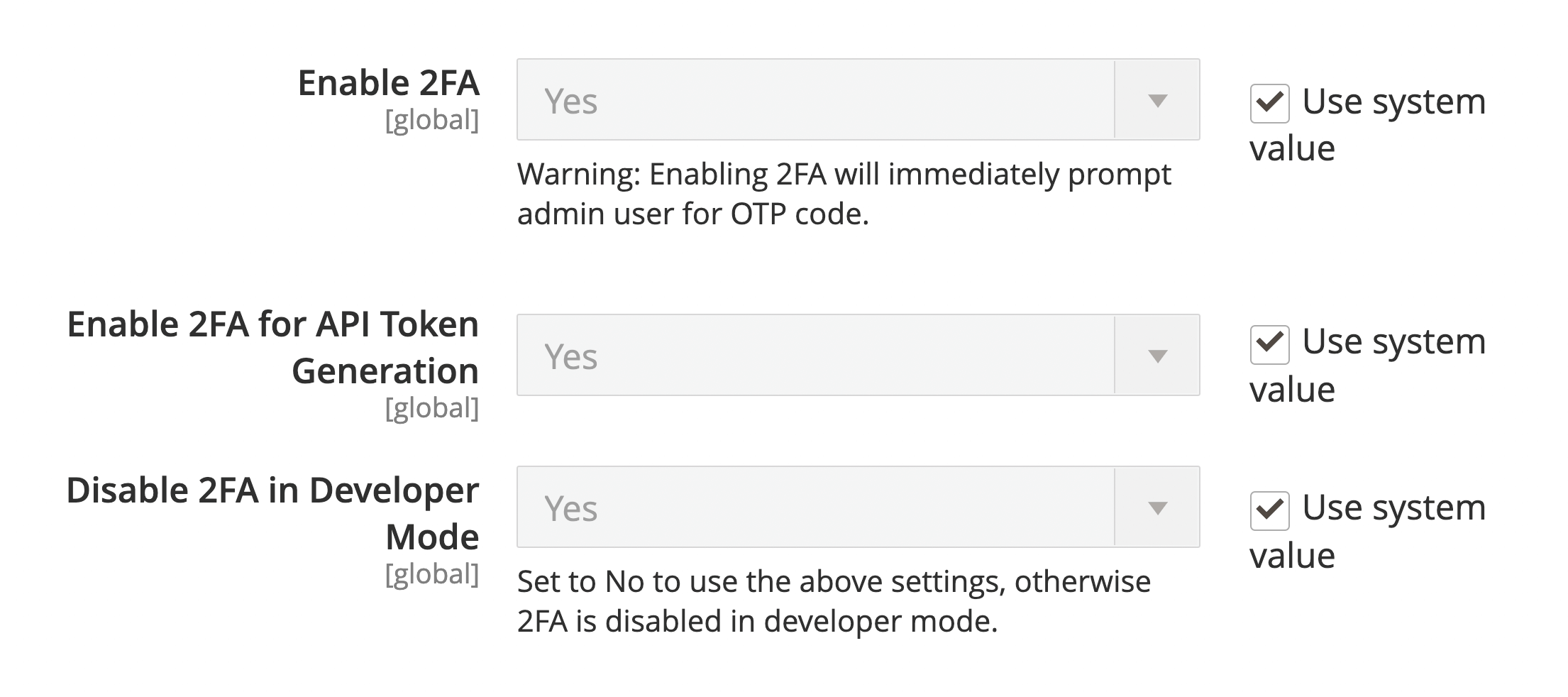
This module automatically disables 2FA while in developer mode (since version 2.0.0), and adds the missing toggle to turn 2FA on or off from the admin for other environments. It does this by hooking into the core code in
a very seamless manner, just as would be done if this toggle existed in the core code. Installing this module should not
open any security holes, as it just works off of a simple config toggle which, if not present, falls back to the default
functionality.
You can also toggle 2FA back on while in developer mode, if you need to test your code functionality while 2FA is enabled.
Why
Why should you use this module? I hear all of the time that you can just disable Magento's 2FA module. There is a large inherent issue with doing this though.
When you disable a module, it updates the app/etc/config.php file with the removed module, which will eventually make its way upstream (accidentally committed to version control or unintendedly leaving your development environment). This will disable 2FA on staging/production, which is a big security concern. This module resolves this because you can keep it installed & enabled on dev/stage/prod, but control whether or not 2FA is enabled or disabled with configuration settings or environment variables. This means you can have it permanently disabled on dev, but have it permanently enabled in all other environments, all while keeping this module installed in all environments.
Installation
composer require --dev markshust/magento2-module-disabletwofactorauth
bin/magento module:enable MarkShust_DisableTwoFactorAuth
bin/magento setup:upgrade
Usage
This module automatically disables 2FA in developer mode (since version 2.0.0). In any other deployment mode, 2FA is kept enabled by default. This is to prevent any unexpected side effects or security loopholes from
being introduced during automated installation processes.
It is highly recommended to install this module as a dev dependency to avoid security warning reports from either Adobe Commerce or other production environments which run security checks. This can be done either by passing in the --dev flag when installing it with Composer, or by adding it to the require-dev property of your composer.json file.
Disable 2FA
It may still be desirable to disable 2FA in non-production environments, such as within testing or internal staging environments. For these cases, 2FA is not automatically disabled. However, there are toggles to override the default Magento settings to disable 2FA within these environments.
You can also bypass 2FA for API token generation. This can be useful for third-party vendors during module development.
NOTE: Always keep 2FA enabled within production environments for security purposes.
2FA
To disable 2FA, visit Admin > Stores > Settings > Configuration > Security > 2FA and set Enable 2FA to No.
CLI: bin/magento config:set twofactorauth/general/enable 0
2FA for API Token Generation
To disable 2FA for API Token Generation, visit Admin > Stores > Settings > Configuration > Security > 2FA and set Enable 2FA for API Token Generation to No.
CLI: bin/magento config:set twofactorauth/general/enable_for_api_token_generation 0
Enable 2FA in developer mode
This module automatically disables 2FA while developer mode is enabled, but there may be situations when you need 2FA enabled during development. Rather than needing to disable this module, you can just disable this configuration setting in the admin.
To enable 2FA while in developer mode, visit Admin > Stores > Settings > Configuration > Security > 2FA and set Disable 2FA in Developer Mode to No.
CLI: bin/magento config:set twofactorauth/general/disable_in_developer_mode 0
Credits
M.academy
This course is sponsored by M.academy, the simplest way to master Magento development.

Mark Shust
My name is Mark Shust and I am a 6X Adobe Commerce Certified Developer and the founder of M.academy. Since the early days of Magento, I've been involved with many intricately complex eCommerce and open-source projects.
My passion is teaching and helping others learn Magento, and has created many courses and tutorials to help thousands of students from all over the world to learn and improve their Magento skills.
- 🖥️ Learn with Magento courses
- 📖 Read my technical articles
- 🔗 Connect on LinkedIn
- 🎥 Watch on YouTube
- 🐦 Follow me on X
- 💌 Contact me
License
Changelog
All notable changes to this project will be documented in this file.
The format is based on Keep a Changelog
and this project adheres to Semantic Versioning.
[2.0.2] - 2024-11-05
Added
- Added PHPStan level 9 support by improving type hints (#27)
- Added keywords to composer.json for better package discovery
Updated
- Updated installation instructions to recommend using
--devflag with composer - Made package explicitly development-focused to avoid Adobe Commerce security warnings (#28)
- Updated badge icon with support for newer versions of Magento
Fixed
- Fixed issue where 2FA could remain enabled for API token generation when main 2FA was disabled (#29)
[2.0.1] - 2022-10-24
Fixed
- Fix compatibility with MFTF 3.10.0 (#16)
[2.0.0] - 2021-11-10
This is a potentially breaking release, as it changes the overall functionality when Magento is in developer mode. A new "Disable 2FA in Developer Mode" system configuration has been created, which is a Yes/No toggle. By default, it is set to Yes so that 2FA is automatically disabled when a Magento site is in developer mode. When this is set to No, the two other 2FA configuration dropdowns set the configuration for 2FA. When not in developer mode, this toggle has no effect.
Added
- Add ability to automatically disable 2FA when in developer mode (#13).
[1.1.4] - 2021-02-22
Fixed
- Removed newline character from MFTF config:show bool cast (#10).
[1.1.3] - 2020-01-18
Fixed
- Fixed composer.json version, re-tagging to redeploy to packagist.
[1.1.2] - 2020-01-18
Added
- Added test rewrite to MFTF to get core tests to pass when 2FA is disabled (#5).
[1.1.1] - 2020-01-13
Fixed
- Removed typed properties for PHP 7.3 support (#6).
[1.1.0] - 2020-01-12
Added
- Support to disable 2FA for API token generation (#1).
Updated
- Updated docblocks and other minor formatting issues.
- Updated REAMDE to make it more explicit not to disable 2FA within production environments.
[1.0.0] - 2020-08-10
Added
- Initial release.
| Version | Stability | QA Status | Compatibility | Released |
|---|---|---|---|---|
| 2.0.2 | stable | Pass | Not yet tested Details | 2024-11-05 17:01:33 |
| 2.0.1 | stable | Not tested | Not yet tested Details | 2022-10-24 17:11:14 |
| 2.0.0 | stable | Not tested | Not yet tested Details | 2021-11-10 14:54:39 |
| 1.1.4 | stable | Not tested | Not yet tested Details | 2021-02-22 16:57:59 |
| 1.1.3 | stable | Not tested | Not yet tested Details | 2021-01-18 22:20:28 |
| 1.1.2 | stable | Not tested | Not yet tested Details | 2021-01-18 17:25:35 |
| 1.1.1 | stable | Not tested | Not yet tested Details | 2021-01-13 14:57:11 |
| 1.1.0 | stable | Not tested | Not yet tested Details | 2021-01-12 14:18:18 |
| 1.0.0 | stable | Not tested | Not yet tested Details | 2020-08-10 11:55:34 |
Requires 2
| Package | Constraint |
|---|---|
| php | ^7||^8 |
| magento/framework | ^103 |
Compatibility
Each Magento release line is installed on its supported PHP versions, then the module is built (DI compilation + static-content deploy) and its unit and integration suites are run. The matrix shows the lines and PHP versions the module is confirmed to install and run on. Code-quality results further down (phpstan, phpcs, …) are reported separately and never affect compatibility.
Code Quality
Advisory checks against the module's source. Static analysis runs once across the whole module; PHPStan re-runs per Magento + PHP version because resolvable symbols differ between releases. These NEVER affect the Compatibility badge. A phpcs finding can't make a module incompatible.
Static analysis
Coding standards (phpcs), mess detection (phpmd), copy-pasted code (cpd), PHP cross-version compatibility, composer.json validity. Each runs once for the whole module.
PHPStan
Type-checks the module's PHP against a real Magento install at the configured gate level. Re-runs per Magento and PHP version because resolvable symbols differ between releases.
Tests
Unit and integration suites, run for each applicable Magento and PHP version. A test failure speaks to the module's behaviour, not its compatibility with a Magento line, so it is reported here separately and never reddens the compatibility matrix.
Unit tests
| Magento | PHP 8.2 | PHP 8.3 | PHP 8.4 | PHP 8.5 |
|---|---|---|---|---|
| 2.4.7 | N/A | N/A | ||
| 2.4.8 | N/A | N/A | ||
| 2.4.9 | N/A | N/A |
Integration tests
| Magento | PHP 8.2 | PHP 8.3 | PHP 8.4 | PHP 8.5 |
|---|---|---|---|---|
| 2.4.7 | N/A | N/A | ||
| 2.4.8 | N/A | N/A | ||
| 2.4.9 | N/A | N/A |
Security
Security checks run directly against the module: an audit of its declared dependencies for known vulnerabilities (composer audit) and a scan of its source for malware and web-shell signatures. Each runs once. A malware detection fails the version outright.
More from markshust
View vendorThe SimpleData module simplifies calling Magento data structures.
The Page Builder Source Code module adds a Source Code button to the toolbar of the Page Builder WYSIWYG editor.
The Order Grid module adds more details to the order grid in the admin.
Turn an existing module into recurring revenue.
If you already maintain a Magento 2 module on GitHub or GitLab, listing it on Packagento takes about five minutes. We mirror your tags, handle distribution signing, and route paid licenses through Stripe Connect, so you can keep shipping the way you already do.