
magefan / module-google-tag-manager
Magento 2 Google Tag Manager and Google Analytics 4
Magento 2 Google Tag Manager by Magefan

Magento 2 Google Tag Manager extension is a solution for better and easier store performance tracking. It connects your store with Google Tag Manager, Google Analytics, and Google Ads, and requires only a few minutes for setup.
Enter your tracking IDs directly in the Magento admin panel and track every step customers take: from the moment they land on your website and up to the purchase.
Magefan Google Tag Manager extension for Magento is a low-effort solution that ensures you collect accurate data and make efficient decisions.


Do You Need a Google Tag Manager Extension in Magento?
As an eCommerce store owner, you have numerous decisions to make, and you have to ensure they are justified and bring real value. You cannot rely on trial and error here. You must have accurate data to back you up.
If you don’t want to edit the code manually and create all the tags and triggers yourself, you do need a dedicated Magento 2 extension to help you. With the Google Tag Manager extension, you can:
- Set up Google Tag Manager, Google Analytics, and Google Ads in a few clicks.
- Track the most important eCommerce events without having to edit code.
- Concentrate on the data and reports instead of figuring out technicalities.
Magefan Google Tag Manager extension for Magento 2 can do just that. So, if you want to avoid the complications that manual setup usually brings, this tool is for you.
Key features of the Magento 2 Google Tag Manager
- Track 13+ eCommerce events
- Client-side and server-side tracking (Measurement Protocol/GTM server container)
- Ready-made datalayer with all tags, triggers, and variables
- Enhanced Conversions / Dynamic Remarketing
- GDPR and Google Consent Mode compliant
- Supports Google Tag Gateway
- No impact of the website speed
- Easy setup with no code editing
Pricing of the Magento Google Tag Manager Extension
Magefan offers three different pricing options for Magento Google Tag Manager, including free GTM plan. Each plan offers different features and events based on the size or your store, numebr of events you want to track and tracking methods. Check some of the following features below.

Benefits of the Magento Google Tag Manager
The Magento 2 Google Tag Manager extension creates an uncomplicated environment for data tracking and brings multiple benefits:
Implement tracking tags in a matter of minutes
Enabling Google Tag Manager tags usually requires you to insert the GTM tracking script into your website's source code manually. That’s way too tedious a task that takes longer than you’d like.
With the Google Tag Manager extension, you won’t have to do any of that.
Just enter the tracking IDs directly in the admin panel and generate the datalayer in one click. Then, import the GTM container with all the tags and triggers ready.
No need to edit code and waste days setting up the events. We’ve got you fully covered.

Monitor Every Customer Journey Step
Tracking customers’ behaviour is essential for detecting patterns and spotting bottlenecks. What seems insignificant may be a real dealbreaker, and you have to know where exactly things don’t go as expected.
With this Google Tag Manager extension for Magento, you get to track every step your customers take: from landing on your website to making a purchase or leaving your website without placing an order.
This info gives you valuable insights into things that work and things that have to be optimized.

Know Exactly What Your Top-Performing Products Are
What are your biggest traffic and revenue generators? What products do not perform as well as you expected?
Use this Magento 2 Google Tag Manager extension to track what products get the most views, are purchased, added to the cart, wishlist, and removed from the cart the most often.
Stop guessing and cut right to the chase. Establish a strategy that allows you to increase conversions and promote products that are falling behind in sales.
Track Every Single Purchase
Ad blockers, browser restrictions, and strict privacy settings often stand in the way of accurate data tracking. That’s where missing purchases start to seep in and disrupt the picture you have in Google Analytics.
This Magento 2 Google Tag Manager has a solution, though. Set up the server-side tracking using the Measurement Protocol or the GTM server container to not miss a single conversion.
Track only missing purchases or opt for the fully server-side setup to close the gaps and get complete data.

Boost Your Google Ads Campaigns
Google Ads campaigns are effective as long as you have relevant data to build them upon. That’s how you know exactly what products to promote and who your efforts have to be aimed at.
This Magento Google Tag Manager extension offers a low-effort solution with high-value results. Set up the tracking in a couple of clicks and get valuable insights into your ads’ performance and user engagement.
Spot common patterns, see what’s working best, and retarget the campaigns that don’t work as expected.
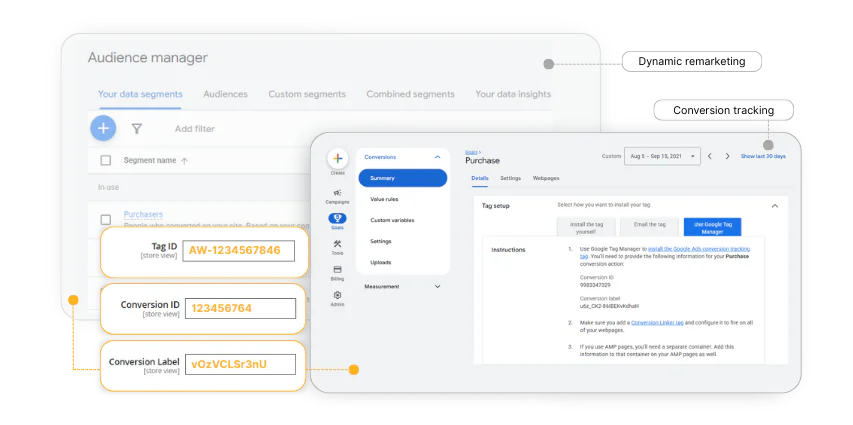
Stay GDPR and Consent Mode Compliant
In the rush to track as much data as possible, it’s crucial to mind privacy regulations. They are obligatory in many countries, so you’d want to stay compliant.
The Magento 2 Google Tag Manager extension effectively collects data while staying GDPR and Google Consent Mode-compliant. It also fully supports the Magento 2 Cookie Consent extension by Magefan and other consent solutions.
Thus, this extension ensures effective but safe data tracking.
Keep Your Website Speed Up to Mark
Website speed matters as much as the versatile catalog and intuitive interface. So, it’s important to keep that aspect in check when adding more tracking scripts.
This is something the Magento 2 Google Tag Manager extension covers out of the box. It inserts the tracking scripts without a negative impact on your website speed and performance.
Why choose between performance and data tracking when you can have both?

Set Up a Long-Lasting Solution
When setting up a tracking solution, it’s important to ensure it’s flexible, reliable, and can stay with you for the time to come.
The Magento 2 Google Tag Manager extension supports your business growth and changes. It integrates seamlessly with custom GTM loaders, headless storefront, and Hyva frontend and checkout, leaving you space for future advancements.
Integrate this solution, knowing that it won’t cause you headaches in the future but will be a reliable tool to support your growth.
Frequently Asked Questions about Magento 2 Google Tag Manager
Do I need to edit code to integrate Google Tag Manager on my website?
No. With the Magefan Google Tag Manager extension for Magento 2, you just have to enter the tracing IDs in the admin panel, export the JSON file, and import it into the GTM container. No need to add code snippets or hire a developer.
What events does the Magento 2 Google Tag Manager extension track?
The GTM extension tracks the most important eCommerce events, such as view item, add to wishlist, add to cart, remove from cart, view cart, begin checkout, add payment info, purchase, sign up, search, and other events.
Does the extension support server-side setup?
Yes, the extension supports server-side tracking via the Measurement Protocol and the GTM server container. You can also set up server-side in a way to only cover the missing transactions and let the web container track the rest.
Does this extension support sending different tracking data to separate GTM accounts?
Yes. The Magento 2 Google Tag Manager by Magefan is fully compatible with a multi-website setup. So, you can connect different containers and track data separately for each.
Requirements
- Magento Community 2.3.0-2.4.x (CE, EE, ECE, B2B)
- Magefan Community Extension >= v2.1.20. Please install this extension first if you use installation via FTP.
- Note that the extension is free only for the Magento Community (Open Source) Edition. For Magento EE, ECE, and B2B you need to purchase the license at magefan.com.
Demo
Try out our open demo and if you like our extension please give us some star on Github ★
| Storefront Demo | Admin Panel Demo |

|

|
| view | view |
Support
If you have any issues, please contact us
then if you still need help, open a bug report in GitHub's
issue tracker.
Need More Features?
Please contact us to get a quote
https://magefan.com/contact
License
The code is licensed under EULA.
Magento Extensions by Magefan
Magento 2 SEO Extensions
- Magento SEO
- Magento 2 Rich Snippets
- Magento 2 LLMs TXT Generator
- Magento 2 HTML Sitemap
- Magento 2 XML Sitemap
- Magento 2 Twitter Cards
- Magento Open Graph Tags
Magento 2 Google Extensions
- Magento 2 Google Analytics 4
- Magento Google Shopping Feed
- Magento Google Customer Reviews
- Magento 2 Google Indexing
Magento Speed Optimisation Extensions
- Magento 2 Google Page Speed Optimizer
- Magento 2 WebP Images
- Magento Full Page Cache Extension
- Magento 2 Lazy Load Images
- Magento 2 Defer JavaScript
Magento Admin Extensions
- Magento 2 Dynamic Category
- Magento 2 Size Chart
- Magento 2 Security Extension
- Magento 2 Admin Action Log
- Magento Extended Product Grid
- Magento 2 Product Tabs
- Magento 2 Product Widget
- Magento 2 Email Attachments
- Magento 2 Admin View
- Magento 2 Email Notifications
- Magento 2 Login As Customer
Magento Order Management Extensions
Magento 2 Blog Extensions
Magento Marketing Extensions
- Magento 2 Facebook Pixel
- Magento TikTok Pixel
- Magento 2 Dynamic Blocks and Pages
- Magento 2 Cookie Consent
- Magento 2 Base Price
- Magento 2 Price History
- Magento 2 Mautic Extension
- Magento 2 YouTube Video
Magento Promotions Extensions
Magento 2 Multi-Language Extensions
- Magento 2 Hreflang Tags
- Magento 2 Currency Switcher
- Magento 2 Language Switcher
- Magento 2 Store Switcher
- Magento 2 Translation Extension
Developers Tools
- Magento Zero Downtime Deployment
- Magento 2 Cron Schedule
- Magento 2 CLI Extension
- Magento 2 Conflict Detector
Shopify Apps by Magefan
- Shopify Login As Customer
- Shopify Blog
- Shopify Persistent Cart
- Shopify Size Chart
- Shopify Google Indexer
- Shopify Product Feeds
- Shopify Server GTM & GA4
Magento 2 Services by Magefan
No changelog yet
The vendor hasn't published a changelog. Tagged releases appear in the Versions tab.
| Version | Stability | QA Status | Compatibility | Released |
|---|---|---|---|---|
| 2.8.0 | stable | Fail | Magento 2.4.7-2.4.9 Details | 2026-05-20 08:37:27 |
| 2.7.4 | stable | Not tested | Not yet tested Details | 2026-01-19 09:11:58 |
| 2.7.3 | stable | Not tested | Not yet tested Details | 2025-10-16 12:00:01 |
| 2.7.2 | stable | Not tested | Not yet tested Details | 2025-09-03 08:57:43 |
| 2.7.1 | stable | Not tested | Not yet tested Details | 2025-08-12 07:07:15 |
| 2.7.0 | stable | Not tested | Not yet tested Details | 2025-08-07 09:19:23 |
| 2.6.10 | stable | Not tested | Not yet tested Details | 2025-06-19 10:35:41 |
| 2.6.9 | stable | Not tested | Not yet tested Details | 2025-05-06 11:55:25 |
| 2.6.8 | stable | Not tested | Not yet tested Details | 2025-04-22 11:22:50 |
| 2.6.7 | stable | Not tested | Not yet tested Details | 2025-01-29 10:06:19 |
| 2.6.6 | stable | Not tested | Not yet tested Details | 2025-01-28 10:18:33 |
| 2.6.5 | stable | Not tested | Not yet tested Details | 2024-11-06 12:01:54 |
| 2.6.4 | stable | Not tested | Not yet tested Details | 2024-09-20 13:31:54 |
| 2.6.3 | stable | Not tested | Not yet tested Details | 2024-06-17 08:01:36 |
| 2.6.2 | stable | Not tested | Not yet tested Details | 2024-06-12 13:05:23 |
| 2.6.1 | stable | Not tested | Not yet tested Details | 2024-06-11 08:27:05 |
| 2.6.0 | stable | Not tested | Not yet tested Details | 2024-06-07 12:07:54 |
| 2.5.8 | stable | Not tested | Not yet tested Details | 2024-05-29 14:51:30 |
| 2.5.7 | stable | Not tested | Not yet tested Details | 2024-05-03 09:07:49 |
| 2.5.6 | stable | Not tested | Not yet tested Details | 2024-04-18 11:06:13 |
| 2.5.5 | stable | Not tested | Not yet tested Details | 2024-04-09 07:38:59 |
| 2.5.4 | stable | Not tested | Not yet tested Details | 2024-03-20 11:35:28 |
| 2.5.3 | stable | Not tested | Not yet tested Details | 2024-03-06 14:24:02 |
| 2.5.2 | stable | Not tested | Not yet tested Details | 2024-02-28 12:11:36 |
| 2.5.1 | stable | Not tested | Not yet tested Details | 2024-02-09 07:30:30 |
| 2.5.0 | stable | Not tested | Not yet tested Details | 2024-01-05 09:18:09 |
| 2.4.2 | stable | Not tested | Not yet tested Details | 2023-11-07 08:14:41 |
| 2.4.1 | stable | Not tested | Not yet tested Details | 2023-09-20 09:33:36 |
| 2.4.0 | stable | Not tested | Not yet tested Details | 2023-08-16 14:22:24 |
| 2.3.1 | stable | Not tested | Not yet tested Details | 2023-07-04 08:16:45 |
| 2.3.0 | stable | Not tested | Not yet tested Details | 2023-06-28 07:54:23 |
| 2.2.0 | stable | Not tested | Not yet tested Details | 2023-05-29 13:54:38 |
| 2.1.0 | stable | Not tested | Not yet tested Details | 2023-04-24 06:15:04 |
| 2.0.2 | stable | Not tested | Not yet tested Details | 2023-04-15 09:35:32 |
| 2.0.1.1 | stable | Not tested | Not yet tested Details | 2023-04-14 13:56:52 |
| 2.0.1 | stable | Not tested | Not yet tested Details | 2023-03-27 14:24:42 |
| 2.0.0 | stable | Not tested | Not yet tested Details | 2023-03-22 15:07:42 |
Requires 1
| Package | Constraint |
|---|---|
| magefan/module-community | >=2.3.5 |
Compatibility
Each Magento release line is installed on its supported PHP versions, then the module is built (DI compilation + static-content deploy) and its unit and integration suites are run. The matrix shows the lines and PHP versions the module is confirmed to install and run on. Code-quality results further down (phpstan, phpcs, …) are reported separately and never affect compatibility.
Code Quality
Advisory checks against the module's source. Static analysis runs once across the whole module; PHPStan re-runs per Magento + PHP version because resolvable symbols differ between releases. These NEVER affect the Compatibility badge. A phpcs finding can't make a module incompatible.
Static analysis
Coding standards (phpcs), mess detection (phpmd), copy-pasted code (cpd), PHP cross-version compatibility, composer.json validity. Each runs once for the whole module.
| Tool | Status | Findings | Summary |
|---|---|---|---|
| PHPCS | Warning | 39 | 39 warnings (ruleset: Magento2), 8 auto-fixable with phpcbf |
| PHPMD | Warning | 31 | 31 rule violations (UnusedFormalParameter:11, IfStatementAssignment:9, UndefinedVariable:4, EmptyCatchBlock:2, MissingImport:2) |
| Cpd | Pass | 0 | |
| Composer validate | Info | 2 | valid; 2 advisory notes (composer validate --strict) |
Tests
Unit and integration suites, run for each applicable Magento and PHP version. A test failure speaks to the module's behaviour, not its compatibility with a Magento line, so it is reported here separately and never reddens the compatibility matrix.
Unit tests
| Magento | PHP 8.2 | PHP 8.3 | PHP 8.4 | PHP 8.5 |
|---|---|---|---|---|
| 2.4.7 | N/A | N/A | ||
| 2.4.8 | N/A | N/A | ||
| 2.4.9 | N/A | N/A |
Integration tests
| Magento | PHP 8.2 | PHP 8.3 | PHP 8.4 | PHP 8.5 |
|---|---|---|---|---|
| 2.4.7 | N/A | N/A | ||
| 2.4.8 | N/A | N/A | ||
| 2.4.9 | N/A | N/A |
Security
Security checks run directly against the module: an audit of its declared dependencies for known vulnerabilities (composer audit) and a scan of its source for malware and web-shell signatures. Each runs once. A malware detection fails the version outright.
More from magefan
View vendorAdmin panel user guides.
Magefan core module, required for other Magefan extensions
Magefan Security extension for Magento 2
Magento 2 Cron Schedule
Turn an existing module into recurring revenue.
If you already maintain a Magento 2 module on GitHub or GitLab, listing it on Packagento takes about five minutes. We mirror your tags, handle distribution signing, and route paid licenses through Stripe Connect, so you can keep shipping the way you already do.