
mageplaza / magento-2-french-language-pack
mageplaza/magento-2-french-language-pack
French language package for Magento 2
Magento 2 French Language Pack
In this free topic, Magento 2 French Language Pack is referred to give you two steps of setting language. Today, you can remove the language barrier in the simple way if you really want to approach French clients. The only thing you need to do is transferring the default language of Magento 2 CE into French language via the following instructions.
Read more Magento 2 French Language Pack

Overview
- Language Package Process
- Install French Language Pack
- How to active French language pack
- How to contribute
- Supported Magento versions
- Notes
- Language package authors
1. Language Package Process
This is status of French Language Pack, you can see how many percentage of this project has been done.
It is not fully translated? Feel free to contribute:
- On Crowdin: It takes time to approve your contribution by Magento team.
- On Github: It's faster, our team will approve it after you send pull request.
Find other language packs here
2. How to Install French Language Pack
There are 3 different methods to install this language pack.
✓ Method #1. Composer method (Recommend)
Install the French language pack via composer is never easier.
Install French pack:
composer require mageplaza/magento-2-french-language-pack:dev-master
php bin/magento setup:static-content:deploy fr_FR
php bin/magento indexer:reindex
php bin/magento cache:clean
php bin/magento cache:flush
Update French pack:
composer update mageplaza/magento-2-french-language-pack:dev-master
php bin/magento setup:static-content:deploy fr_FR
php bin/magento indexer:reindex
php bin/magento cache:clean
php bin/magento cache:flush
Authentication required (If any)

If you have not added this authentication, you can follow this guide
Or use these keys:
Public Key: c7af1bfc9352e9c986637eec85ed53af
Private Key: 17e1b72ea5f0b23e9dbfb1f68dc12b53
✓ Method #2. Copy & Paste method (Not recommended)
This method suitable for non-technical people such as merchants. Just download the package then flush cache.
Overview
- Step 1: Download the French language pack
- Step 2: Unzip French pack
- Step 3: Flush Magento 2 Cache
Step 1 : Download the French language pack
You can download the language pack from above link
Step 2: Unzip French pack
Unzip the French language pack to Magento 2 root folder. In this guide, we extract to /var/www/html/
Your Magento 2 root folder can be: /home/account_name/yourstore.com/public_html/
unzip master.zip app/i18n/Mageplaza/
Rename folder magento-2-french-language-pack to fr_fr.
You also can unzip locally and upload them to Magento 2 root folder.
Step 3: Flush Magento 2 Cache
Follow this guide to Flush Cache on your Magento 2 store
✓ Method #3. Download and install manually (Not recommended)
To download and install French pack manually, you have to access to your server via FTP or SFTP.
Step 1: Download the package
Step 1: Unzip and upload
Unzip the compressed file and upload file master.zip into app/i18n/Mageplaza/fr_fr/
See this screenshot:
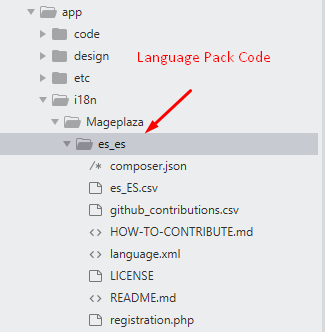
This language pack code is: fr_fr
Step 2: Flush cache
Follow this guide to Flush Cache on your Magento 2 store
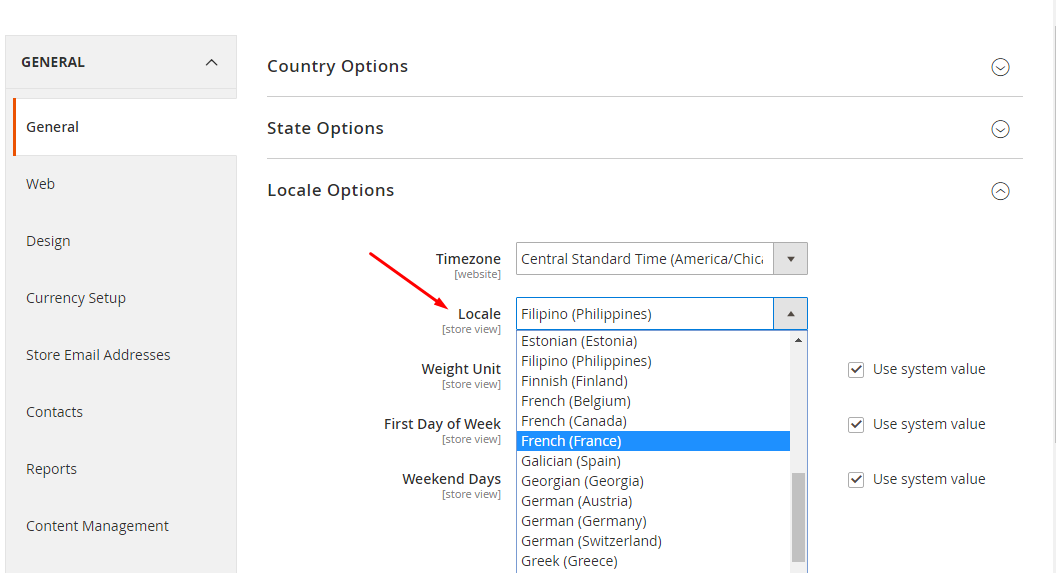
3. How to Active the French language pack
Now time to active the French language pack for your Magento 2 store. From Magento 2 admin panel, navigate to Stores > Configuration > General > Locale Options
4. How to contribute
Contribute to this language at :
- On Crowdin: It takes time to approve your contribution by Magento team.
- On Github: It's faster, our team will approve it after you send pull request.
5. Supported Magento versions
It supports all Magento 2 versions include Magento 2 open-source (Community), Magento 2 Commerce (EE), Magento Cloud, Magento B2B, Magento MSI.
- Magento v2.0.x
- Magento v2.1.x
- Magento v2.2.x
- Magento v2.3.x
6. Notes
- This project automatically updates weekly from Crowdin.
- Any question, issue please create a new issue
7. Language package authors
- Magento official translations project for Magento 2
- Magento Community
- Language packages built by Mageplaza team
8. References
Mageplaza extensions on Magento Marketplace, Github
No changelog yet
The vendor hasn't published a changelog. Tagged releases appear in the Versions tab.
Requires 1
| Package | Constraint |
|---|---|
| mageplaza/module-core | ^1.3.13 |
Compatibility
Each Magento release line is installed on its supported PHP versions, then the module is built (DI compilation + static-content deploy) and its unit and integration suites are run. The matrix shows the lines and PHP versions the module is confirmed to install and run on. Code-quality results further down (phpstan, phpcs, …) are reported separately and never affect compatibility.
Code Quality
Advisory checks against the module's source. Static analysis runs once across the whole module; PHPStan re-runs per Magento + PHP version because resolvable symbols differ between releases. These NEVER affect the Compatibility badge. A phpcs finding can't make a module incompatible.
Static analysis
Coding standards (phpcs), mess detection (phpmd), copy-pasted code (cpd), PHP cross-version compatibility, composer.json validity. Each runs once for the whole module.
PHPStan
Type-checks the module's PHP against a real Magento install at the configured gate level. Re-runs per Magento and PHP version because resolvable symbols differ between releases.
Tests
Unit and integration suites, run for each applicable Magento and PHP version. A test failure speaks to the module's behaviour, not its compatibility with a Magento line, so it is reported here separately and never reddens the compatibility matrix.
Unit tests
| Magento | PHP 8.2 | PHP 8.3 | PHP 8.4 | PHP 8.5 |
|---|---|---|---|---|
| 2.4.7 | N/A | N/A | ||
| 2.4.8 | N/A | N/A | ||
| 2.4.9 | N/A | N/A |
Integration tests
| Magento | PHP 8.2 | PHP 8.3 | PHP 8.4 | PHP 8.5 |
|---|---|---|---|---|
| 2.4.7 | N/A | N/A | ||
| 2.4.8 | N/A | N/A | ||
| 2.4.9 | N/A | N/A |
Security
Security checks run directly against the module: an audit of its declared dependencies for known vulnerabilities (composer audit) and a scan of its source for malware and web-shell signatures. Each runs once. A malware detection fails the version outright.
More from mageplaza
View vendorTurn an existing module into recurring revenue.
If you already maintain a Magento 2 module on GitHub or GitLab, listing it on Packagento takes about five minutes. We mirror your tags, handle distribution signing, and route paid licenses through Stripe Connect, so you can keep shipping the way you already do.