
magenerds / pagedesigner
This module lets you edit cms pages easily with drag and drop
Magenerds_PageDesigner
This extension facilitates the cms editing process in your store.
Instead of just a wysiwyg editor you now have a drag and drop editor to layout your blocks.
- Magento 2.3 compatibility version 4.0.0
- Magento 2.2 and lower version 3.x
Extension installation
The easiest way to install the Magenerds module is via composer
# add to composer require
composer require magenerds/pagedesigner

# run magento setup to activate the module
bin/magento set:up
Extension configuration
The extension can be configured if you go to Stores > Configuration and afterwards to Magenerds > Page Designer.
[image: PageDesigner-Configuration]
- CSS Classes (for columns):
A comma separated list of pre defined css classes which the cms editor can choose from.
The default class pd-highlight is just a dummy class and does nothing.
It is important that a developer has to include the css classes into the theme before using them. - CSS Classes (for rows):
A comma separated list of pre defined css classes which the cms editor can choose from.
The default class pd-highlight is just a dummy class and does nothing.
It is important that a developer has to include the css classes into the theme before using them.
How to use
The page designer can be used for cms blocks and cms pages. Add a new block/page or edit an existing one.
[image: PageDesigner-Usage]
- Select the responsive layout. You can define different layouts for smartphone, tablet, laptop and desktop
- Add more rows
- Click + in order to open up the editor. There you can choose from the widget list or just a wysiwyg editor
- Drag and drop the row
- Click + in order to add a column in the current row
- Click to add pre defined css classes to the row
- Delete the row
- Drag and drop the column
- Click to add pre defined css classes to the column
- Delete the row
Here is an example how a layout can look like:
[image: PageDesigner-Example]
You can import cms blocks you already created into another cms block in order to build on already existing layouts.
This helps you to not start from scratch. All cms blocks created with the page designer are visible in the dropdown Import Static Block.
##Video Tutorial
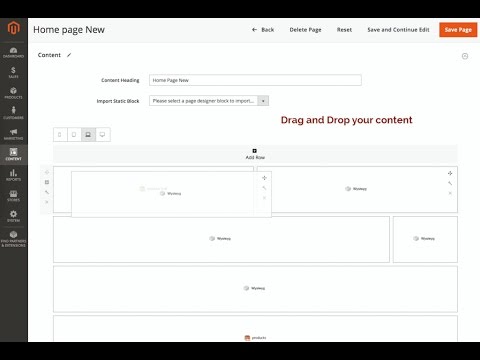
Watch a short video about the extension:
- Magento 2.3 compatibility version 4.0.0
- Magento 2.2 and lower version 3.x
No changelog yet
The vendor hasn't published a changelog. Tagged releases appear in the Versions tab.
| Version | Stability | QA Status | Compatibility | Released |
|---|---|---|---|---|
| 4.3.2 | stable | Fail | Not compatible Details | 2022-11-23 22:02:08 |
| 4.3.1 | stable | Not tested | Not yet tested Details | 2021-04-28 15:28:12 |
| 4.3.0 | stable | Not tested | Not yet tested Details | 2021-04-28 15:15:43 |
| 4.2.0 | stable | Not tested | Not yet tested Details | 2019-11-08 12:30:57 |
| 4.1.6 | stable | Not tested | Not yet tested Details | 2019-06-24 13:29:26 |
| 4.1.5 | stable | Not tested | Not yet tested Details | 2019-06-19 15:40:14 |
| 4.1.4 | stable | Not tested | Not yet tested Details | 2019-06-19 14:03:55 |
| 4.1.3 | stable | Not tested | Not yet tested Details | 2019-05-31 14:52:11 |
| 4.1.2 | stable | Not tested | Not yet tested Details | 2019-05-23 14:06:14 |
| 4.1.1 | stable | Not tested | Not yet tested Details | 2019-04-12 15:39:15 |
| 4.1.0 | stable | Not tested | Not yet tested Details | 2019-04-12 14:55:22 |
| 4.0.1 | stable | Not tested | Not yet tested Details | 2019-04-02 20:53:37 |
| 4.0.0 | stable | Not tested | Not yet tested Details | 2019-02-12 10:41:48 |
| 3.2.0 | stable | Not tested | Not yet tested Details | 2018-08-23 06:33:37 |
| 3.1.0 | stable | Not tested | Not yet tested Details | 2018-02-25 19:05:42 |
| 3.0.1 | stable | Not tested | Not yet tested Details | 2018-02-12 20:19:08 |
| 3.0.0 | stable | Not tested | Not yet tested Details | 2018-02-08 14:14:16 |
| 2.0.0 | stable | Not tested | Not yet tested Details | 2017-08-14 12:01:59 |
| 1.0.7 | stable | Not tested | Not yet tested Details | 2017-04-21 08:29:28 |
| 1.0.6 | stable | Not tested | Not yet tested Details | 2017-04-13 14:07:38 |
| 1.0.5 | stable | Not tested | Not yet tested Details | 2017-03-24 13:05:34 |
| 1.0.4 | stable | Not tested | Not yet tested Details | 2017-03-24 11:11:29 |
| 1.0.3 | stable | Not tested | Not yet tested Details | 2017-03-21 12:56:53 |
| 1.0.2 | stable | Not tested | Not yet tested Details | 2017-03-19 10:08:26 |
| 1.0.1 | stable | Not tested | Not yet tested Details | 2017-03-16 09:05:54 |
| 1.0.0 | stable | Not tested | Not yet tested Details | 2017-02-17 18:52:32 |
Requires 5
| Package | Constraint |
|---|---|
| magenerds/dashboard | * |
| magenerds/wysiwyg-widget | ^1.1 |
| magento/framework | ^102.0.0|^103.0.0 |
| magento/module-backend | * |
| magento/module-cms | * |
Conflicts 2
| Package | Constraint |
|---|---|
| gene/bluefoot | * |
| magento/module-page-builder | * |
Compatibility
Each Magento release line is installed on its supported PHP versions, then the module is built (DI compilation + static-content deploy) and its unit and integration suites are run. The matrix shows the lines and PHP versions the module is confirmed to install and run on. Code-quality results further down (phpstan, phpcs, …) are reported separately and never affect compatibility.
Code Quality
Advisory checks against the module's source. Static analysis runs once across the whole module; PHPStan re-runs per Magento + PHP version because resolvable symbols differ between releases. These NEVER affect the Compatibility badge. A phpcs finding can't make a module incompatible.
Static analysis
Coding standards (phpcs), mess detection (phpmd), copy-pasted code (cpd), PHP cross-version compatibility, composer.json validity. Each runs once for the whole module.
| Tool | Status | Findings | Summary |
|---|---|---|---|
| PHPCS | Fail | 133 | 12 errors, 121 warnings (ruleset: Magento2) — 80 auto-fixable with phpcbf |
| PHPMD | Warning | 15 | 15 rule violations (UnusedFormalParameter:9, IfStatementAssignment:6) |
| Cpd | Pass | 0 | |
| Composer validate | Info | 3 | valid; 3 advisory notes (composer validate --strict) |
PHPStan
Type-checks the module's PHP against a real Magento install at the configured gate level. Re-runs per Magento and PHP version because resolvable symbols differ between releases.
Tests
Unit and integration suites, run for each applicable Magento and PHP version. A test failure speaks to the module's behaviour, not its compatibility with a Magento line, so it is reported here separately and never reddens the compatibility matrix.
Unit tests
| Magento | PHP 8.2 | PHP 8.3 | PHP 8.4 | PHP 8.5 |
|---|---|---|---|---|
| 2.4.7 | N/A | N/A | ||
| 2.4.8 | N/A | N/A | ||
| 2.4.9 | N/A | N/A |
Integration tests
| Magento | PHP 8.2 | PHP 8.3 | PHP 8.4 | PHP 8.5 |
|---|---|---|---|---|
| 2.4.7 | N/A | N/A | ||
| 2.4.8 | N/A | N/A | ||
| 2.4.9 | N/A | N/A |
Security
Security checks run directly against the module: an audit of its declared dependencies for known vulnerabilities (composer audit) and a scan of its source for malware and web-shell signatures. Each runs once. A malware detection fails the version outright.
More from magenerds
View vendorCountry Popup module
Cron Process check for Magento 2. This modules checks if a cron job process crashed and sets its status to error.
This module adds a wysiwyg editor to the widget menu.
The Magenerds dashboard provides useful information about Magenerds
Turn an existing module into recurring revenue.
If you already maintain a Magento 2 module on GitHub or GitLab, listing it on Packagento takes about five minutes. We mirror your tags, handle distribution signing, and route paid licenses through Stripe Connect, so you can keep shipping the way you already do.