# zepgram/module-rest
> Technical module to industrialize API REST call with dependency injection pattern using Guzzle library
`composer require zepgram/module-rest`
Canonical URL: https://packagento.com/zepgram/module-rest
## At a glance
- **Vendor**: zepgram (https://packagento.com/zepgram.md)
- **Latest version**: 3.0.0 — released 2026-03-04
- **Pricing**: Free
- **Package type**: Magento 2 module
- **Status**: active, accepting new buyers
## Installation
Packagento is licence-gated, so even free packages need a licence on a project before Composer can resolve them.
1. **Sign in or create an account** at https://packagento.com/customer/account/.
2. **Add the package to your account.** Open https://packagento.com/zepgram/module-rest and complete the free checkout. A licence is minted automatically.
3. **Create or pick a project, then activate the licence on it.**
- Projects represent the Magento installs you deploy to. Manage them at https://packagento.com/projects/.
- Activate the new licence on the project you'll deploy this package to. Activation is what generates the Composer credentials scoped to that project.
4. **Add the project credentials to your Magento codebase.**
Grab the project's public + private key from https://packagento.com/projects/ (open the project, then its Credentials tab), and add them to `auth.json`:
```json
{
"http-basic": {
"packagento.com": {
"username": "ppk_live_...",
"password": "psk_live_..."
}
}
}
```
Add the Packagento Composer repository to `composer.json`:
```json
{
"repositories": [
{ "type": "composer", "url": "https://packagento.com" }
]
}
```
5. **Install and apply.**
```bash
composer require zepgram/module-rest:*
bin/magento setup:upgrade
bin/magento setup:di:compile
bin/magento cache:flush
```
## What it does
Technical module to industrialize API REST call with dependency injection pattern using Guzzle library
## README
### Overview
Zepgram Rest is a technical module designed to streamline the development of REST API integrations in Magento 2 projects.
Utilizing the Guzzle HTTP client for dependency injection, this module offers a robust set of features aimed at reducing
boilerplate code, improving performance, and enhancing debugging capabilities. By centralizing REST API interactions and
leveraging Magento's built-in systems, Zepgram Rest simplifies the implementation process for developers.
### Features
Zepgram Rest provides several key features to aid Magento developers in creating and managing RESTful services:
- Avoid Code Duplication: Minimize repetitive code with a straightforward setup in di.xml. Implement your REST API integrations with just one class creation, streamlining the development process.
- Centralized Configuration: Manage all your REST web services configurations in one place, ensuring consistency and ease of maintenance.
- Built-in Registry and Cache: Take advantage of Magento's native cache mechanisms and dedicated registry to boost your API's performance and security. This feature helps in efficiently managing data retrieval and storage, reducing the load on your server.
- Generic Logger: Debugging is made effortless with an inclusive logging system. Enable the debug mode to log detailed information about your API calls, including parameters, requests, and responses, facilitating easier troubleshooting.
- Data Serialization: Declare whether your requests and results should be JSON serialized or not. This flexibility prevents the need for multiple serializer implementations, accommodating various API requirements with ease.
### Installation
```
composer require zepgram/module-rest
bin/magento module:enable Zepgram_Rest
bin/magento setup:upgrade
```
### Guideline with ApiPool
1. Create a RequestAdapter class for your service extending abstract class `Zepgram\Rest\Model\RequestAdapter`,
this class represent your service contract adapter:
- **public const SERVICE_ENDPOINT**: define the service endpoint
- **dispatch(DataObject $rawData)**: initialize data that you will adapt to request the web service
- **getBody()**: implement body request
- **getHeaders()**: implement headers
- **getUri()**: implement uri endpoint (used to handle dynamic values)
- **getCacheKey()**: implement cache key for your specific request (you must define a unique key)
1. Create a system.xml, and a config.xml with a dedicated **configName**:
- **section**: `rest_api`
- **group_id**: `$configName`
- **fields**:
- `base_uri`
- `timeout`
- `is_debug`
- `cache_ttl`
1. Declare your service in di.xml by implementing `Zepgram\Rest\Service\ApiProvider` as VirtualClass, you can configure
it by following the [ApiProviderConfig](#configuration)
1. Declare your RequestAdapter and ApiProvider in `Zepgram\Rest\Service\ApiPoolInterface`:
- Add a new item in `apiProviders[]`:
- The **key** is your custom RequestAdapter full namespace
- The **value** is your ApiProvider as a VirtualClass
1. Inject ApiPoolInterface in the class that will consume your API and use `$this->apiPool->execute(RequestAdapter::class, $rawData)` where:
- **RequestAdapter::class** represents the request adapter declared in `apiProviders[]`
- **$rawData** is an array of dynamic data that will be dispatch in `dispatch()` method
### Basic guideline implementation
Instead of declaring your class in `Zepgram\Rest\Service\ApiPoolInterface` you can also directly inject
your ApiProvider in a dedicated class:
```xml
Zepgram\Sales\Rest\FoxtrotOrderRequestAdapter
foxtrot
CustomApiProvider
```
```php
orderRepository->get($orderId);
// send request
$result = $this->apiProvider->execute(['order' => $order]);
return $result;
}
}
```
### Configuration
#### Store config
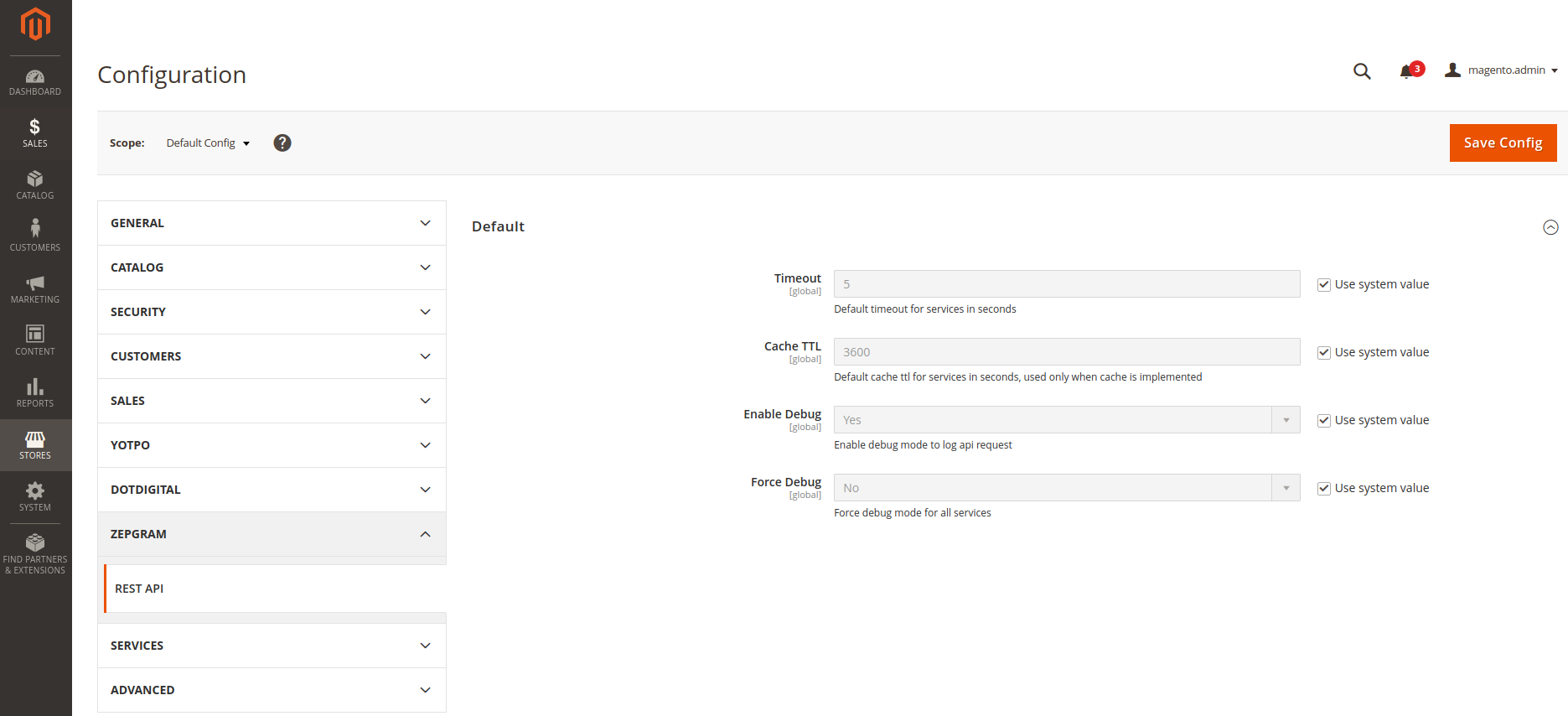
If you do not declare specific configuration, the request will fall back on default configuration.
To override the default config, you must follow this system config pattern: `rest_api/%configName%/base_uri`
#### XML config
You can configure your service with `Zepgram\Rest\Service\ApiProvider` by creating a
VirtualClass and customize its injections for your needs by following the below configuration:
_(README truncated for .md surface. Full README on https://packagento.com/zepgram/module-rest.)_
## Recent Versions
| Version | Released |
|---|---|
| 3.0.0 | 2026-03-04 |
| 2.1.1 | 2026-01-15 |
| 2.1.0 | 2025-06-25 |
| 2.0.3 | 2024-11-24 |
| 2.0.2 | 2024-05-06 |
| 1.1.5 | 2024-05-06 |
| 1.1.4 | 2024-05-03 |
| 2.0.1 | 2024-05-03 |
| 2.0.0 | 2024-02-19 |
| 1.0.5 | 2023-11-17 |
Showing 10 of 21 versions. Full release history on https://packagento.com/zepgram/module-rest.
## Dependencies
### Require
| Package | Constraint |
|---|---|
| guzzlehttp/guzzle | ^7.0 |
| magento/framework | ^103.0.8 |
| monolog/monolog | ^3.0 |
| php | ^8.2 |
| zepgram/module-base | ~0.0.1 |
| zepgram/module-json-schema | ^0.2.0 |
## Quality
Latest release (3.0.0) fails the Packagento QA pipeline. Verdicts below are per-cell (Magento line × PHP version) for the matrixed tools, and run-once for the static / security tiers.
### Compatibility
Each Magento line is installed on its supported PHP versions, then the module is built (DI compile + static-content deploy). Cells show passed / failed / untested; staircase gaps render as `–`.
| Magento | PHP 8.2 | PHP 8.3 | PHP 8.4 | PHP 8.5 |
|---|---|---|---|---|
| 2.4.7 | 1 | not tested | – | – |
| 2.4.8 | – | Pass | 1 | – |
| 2.4.9 | – | – | 1 | 1 |
### Code Quality
Advisory checks against the module's source. Never affect the Compatibility verdict — a phpcs finding can't make a module incompatible.
#### Static Analysis
Coding standards (phpcs), mess detection (phpmd), copy-pasted code (cpd), PHP cross-version compatibility, composer.json validity. Each runs once for the whole module.
| Tool | Status | Findings | Summary |
|---|---|---|---|
| PHPCS | Warning | 2 | 2 warnings (ruleset: Magento2) |
| PHPMD | Warning | 25 | 25 rule violations (UndefinedVariable:22, IfStatementAssignment:1, CyclomaticComplexity:1, UnusedFormalParameter:1) |
| Cpd | Pass | 0 | |
| Composer validate | Info | 1 | valid; 1 advisory note (composer validate --strict) |
#### PHPStan
Type-checks the module against a real Magento install. Re-runs per Magento + PHP version because resolvable symbols differ between releases.
| Magento | PHP 8.2 | PHP 8.3 | PHP 8.4 | PHP 8.5 |
|---|---|---|---|---|
| 2.4.7 | Error | Error | – | – |
| 2.4.8 | – | 3 | 4 | – |
| 2.4.9 | – | – | 4 | 4 |
### Tests
Unit and integration suites run per Magento + PHP cell. Test failures speak to the module's behaviour, not its compatibility with a line, so they're reported here separately.
#### Unit Tests
| Magento | PHP 8.2 | PHP 8.3 | PHP 8.4 | PHP 8.5 |
|---|---|---|---|---|
| 2.4.7 | N/A | N/A | – | – |
| 2.4.8 | – | N/A | N/A | – |
| 2.4.9 | – | – | N/A | N/A |
#### Integration Tests
| Magento | PHP 8.2 | PHP 8.3 | PHP 8.4 | PHP 8.5 |
|---|---|---|---|---|
| 2.4.7 | N/A | N/A | – | – |
| 2.4.8 | – | N/A | N/A | – |
| 2.4.9 | – | – | N/A | N/A |
### Security
Dependency-advisory audit (composer audit) plus a source malware scan. A malware detection fails the version outright.
| Tool | Status | Findings | Summary |
|---|---|---|---|
| Composer audit | Pass | 0 | |
| Malware scan | Pass | 0 | |
## Licence and pricing
Free. A licence is still minted on checkout and bound to your project for Composer access — no payment step.
Refundable within 14 days of first purchase via https://packagento.com/account/refunds/.
## Install via Claude Code or any MCP client
The Packagento MCP server can run the licence + project + Composer steps above in one tool call:
```
purchase_and_install_packages(
composer_names=["zepgram/module-rest"],
project_id="proj_xxx"
)
```
This handles cart, checkout, licence minting, project activation, and writes auth.json credentials. Connect a client with `claude mcp add packagento https://mcp.packagento.com`. Full setup at https://packagento.com/docs/mcp-setup.
## Vendor
zepgram is a Magento 2 vendor on Packagento. See https://packagento.com/zepgram.md for their full catalogue.