# scandipwa/menu-organizer
> Scandiweb Menu Organizer for ScandiPWA
`composer require scandipwa/menu-organizer`
Canonical URL: https://packagento.com/scandipwa/menu-organizer
## At a glance
- **Vendor**: scandipwa (https://packagento.com/scandipwa.md)
- **Latest version**: 2.1.5 — released 2021-10-06
- **Pricing**: Free
- **Package type**: Magento 2 module
- **Status**: active, accepting new buyers
## Installation
Packagento is licence-gated, so even free packages need a licence on a project before Composer can resolve them.
1. **Sign in or create an account** at https://packagento.com/customer/account/.
2. **Add the package to your account.** Open https://packagento.com/scandipwa/menu-organizer and complete the free checkout. A licence is minted automatically.
3. **Create or pick a project, then activate the licence on it.**
- Projects represent the Magento installs you deploy to. Manage them at https://packagento.com/projects/.
- Activate the new licence on the project you'll deploy this package to. Activation is what generates the Composer credentials scoped to that project.
4. **Add the project credentials to your Magento codebase.**
Grab the project's public + private key from https://packagento.com/projects/ (open the project, then its Credentials tab), and add them to `auth.json`:
```json
{
"http-basic": {
"packagento.com": {
"username": "ppk_live_...",
"password": "psk_live_..."
}
}
}
```
Add the Packagento Composer repository to `composer.json`:
```json
{
"repositories": [
{ "type": "composer", "url": "https://packagento.com" }
]
}
```
5. **Install and apply.**
```bash
composer require scandipwa/menu-organizer:*
bin/magento setup:upgrade
bin/magento setup:di:compile
bin/magento cache:flush
```
## What it does
Scandiweb Menu Organizer for ScandiPWA
## README
This repository is a module for Magento 2. This module is used to create customized navigation.
### Menu
1. Supported features
2. Installation
3. How to use
3.1. Creating first menu
3.2. Adding menu items
3.3. Structure for ScandiPWA
3.4. How to enable/disable menu per store
4. For development
4.1. DB structure
4.2. GraphQl structure
4.3. Quick file access
--------
### 1. Supported features
* Multilevel structured menu
* Magento categories
* Magento CMS pages
* Custom URLs
* Icons for menu items
* Custom CSS classes
-----
### 2. Installation
Installation via composer:
```
composer require scandipwa/menu-organizer
```
-----
### 3. How to use
#### 3.1. Creating first menu
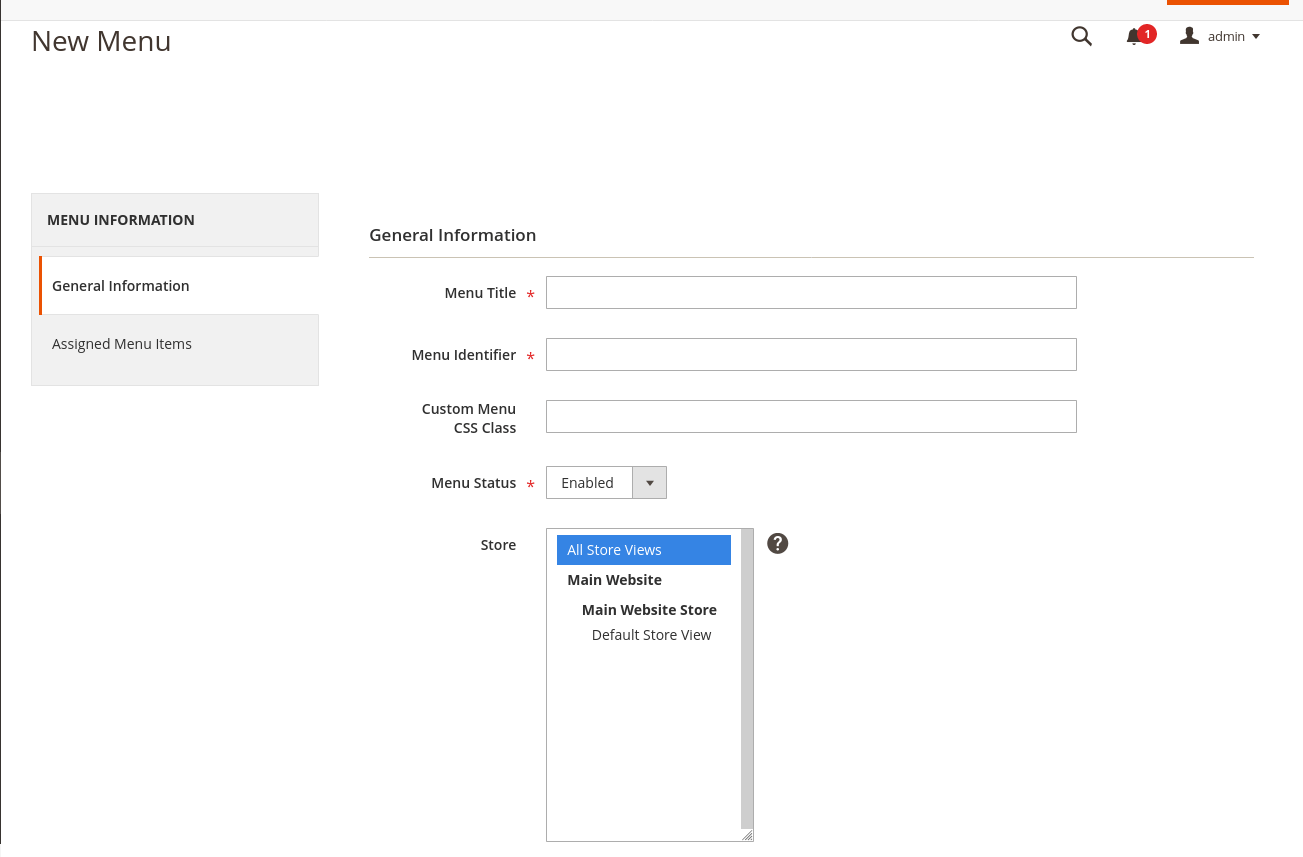
1. Open admin panel
2. Locate `admin/scandipwa_menuorganizer/menu` via URL or by using side panel menu: `Scandiweb -> Navigation -> MenuManager`
3. Find `Add New Menu` button in the right top corner, click it.
4. Fill out form fields:
1. Required:
* _Title_
* _Menu identifier (used in graphql requests)_
* _Menu status (enabled / disabled)_
2. Optional:
* _Custom Menu CSS Class_
* _Store (to which store-view this menu is assigned to)_
5. Click `Save`.
#### 3.2. Adding menu items
1. Open menu.
2. Find the `Assigned Menu Items` in the navigation on the left. click it.
3. Click `Add item` in the top right corner.
4. Fill out form fields:
1. Required:
* Menu Item Title
* URL Type _(Custom URL / Category / CMS page)_
* URL Type specific field: Custom URL | Category | CMS Page
* Parent _(Parent menu item)_
* Menu Item Status _(enabled / disabled)_
2. Optional:
* Menu Item CSS Class
* URL Attributes
* Icon
* Icon Alt Text
* Menu Item Sort Order _(Item with lowest number will be on top)_
5. Click `Save`.

#### 3.3. Structure for ScandiPWA
By default ScandiPWA will only render yellow elements _(check image)_ and ignore the red ones.
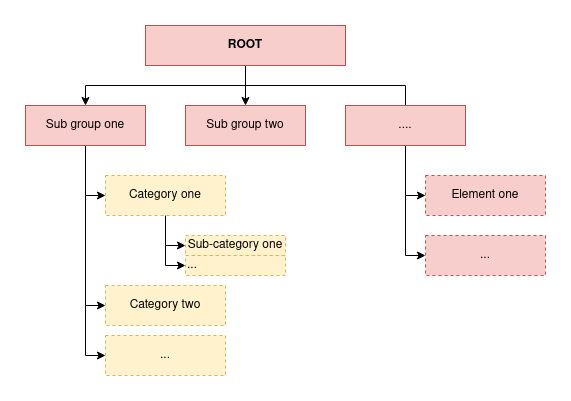
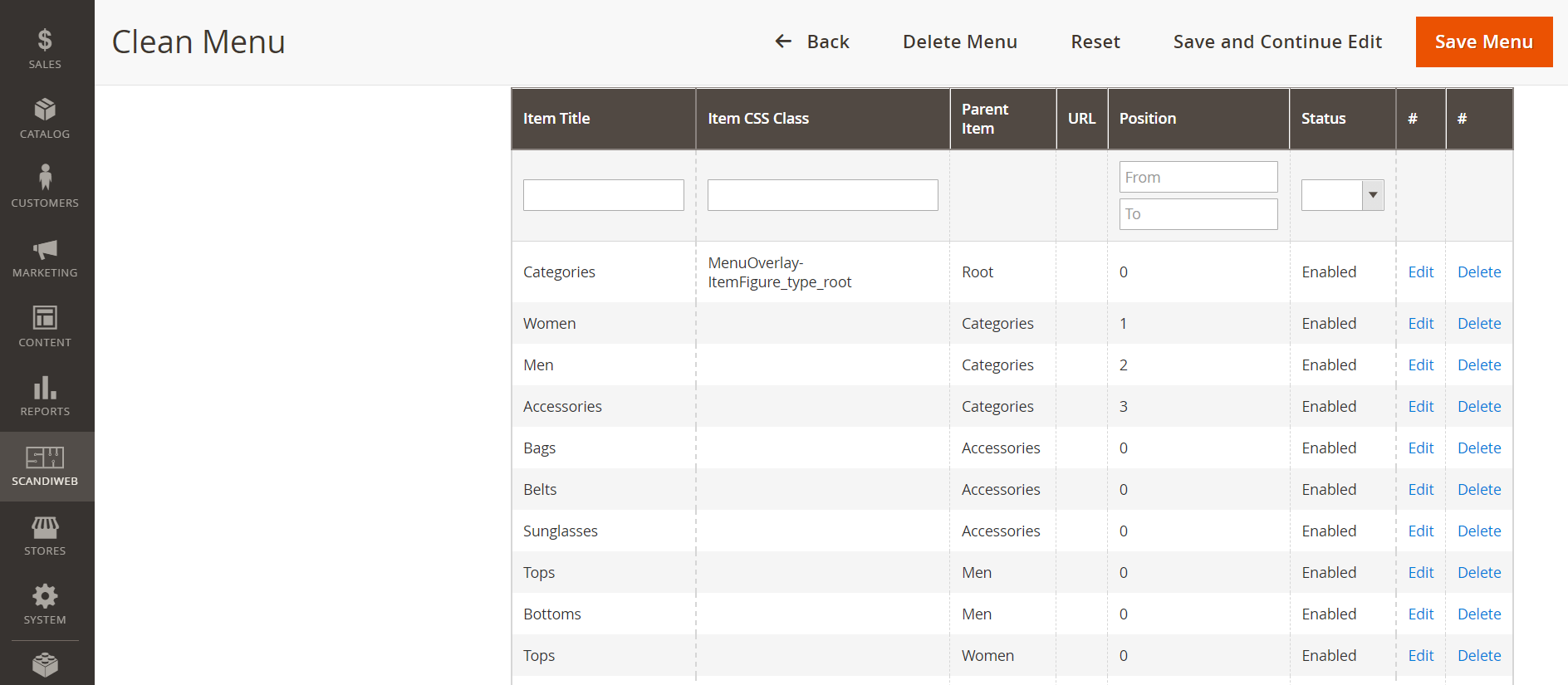
The example below would result in a menu with the options Women, Men and Accessories and their respective sub-items (such as Bags and Tops).
#### 3.4. How to enable/disable menu per store
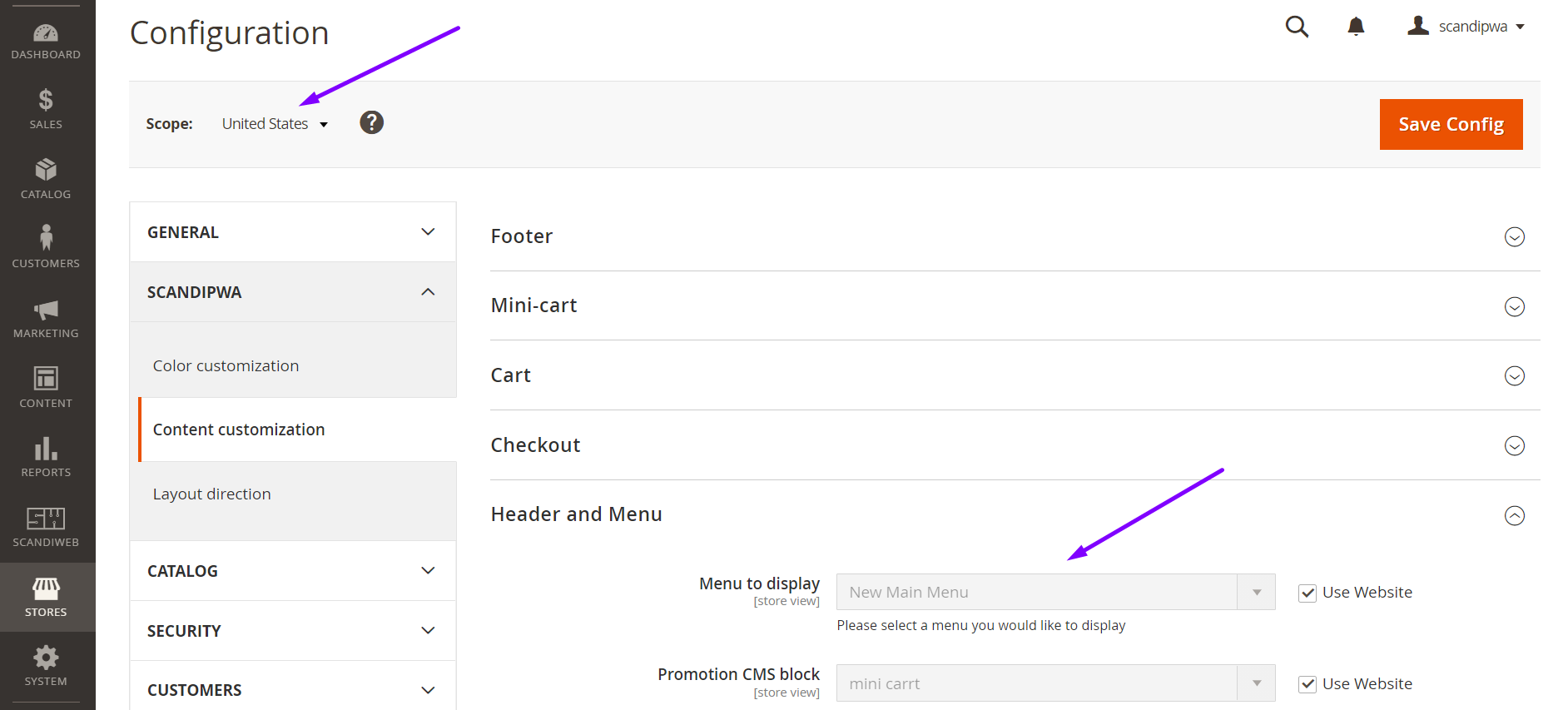
To enable a menu for a specific store, make sure you have selected the store in the menu configuration on step 3.1.4.ii.
Then, select the correct menu id in the configuration:
1. Open admin panel
2. Using the side panel menu, go to: `Stores -> Settings -> Configuration`
3. Find `Scope` and select the desired store view.
4. Using the menu dropdown, go to: `ScandiPWA -> Content Customization -> Header and Menu`
5. Uncheck the checkbox `Use Website`
6. Select the desired menu in `Menu to display`
7. Tap `Save Config`
8. Flush Cache Storage
-----
### 4. For development
#### 4.1. DB structure

#### 4.2. GraphQl structure
```js
type Query {
scandiwebMenu(identifier: String!): Menu @resolver(class: "ScandiPWA\\MenuOrganizer\\Model\\Resolver\\Menu")
}
type Menu {
menu_id: ID
title: String
is_active: Boolean
css_class: String
items: [Item]
}
type Item {
item_id: ID
icon: String
title: String
item_class: String @doc(description: "CSS class of the item")
parent_id: Int
url: String
url_type: Int @doc(description: "0 - regular link, 1 - cms page, 2 - category")
position: Int
is_active: Boolean
cms_page_identifier: String
is_promo: Int @doc(description: "Boolean if category is promotional category")
promo_image: String @doc(description: "Promo category image background")
category_id: Int @doc(description: "Category id")
}
```
Or check: [schema.graphqls](./src/etc/schema.graphqls)
#### 4.3. Quick file access:
* Form for creating menu: [General.php](./src/Block/Adminhtml/Menu/Edit/Tab/General.php)
* Form for creating item: [Form.php](./src/Block/Adminhtml/Item/Edit/Form.php)
* Menu model: [Item.php](./src/Model/Menu.php) | [ResourceModel/Item.php](./src/Model/ResourceModel/Menu.php)
* Item model: [Menu.php](./src/Model/Item.php) | [ResourceModel/Item.php](./src/Model/ResourceModel/Item.php)
* Menu resolver: [Menu.php](./src/Model/Resolver/Menu.php)
* DB schema: [db_schema.xml](./src/Model/Resolver/Menu.php)
## Changelog
Scandiweb_Menumanager changelog
========================
0.1.0:
- added install schema for menu / menu items / menu-store mapping
- added CRUD functionality for menus
- added menu mass actions
- added menus functionality to be based on 'store' level
- added CRUD functionality for menu items
- added custom output for categories/menus as dropdown options
## Recent Versions
| Version | Released |
|---|---|
| 2.1.5 | 2021-10-06 |
| 2.1.4 | 2021-07-28 |
| 2.1.3 | 2021-07-19 |
| 2.1.2 | 2021-07-13 |
| 2.1.1 | 2021-03-05 |
| 2.1.0 | 2020-09-07 |
| 2.0.0 | 2020-06-26 |
| 1.1.10 | 2020-06-18 |
| 1.1.9 | 2020-06-15 |
| 1.1.8 | 2020-05-25 |
Showing 10 of 22 versions. Full release history on https://packagento.com/scandipwa/menu-organizer.
## Dependencies
### Require
| Package | Constraint |
|---|---|
| magento/framework | * |
| magento/module-backend | * |
| magento/module-captcha | * |
| magento/module-catalog | * |
| magento/module-cms | * |
| magento/module-media-storage | * |
| magento/module-store | * |
| magento/module-ui | * |
| scandiweb/module-core | ~0.1.2 |
## Quality
Latest release (2.1.5) fails the Packagento QA pipeline. Verdicts below are per-cell (Magento line × PHP version) for the matrixed tools, and run-once for the static / security tiers.
### Compatibility
Each Magento line is installed on its supported PHP versions, then the module is built (DI compile + static-content deploy). Cells show passed / failed / untested; staircase gaps render as `–`.
| Magento | PHP 8.2 | PHP 8.3 | PHP 8.4 | PHP 8.5 |
|---|---|---|---|---|
| 2.4.7 | Pass | Pass | – | – |
| 2.4.8 | – | Pass | 1 | – |
| 2.4.9 | – | – | 1 | 1 |
### Code Quality
Advisory checks against the module's source. Never affect the Compatibility verdict — a phpcs finding can't make a module incompatible.
#### Static Analysis
Coding standards (phpcs), mess detection (phpmd), copy-pasted code (cpd), PHP cross-version compatibility, composer.json validity. Each runs once for the whole module.
| Tool | Status | Findings | Summary |
|---|---|---|---|
| PHPCS | Warning | 259 | 259 warnings (ruleset: Magento2) — 152 auto-fixable with phpcbf |
| PHPMD | Warning | 48 | 48 rule violations (IfStatementAssignment:16, MissingImport:10, UndefinedVariable:9, UnusedFormalParameter:5, ExcessiveMethodLength:2) |
| Cpd | Pass | 0 | |
| Composer validate | Info | 8 | valid; 8 advisory notes (composer validate --strict) |
#### PHPStan
Type-checks the module against a real Magento install. Re-runs per Magento + PHP version because resolvable symbols differ between releases.
| Magento | PHP 8.2 | PHP 8.3 | PHP 8.4 | PHP 8.5 |
|---|---|---|---|---|
| 2.4.7 | 75 | 75 | – | – |
| 2.4.8 | – | 75 | 77 | – |
| 2.4.9 | – | – | 77 | 77 |
### Tests
Unit and integration suites run per Magento + PHP cell. Test failures speak to the module's behaviour, not its compatibility with a line, so they're reported here separately.
#### Unit Tests
| Magento | PHP 8.2 | PHP 8.3 | PHP 8.4 | PHP 8.5 |
|---|---|---|---|---|
| 2.4.7 | N/A | N/A | – | – |
| 2.4.8 | – | N/A | N/A | – |
| 2.4.9 | – | – | N/A | N/A |
#### Integration Tests
| Magento | PHP 8.2 | PHP 8.3 | PHP 8.4 | PHP 8.5 |
|---|---|---|---|---|
| 2.4.7 | N/A | N/A | – | – |
| 2.4.8 | – | N/A | N/A | – |
| 2.4.9 | – | – | N/A | N/A |
### Security
Dependency-advisory audit (composer audit) plus a source malware scan. A malware detection fails the version outright.
| Tool | Status | Findings | Summary |
|---|---|---|---|
| Composer audit | Pass | 0 | |
| Malware scan | Pass | 0 | |
## Licence and pricing
Free. A licence is still minted on checkout and bound to your project for Composer access — no payment step.
Refundable within 14 days of first purchase via https://packagento.com/account/refunds/.
## Install via Claude Code or any MCP client
The Packagento MCP server can run the licence + project + Composer steps above in one tool call:
```
purchase_and_install_packages(
composer_names=["scandipwa/menu-organizer"],
project_id="proj_xxx"
)
```
This handles cart, checkout, licence minting, project activation, and writes auth.json credentials. Connect a client with `claude mcp add packagento https://mcp.packagento.com`. Full setup at https://packagento.com/docs/mcp-setup.
## Vendor
scandipwa is a Magento 2 vendor on Packagento. See https://packagento.com/scandipwa.md for their full catalogue.