# msp/twofactorauth
> Two Factor Authentication module for Magento2 - Member of MageSpecialist SecuritySuite
`composer require msp/twofactorauth`
Canonical URL: https://packagento.com/msp/twofactorauth
## At a glance
- **Vendor**: msp (https://packagento.com/msp.md)
- **Latest version**: 2.1.12 — released 2018-03-24
- **Pricing**: Free
- **Package type**: Magento 2 module
- **Status**: active, accepting new buyers
## Installation
Packagento is licence-gated, so even free packages need a licence on a project before Composer can resolve them.
1. **Sign in or create an account** at https://packagento.com/customer/account/.
2. **Add the package to your account.** Open https://packagento.com/msp/twofactorauth and complete the free checkout. A licence is minted automatically.
3. **Create or pick a project, then activate the licence on it.**
- Projects represent the Magento installs you deploy to. Manage them at https://packagento.com/projects/.
- Activate the new licence on the project you'll deploy this package to. Activation is what generates the Composer credentials scoped to that project.
4. **Add the project credentials to your Magento codebase.**
Grab the project's public + private key from https://packagento.com/projects/ (open the project, then its Credentials tab), and add them to `auth.json`:
```json
{
"http-basic": {
"packagento.com": {
"username": "ppk_live_...",
"password": "psk_live_..."
}
}
}
```
Add the Packagento Composer repository to `composer.json`:
```json
{
"repositories": [
{ "type": "composer", "url": "https://packagento.com" }
]
}
```
5. **Install and apply.**
```bash
composer require msp/twofactorauth:*
bin/magento setup:upgrade
bin/magento setup:di:compile
bin/magento cache:flush
```
## What it does
Two Factor Authentication module for Magento2 - Member of MageSpecialist SecuritySuite
## README
MSP TwoFactorAuth
Two Factor Authentication module for maximum **backend access protection** in Magento 2.
> Member of **MSP Security Suite**
>
> See: https://github.com/magespecialist/m2-MSP_Security_Suite
Did you lock yourself out from Magento backend? click here.
### Main features:
* Providers:
* Google authenticator
* QR code enroll
* Authy
* SMS
* Call
* Token
* One touch
* U2F keys (Yubico and others)
* Duo Security
* SMS
* Push notification
* Trusted devices
* High security rolling codes
* Trusted devices revoke list
* Central security suite events logging
* Per user configuration
* Forced global 2FA configuration
### Installing on Magento2:
**1. Install using composer**
From command line:
`composer require msp/twofactorauth`
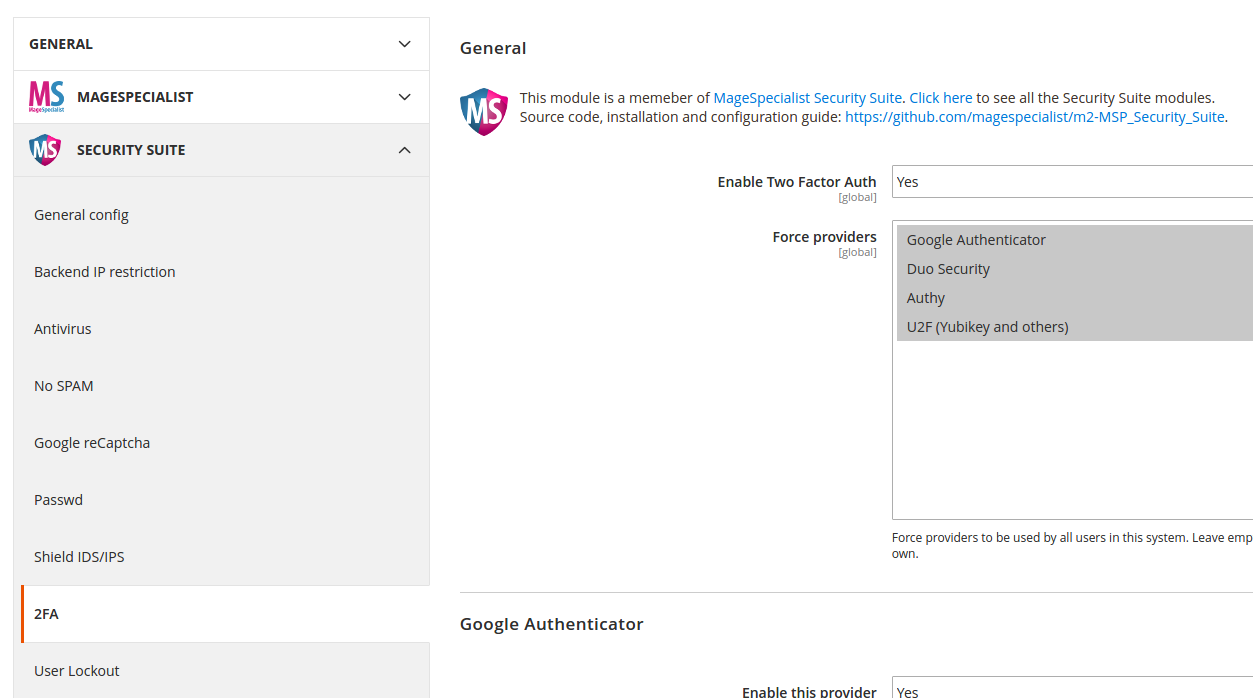
**2. Enable and configure from your Magento backend config**
Enable from **Store > Config > SecuritySuite > Two Factor Authentication**.
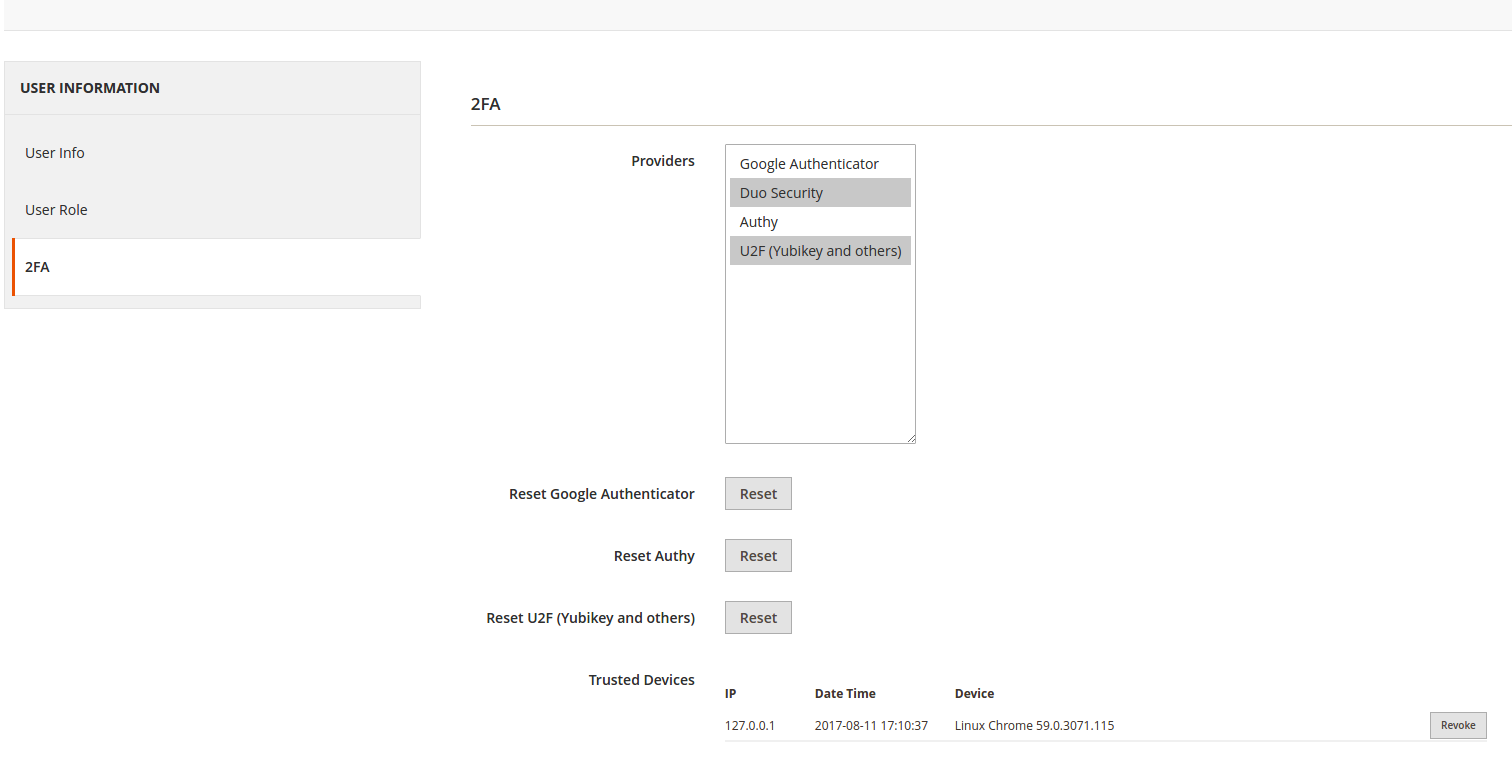
 **3. Enable two factor authentication for your user**
You can select among a set of different 2FA providers. **Multiple concurrent providers** are supported.
**3. Enable two factor authentication for your user**
You can select among a set of different 2FA providers. **Multiple concurrent providers** are supported.
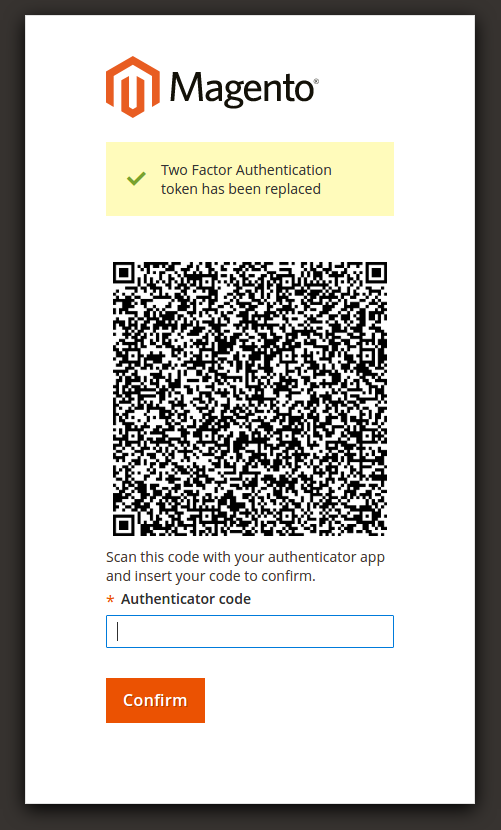
 **4. Subscribe / Configure your 2FA provider(s):**
**4.1 Google Authenticator example**
**4. Subscribe / Configure your 2FA provider(s):**
**4.1 Google Authenticator example**
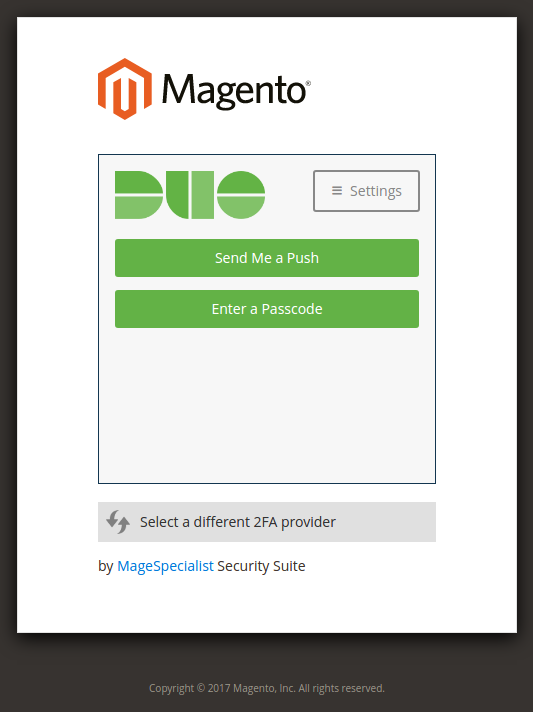
 **4.2. Duo Security example**
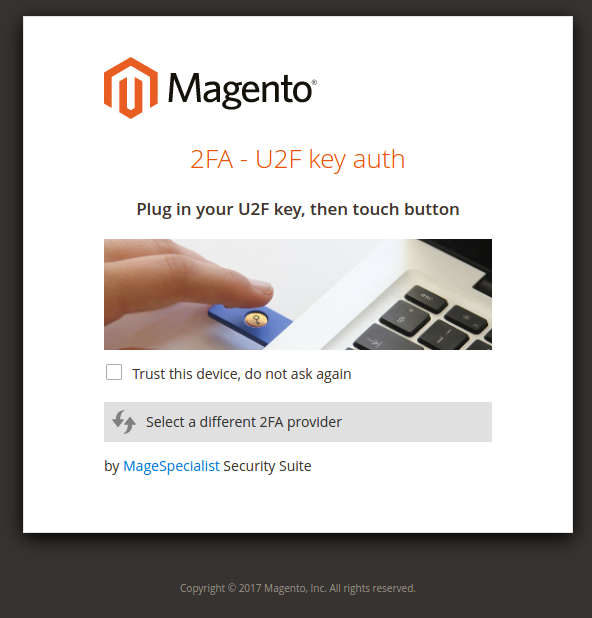
 **4.3. U2F key (Yubico and others) example**
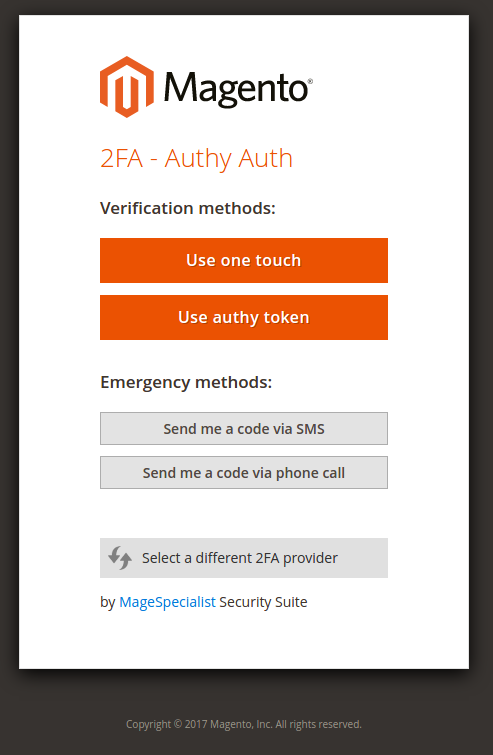
 **4.4. Authy example**
 ### Emergency commandline disable:
If you messed up with two factor authentication you can disable it from command-line:
`php bin/magento msp:security:tfa:disable`
This will disable two factor auth globally.
### Emergency commandline reset:
If you need to manually reset one single user configuration (so you can restart configuration / subscription), type:
`php bin/magento msp:security:tfa:reset `
e.g.:
`php bin/magento msp:security:tfa:reset admin google`
`php bin/magento msp:security:tfa:reset admin u2fkey`
`php bin/magento msp:security:tfa:reset admin authy`
### Emergency of emergency and your house is on fire, your dog is lost and your wife doesn't love you anymore:
**DO NOT ATTEMPT TO MODIFY ANY DB INFORMATION UNLESS YOU UNDERSTAND WHAT YOU ARE DOING**
Table `core_config_data`:
* `msp/twofactorauth/enabled`: Set to zero to disable 2fa globally
* `msp/twofactorauth/force_providers`: Delete this entry to remove forced providers option
Table `msp_tfa_user_config`:
* Delete one user row to reset user's 2FA preference and configuration
## Recent Versions
| Version | Released |
|---|---|
| 2.1.12 | 2018-03-24 |
| 2.1.11 | 2018-03-16 |
| 2.1.10 | 2018-03-02 |
| 2.1.9 | 2018-02-25 |
| 2.1.7 | 2018-02-09 |
| 2.1.6 | 2018-02-08 |
| 2.1.3 | 2018-01-29 |
| 2.1.2 | 2018-01-04 |
| 2.1.1 | 2017-11-20 |
| 2.1 | 2017-10-28 |
Showing 10 of 38 versions. Full release history on https://packagento.com/msp/twofactorauth.
## Dependencies
### Require
| Package | Constraint |
|---|---|
| christian-riesen/base32 | ^1.3 |
| donatj/phpuseragentparser | ~0.7 |
| endroid/qrcode | ^2.5 |
| magento/magento-composer-installer | * |
| msp/security-suite-common | ^2.0 |
| php | ^7.0\|^7.1 |
| spomky-labs/otphp | ~8.3 |
| yubico/u2flib-server | ^1.0 |
### Suggest
| Package | Constraint |
|---|---|
| msp/security-suite | Full MageSpecialist Security Suite |
## Quality
Latest release (2.1.12) fails the Packagento QA pipeline. Verdicts below are per-cell (Magento line × PHP version) for the matrixed tools, and run-once for the static / security tiers.
### Compatibility
Each Magento line is installed on its supported PHP versions, then the module is built (DI compile + static-content deploy). Cells show passed / failed / untested; staircase gaps render as `–`.
| Magento | PHP 8.2 | PHP 8.3 | PHP 8.4 | PHP 8.5 |
|---|---|---|---|---|
| 2.4.7 | not tested | not tested | – | – |
| 2.4.8 | – | not tested | not tested | – |
| 2.4.9 | – | – | not tested | not tested |
### Code Quality
Advisory checks against the module's source. Never affect the Compatibility verdict — a phpcs finding can't make a module incompatible.
#### Static Analysis
Coding standards (phpcs), mess detection (phpmd), copy-pasted code (cpd), PHP cross-version compatibility, composer.json validity. Each runs once for the whole module.
| Tool | Status | Findings | Summary |
|---|---|---|---|
| PHPCS | Fail | 74 | 4 errors, 70 warnings (ruleset: Magento2) — 6 auto-fixable with phpcbf |
| PHPMD | Warning | 22 | 22 rule violations (MissingImport:9, IfStatementAssignment:9, UndefinedVariable:3, NumberOfChildren:1) |
| Cpd | Pass | 0 | |
| Composer validate | Info | 1 | valid; 1 advisory note (composer validate --strict) |
#### PHPStan
Type-checks the module against a real Magento install. Re-runs per Magento + PHP version because resolvable symbols differ between releases.
| Magento | PHP 8.2 | PHP 8.3 | PHP 8.4 | PHP 8.5 |
|---|---|---|---|---|
| 2.4.7 | N/A | N/A | – | – |
| 2.4.8 | – | N/A | N/A | – |
| 2.4.9 | – | – | N/A | N/A |
### Tests
Unit and integration suites run per Magento + PHP cell. Test failures speak to the module's behaviour, not its compatibility with a line, so they're reported here separately.
#### Unit Tests
| Magento | PHP 8.2 | PHP 8.3 | PHP 8.4 | PHP 8.5 |
|---|---|---|---|---|
| 2.4.7 | N/A | N/A | – | – |
| 2.4.8 | – | N/A | N/A | – |
| 2.4.9 | – | – | N/A | N/A |
#### Integration Tests
| Magento | PHP 8.2 | PHP 8.3 | PHP 8.4 | PHP 8.5 |
|---|---|---|---|---|
| 2.4.7 | N/A | N/A | – | – |
| 2.4.8 | – | N/A | N/A | – |
| 2.4.9 | – | – | N/A | N/A |
### Security
Dependency-advisory audit (composer audit) plus a source malware scan. A malware detection fails the version outright.
| Tool | Status | Findings | Summary |
|---|---|---|---|
| Composer audit | Pass | 0 | |
| Malware scan | Pass | 0 | |
## Licence and pricing
Free. A licence is still minted on checkout and bound to your project for Composer access — no payment step.
Refundable within 14 days of first purchase via https://packagento.com/account/refunds/.
## Install via Claude Code or any MCP client
The Packagento MCP server can run the licence + project + Composer steps above in one tool call:
```
purchase_and_install_packages(
composer_names=["msp/twofactorauth"],
project_id="proj_xxx"
)
```
This handles cart, checkout, licence minting, project activation, and writes auth.json credentials. Connect a client with `claude mcp add packagento https://mcp.packagento.com`. Full setup at https://packagento.com/docs/mcp-setup.
## Vendor
msp is a Magento 2 vendor on Packagento. See https://packagento.com/msp.md for their full catalogue.
### Emergency commandline disable:
If you messed up with two factor authentication you can disable it from command-line:
`php bin/magento msp:security:tfa:disable`
This will disable two factor auth globally.
### Emergency commandline reset:
If you need to manually reset one single user configuration (so you can restart configuration / subscription), type:
`php bin/magento msp:security:tfa:reset `
e.g.:
`php bin/magento msp:security:tfa:reset admin google`
`php bin/magento msp:security:tfa:reset admin u2fkey`
`php bin/magento msp:security:tfa:reset admin authy`
### Emergency of emergency and your house is on fire, your dog is lost and your wife doesn't love you anymore:
**DO NOT ATTEMPT TO MODIFY ANY DB INFORMATION UNLESS YOU UNDERSTAND WHAT YOU ARE DOING**
Table `core_config_data`:
* `msp/twofactorauth/enabled`: Set to zero to disable 2fa globally
* `msp/twofactorauth/force_providers`: Delete this entry to remove forced providers option
Table `msp_tfa_user_config`:
* Delete one user row to reset user's 2FA preference and configuration
## Recent Versions
| Version | Released |
|---|---|
| 2.1.12 | 2018-03-24 |
| 2.1.11 | 2018-03-16 |
| 2.1.10 | 2018-03-02 |
| 2.1.9 | 2018-02-25 |
| 2.1.7 | 2018-02-09 |
| 2.1.6 | 2018-02-08 |
| 2.1.3 | 2018-01-29 |
| 2.1.2 | 2018-01-04 |
| 2.1.1 | 2017-11-20 |
| 2.1 | 2017-10-28 |
Showing 10 of 38 versions. Full release history on https://packagento.com/msp/twofactorauth.
## Dependencies
### Require
| Package | Constraint |
|---|---|
| christian-riesen/base32 | ^1.3 |
| donatj/phpuseragentparser | ~0.7 |
| endroid/qrcode | ^2.5 |
| magento/magento-composer-installer | * |
| msp/security-suite-common | ^2.0 |
| php | ^7.0\|^7.1 |
| spomky-labs/otphp | ~8.3 |
| yubico/u2flib-server | ^1.0 |
### Suggest
| Package | Constraint |
|---|---|
| msp/security-suite | Full MageSpecialist Security Suite |
## Quality
Latest release (2.1.12) fails the Packagento QA pipeline. Verdicts below are per-cell (Magento line × PHP version) for the matrixed tools, and run-once for the static / security tiers.
### Compatibility
Each Magento line is installed on its supported PHP versions, then the module is built (DI compile + static-content deploy). Cells show passed / failed / untested; staircase gaps render as `–`.
| Magento | PHP 8.2 | PHP 8.3 | PHP 8.4 | PHP 8.5 |
|---|---|---|---|---|
| 2.4.7 | not tested | not tested | – | – |
| 2.4.8 | – | not tested | not tested | – |
| 2.4.9 | – | – | not tested | not tested |
### Code Quality
Advisory checks against the module's source. Never affect the Compatibility verdict — a phpcs finding can't make a module incompatible.
#### Static Analysis
Coding standards (phpcs), mess detection (phpmd), copy-pasted code (cpd), PHP cross-version compatibility, composer.json validity. Each runs once for the whole module.
| Tool | Status | Findings | Summary |
|---|---|---|---|
| PHPCS | Fail | 74 | 4 errors, 70 warnings (ruleset: Magento2) — 6 auto-fixable with phpcbf |
| PHPMD | Warning | 22 | 22 rule violations (MissingImport:9, IfStatementAssignment:9, UndefinedVariable:3, NumberOfChildren:1) |
| Cpd | Pass | 0 | |
| Composer validate | Info | 1 | valid; 1 advisory note (composer validate --strict) |
#### PHPStan
Type-checks the module against a real Magento install. Re-runs per Magento + PHP version because resolvable symbols differ between releases.
| Magento | PHP 8.2 | PHP 8.3 | PHP 8.4 | PHP 8.5 |
|---|---|---|---|---|
| 2.4.7 | N/A | N/A | – | – |
| 2.4.8 | – | N/A | N/A | – |
| 2.4.9 | – | – | N/A | N/A |
### Tests
Unit and integration suites run per Magento + PHP cell. Test failures speak to the module's behaviour, not its compatibility with a line, so they're reported here separately.
#### Unit Tests
| Magento | PHP 8.2 | PHP 8.3 | PHP 8.4 | PHP 8.5 |
|---|---|---|---|---|
| 2.4.7 | N/A | N/A | – | – |
| 2.4.8 | – | N/A | N/A | – |
| 2.4.9 | – | – | N/A | N/A |
#### Integration Tests
| Magento | PHP 8.2 | PHP 8.3 | PHP 8.4 | PHP 8.5 |
|---|---|---|---|---|
| 2.4.7 | N/A | N/A | – | – |
| 2.4.8 | – | N/A | N/A | – |
| 2.4.9 | – | – | N/A | N/A |
### Security
Dependency-advisory audit (composer audit) plus a source malware scan. A malware detection fails the version outright.
| Tool | Status | Findings | Summary |
|---|---|---|---|
| Composer audit | Pass | 0 | |
| Malware scan | Pass | 0 | |
## Licence and pricing
Free. A licence is still minted on checkout and bound to your project for Composer access — no payment step.
Refundable within 14 days of first purchase via https://packagento.com/account/refunds/.
## Install via Claude Code or any MCP client
The Packagento MCP server can run the licence + project + Composer steps above in one tool call:
```
purchase_and_install_packages(
composer_names=["msp/twofactorauth"],
project_id="proj_xxx"
)
```
This handles cart, checkout, licence minting, project activation, and writes auth.json credentials. Connect a client with `claude mcp add packagento https://mcp.packagento.com`. Full setup at https://packagento.com/docs/mcp-setup.
## Vendor
msp is a Magento 2 vendor on Packagento. See https://packagento.com/msp.md for their full catalogue.