# msp/devtools

`composer require msp/devtools`

Canonical URL: https://packagento.com/msp/devtools

## At a glance

- **Vendor**: msp (https://packagento.com/msp.md)
- **Latest version**: 1.2.18 — released 2024-04-22
- **Pricing**: Free
- **Package type**: Magento 2 module
- **Status**: active, accepting new buyers

## Installation

Packagento is licence-gated, so even free packages need a licence on a project before Composer can resolve them.

1. **Sign in or create an account** at https://packagento.com/customer/account/.

2. **Add the package to your account.** Open https://packagento.com/msp/devtools and complete the free checkout. A licence is minted automatically.

3. **Create or pick a project, then activate the licence on it.**
   - Projects represent the Magento installs you deploy to. Manage them at https://packagento.com/projects/.
   - Activate the new licence on the project you'll deploy this package to. Activation is what generates the Composer credentials scoped to that project.

4. **Add the project credentials to your Magento codebase.**

   Grab the project's public + private key from https://packagento.com/projects/ (open the project, then its Credentials tab), and add them to `auth.json`:

   ```json
   {
     "http-basic": {
       "packagento.com": {
         "username": "ppk_live_...",
         "password": "psk_live_..."
       }
     }
   }
   ```

   Add the Packagento Composer repository to `composer.json`:

   ```json
   {
     "repositories": [
       { "type": "composer", "url": "https://packagento.com" }
     ]
   }
   ```

5. **Install and apply.**

   ```bash
   composer require msp/devtools:*
   bin/magento setup:upgrade
   bin/magento setup:di:compile
   bin/magento cache:flush
   ```

## README

This module is intended to be used with **MageSpecialist Chrome Toolbar**.

Readme and installation guide can be found here: https://github.com/magespecialist/mage-chrome-toolbar

> This module is also available for **Magento 1**: https://github.com/magespecialist/m1-MSP_DevTools/

### Installing on Magento 2:
Please refer to this page: https://github.com/magespecialist/mage-chrome-toolbar#installing-on-magento-2

### Some screenshot

##### Theme, Controller and Global information: 
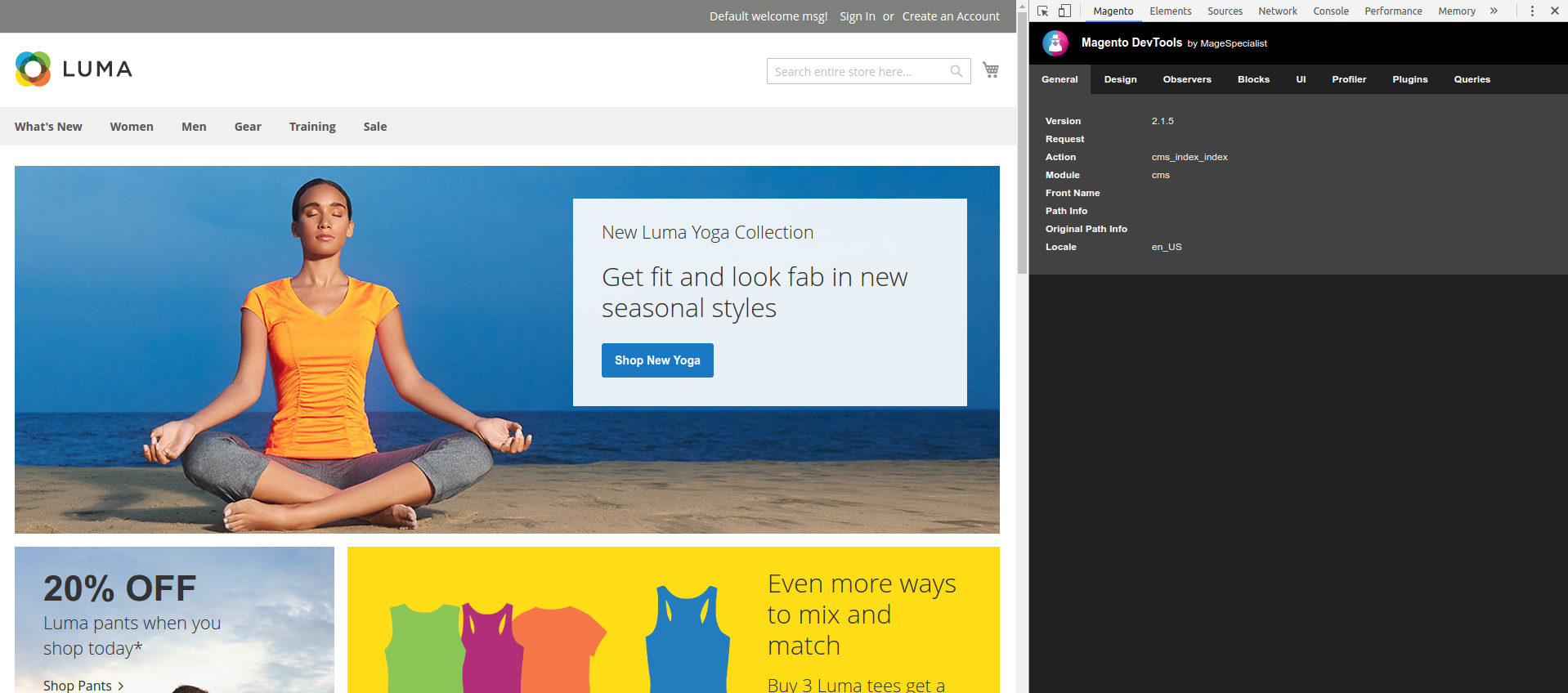
<img src="https://raw.githubusercontent.com/magespecialist/mage-chrome-toolbar/master/screenshots/1.png" width="480" />

##### Blocks / Containers information:
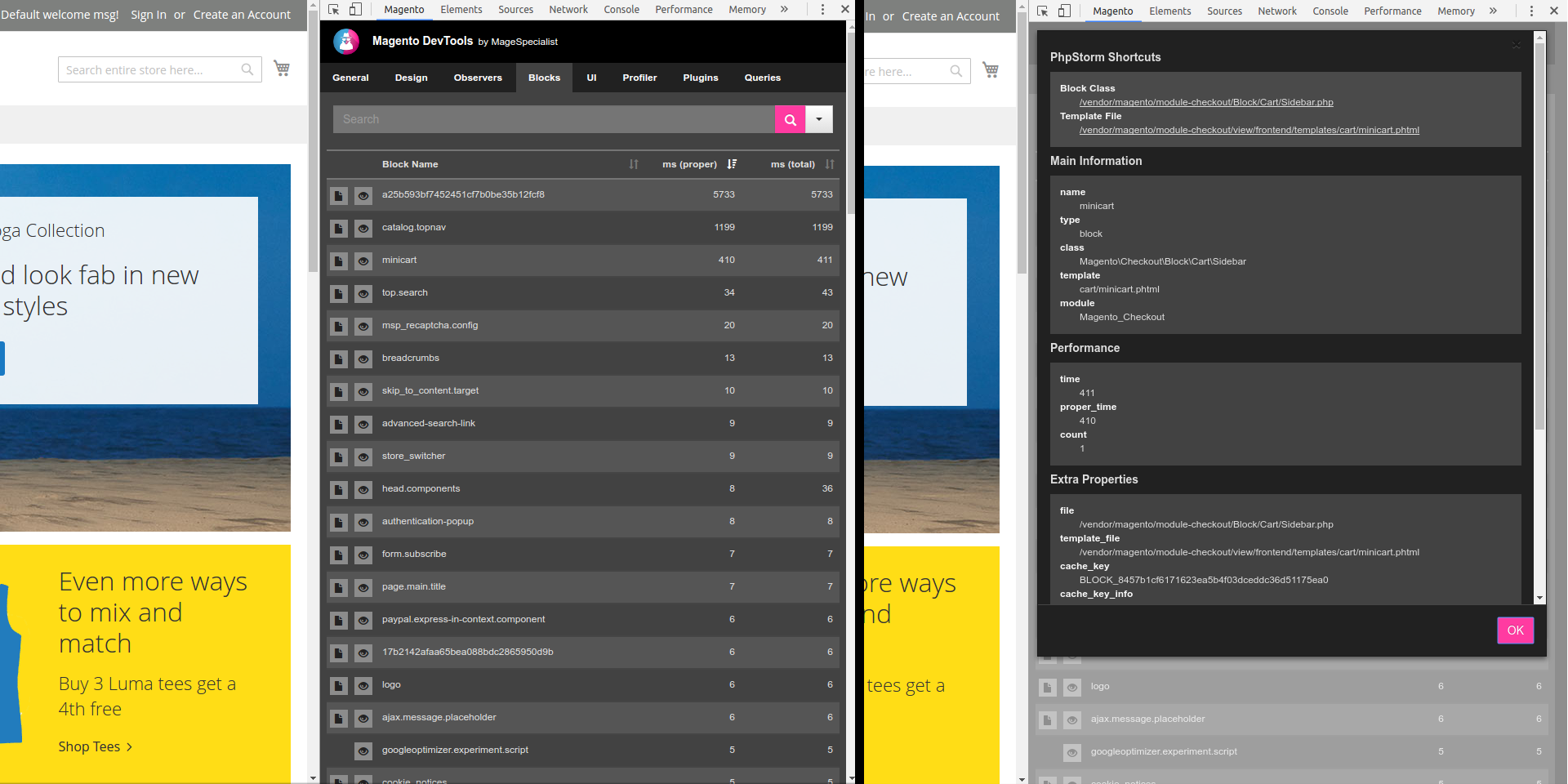
<img src="https://raw.githubusercontent.com/magespecialist/mage-chrome-toolbar/master/screenshots/2.png" width="480" />

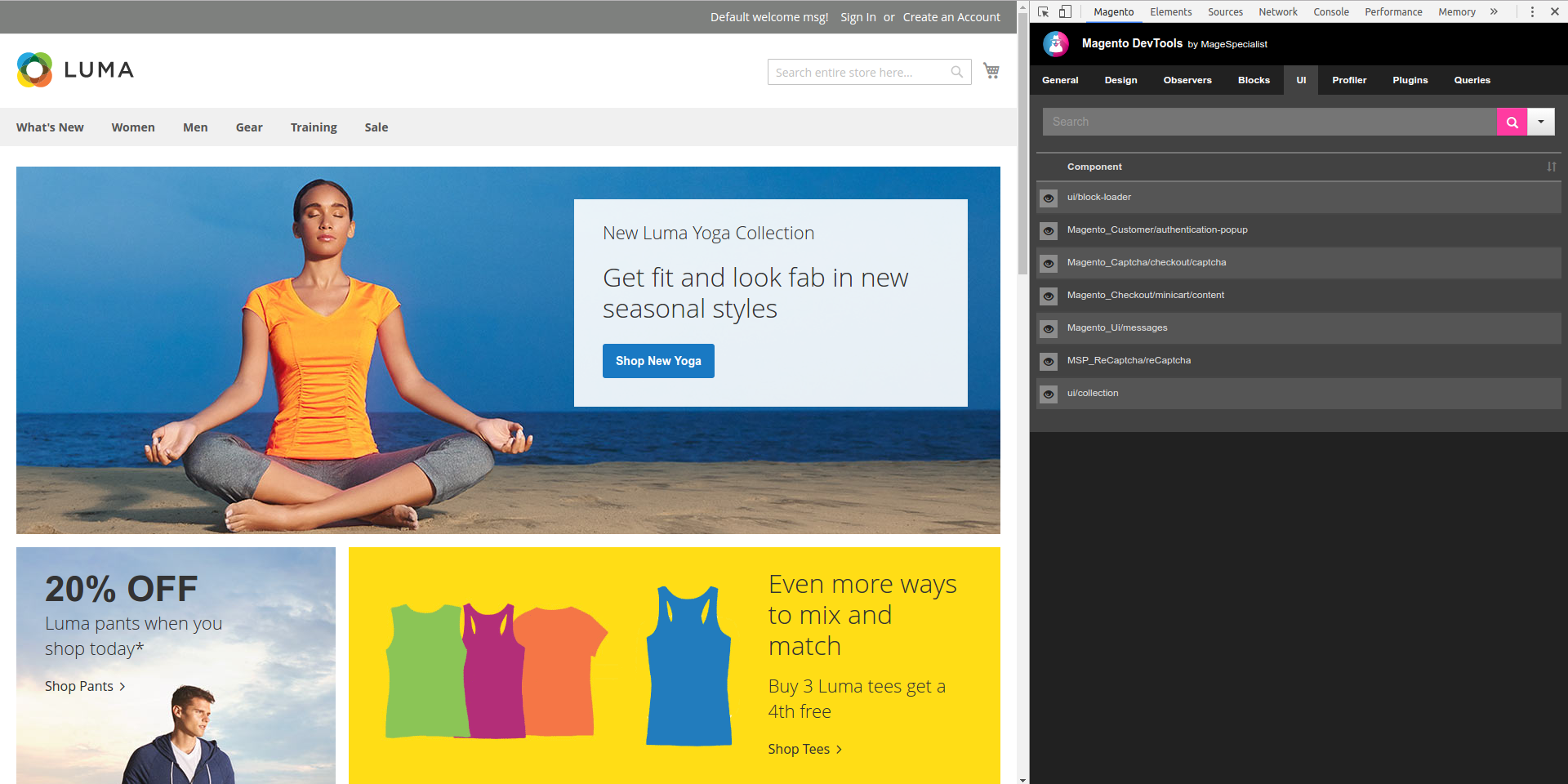
##### uiComponents information:
<img src="https://raw.githubusercontent.com/magespecialist/mage-chrome-toolbar/master/screenshots/3.png" width="480" />

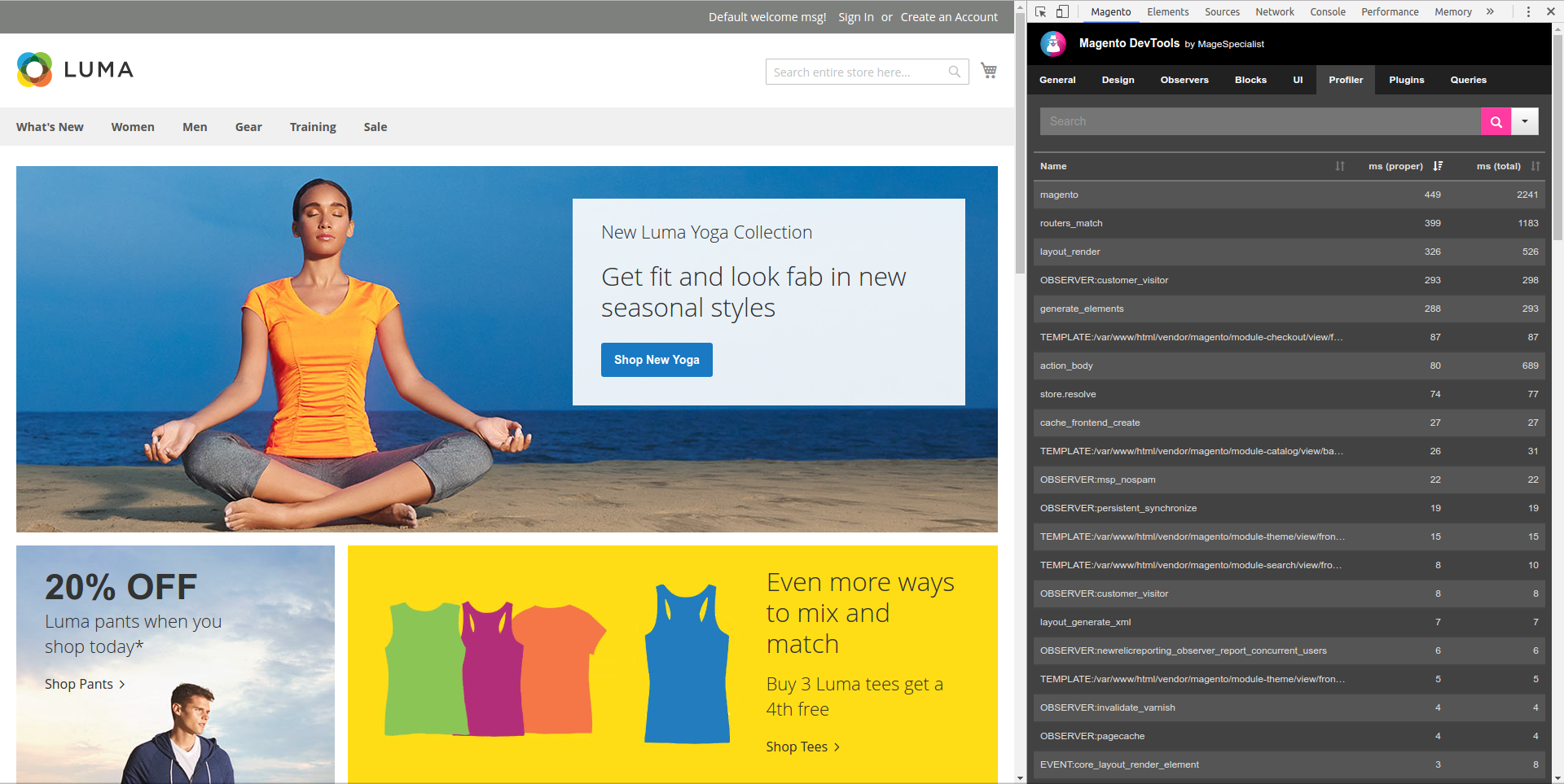
##### Profiler information:
<img src="https://raw.githubusercontent.com/magespecialist/mage-chrome-toolbar/master/screenshots/5.png" width="480" />

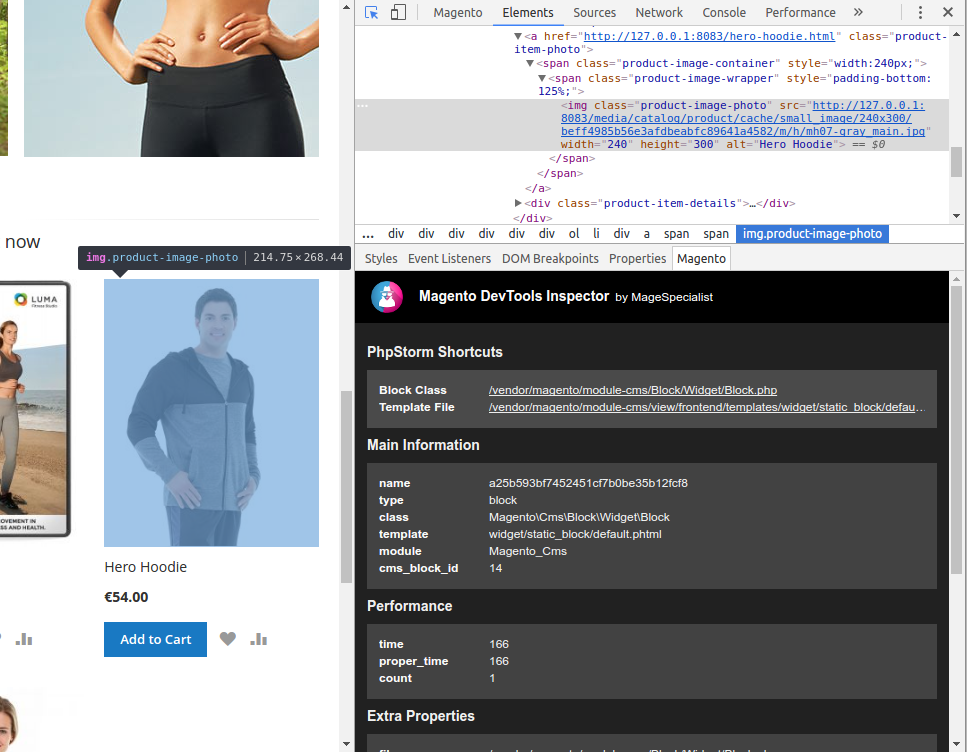
##### Inspector integration
<img src="https://raw.githubusercontent.com/magespecialist/mage-chrome-toolbar/master/screenshots/main2.png" width="480" />

## Known Issue

When using [axios](https://github.com/axios/axios]) always set 

`headers: {'X-Requested-With': 'XMLHttpRequest'}` 

in your request config to avoid to avoid to obtain json with appended `<script>` tag as described in [Issue #33](https://github.com/magespecialist/m2-MSP_DevTools/issues/33)

## Recent Versions

| Version | Released |
|---|---|
| 1.2.18 | 2024-04-22 |
| 1.2.17 | 2023-03-15 |
| 1.2.16 | 2022-08-09 |
| 1.2.15 | 2021-09-01 |
| 1.2.14 | 2018-05-18 |
| 1.2.13 | 2018-05-18 |
| 1.2.12 | 2018-01-25 |
| 1.2.11 | 2018-01-25 |
| 1.2.10 | 2018-01-23 |
| 1.2.9 | 2017-11-20 |

Showing 10 of 34 versions. Full release history on https://packagento.com/msp/devtools.

## Dependencies

### Require

| Package | Constraint |
|---|---|
| magento/magento-composer-installer | * |
| msp/common | * |
| php | ^7.4\|^8.1 |

## Quality

Latest release (1.2.18) fails the Packagento QA pipeline. Verdicts below are per-cell (Magento line × PHP version) for the matrixed tools, and run-once for the static / security tiers.


### Compatibility

Each Magento line is installed on its supported PHP versions, then the module is built (DI compile + static-content deploy). Cells show passed / failed / untested; staircase gaps render as `–`.

| Magento | PHP 8.2 | PHP 8.3 | PHP 8.4 | PHP 8.5 |
|---|---|---|---|---|
| 2.4.7 | Pass | Pass | – | – |
| 2.4.8 | – | Pass | Pass | – |
| 2.4.9 | – | – | Pass | Pass |


### Code Quality

Advisory checks against the module's source. Never affect the Compatibility verdict — a phpcs finding can't make a module incompatible.

#### Static Analysis

Coding standards (phpcs), mess detection (phpmd), copy-pasted code (cpd), PHP cross-version compatibility, composer.json validity. Each runs once for the whole module.

| Tool | Status | Findings | Summary |
|---|---|---|---|
| PHPCS | Warning | 30 | 30 warnings (ruleset: Magento2) — 6 auto-fixable with phpcbf |
| PHPMD | Warning | 4 | 4 rule violations (MissingImport:2, EmptyCatchBlock:2) |
| Cpd | Pass | 0 |  |
| Composer validate | Info | 2 | valid; 2 advisory notes (composer validate --strict) |

#### PHPStan

Type-checks the module against a real Magento install. Re-runs per Magento + PHP version because resolvable symbols differ between releases.

| Magento | PHP 8.2 | PHP 8.3 | PHP 8.4 | PHP 8.5 |
|---|---|---|---|---|
| 2.4.7 | 11 | 11 | – | – |
| 2.4.8 | – | 11 | 11 | – |
| 2.4.9 | – | – | 11 | 11 |


### Tests

Unit and integration suites run per Magento + PHP cell. Test failures speak to the module's behaviour, not its compatibility with a line, so they're reported here separately.

#### Unit Tests

| Magento | PHP 8.2 | PHP 8.3 | PHP 8.4 | PHP 8.5 |
|---|---|---|---|---|
| 2.4.7 | N/A | N/A | – | – |
| 2.4.8 | – | N/A | N/A | – |
| 2.4.9 | – | – | N/A | N/A |

#### Integration Tests

| Magento | PHP 8.2 | PHP 8.3 | PHP 8.4 | PHP 8.5 |
|---|---|---|---|---|
| 2.4.7 | N/A | N/A | – | – |
| 2.4.8 | – | N/A | N/A | – |
| 2.4.9 | – | – | N/A | N/A |


### Security

Dependency-advisory audit (composer audit) plus a source malware scan. A malware detection fails the version outright.

| Tool | Status | Findings | Summary |
|---|---|---|---|
| Composer audit | Pass | 0 |  |
| Malware scan | Pass | 0 |  |

## Licence and pricing

Free. A licence is still minted on checkout and bound to your project for Composer access — no payment step.

Refundable within 14 days of first purchase via https://packagento.com/account/refunds/.

## Install via Claude Code or any MCP client

The Packagento MCP server can run the licence + project + Composer steps above in one tool call:

```
purchase_and_install_packages(
  composer_names=["msp/devtools"],
  project_id="proj_xxx"
)
```

This handles cart, checkout, licence minting, project activation, and writes auth.json credentials. Connect a client with `claude mcp add packagento https://mcp.packagento.com`. Full setup at https://packagento.com/docs/mcp-setup.

## Vendor

msp is a Magento 2 vendor on Packagento. See https://packagento.com/msp.md for their full catalogue.