# magepsycho/magento2-gotocatalog
> Magento 2 Preview / Go To Catalog Extensions
`composer require magepsycho/magento2-gotocatalog`
Canonical URL: https://packagento.com/magepsycho/magento2-gotocatalog
## At a glance
- **Vendor**: magepsycho (https://packagento.com/magepsycho.md)
- **Latest version**: 1.0.0 — released 2022-02-23
- **Pricing**: Free
- **Package type**: Magento 2 module
- **Status**: active, accepting new buyers
## Installation
Packagento is licence-gated, so even free packages need a licence on a project before Composer can resolve them.
1. **Sign in or create an account** at https://packagento.com/customer/account/.
2. **Add the package to your account.** Open https://packagento.com/magepsycho/magento2-gotocatalog and complete the free checkout. A licence is minted automatically.
3. **Create or pick a project, then activate the licence on it.**
- Projects represent the Magento installs you deploy to. Manage them at https://packagento.com/projects/.
- Activate the new licence on the project you'll deploy this package to. Activation is what generates the Composer credentials scoped to that project.
4. **Add the project credentials to your Magento codebase.**
Grab the project's public + private key from https://packagento.com/projects/ (open the project, then its Credentials tab), and add them to `auth.json`:
```json
{
"http-basic": {
"packagento.com": {
"username": "ppk_live_...",
"password": "psk_live_..."
}
}
}
```
Add the Packagento Composer repository to `composer.json`:
```json
{
"repositories": [
{ "type": "composer", "url": "https://packagento.com" }
]
}
```
5. **Install and apply.**
```bash
composer require magepsycho/magento2-gotocatalog:*
bin/magento setup:upgrade
bin/magento setup:di:compile
bin/magento cache:flush
```
## What it does
Magento 2 Preview / Go To Catalog Extensions
## README

## Magento 2 Preview/Visit Catalog
[](https://packagist.org/packages/magepsycho/magento2-gotocatalog)
[](https://packagist.org/packages/magepsycho/magento2-gotocatalog/stats)


### Overview
[Magento 2 Preview/Visit Catalog](https://www.magepsycho.com/magento2-preview-catalog-visit-sku.html) allows the store owner to quickly preview the catalog (product & category) pages from the admin panel.
Also, it gives flexibility to the customers and the support & marketing team to visit the product page directly via SKU.
### Key Features
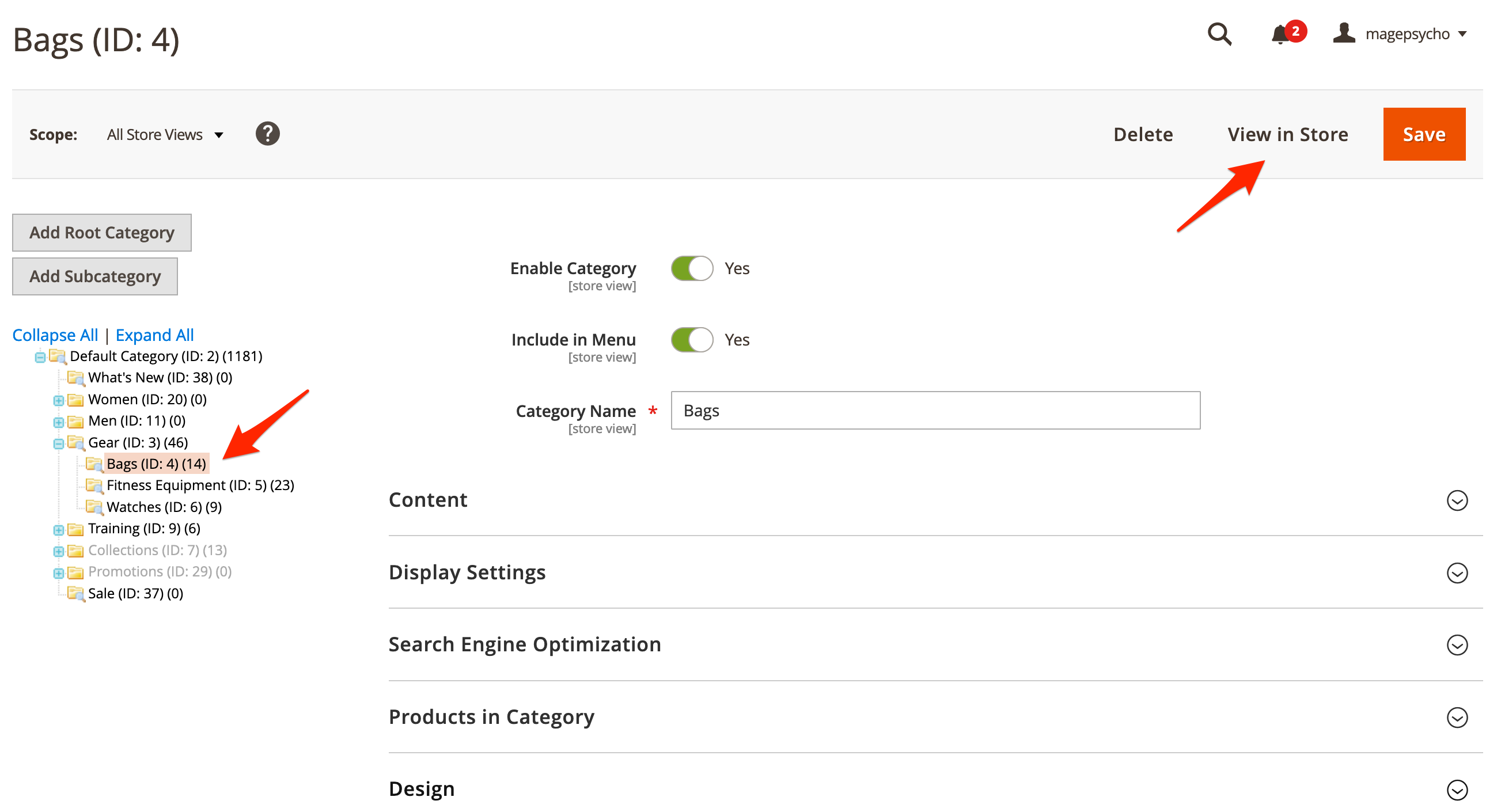
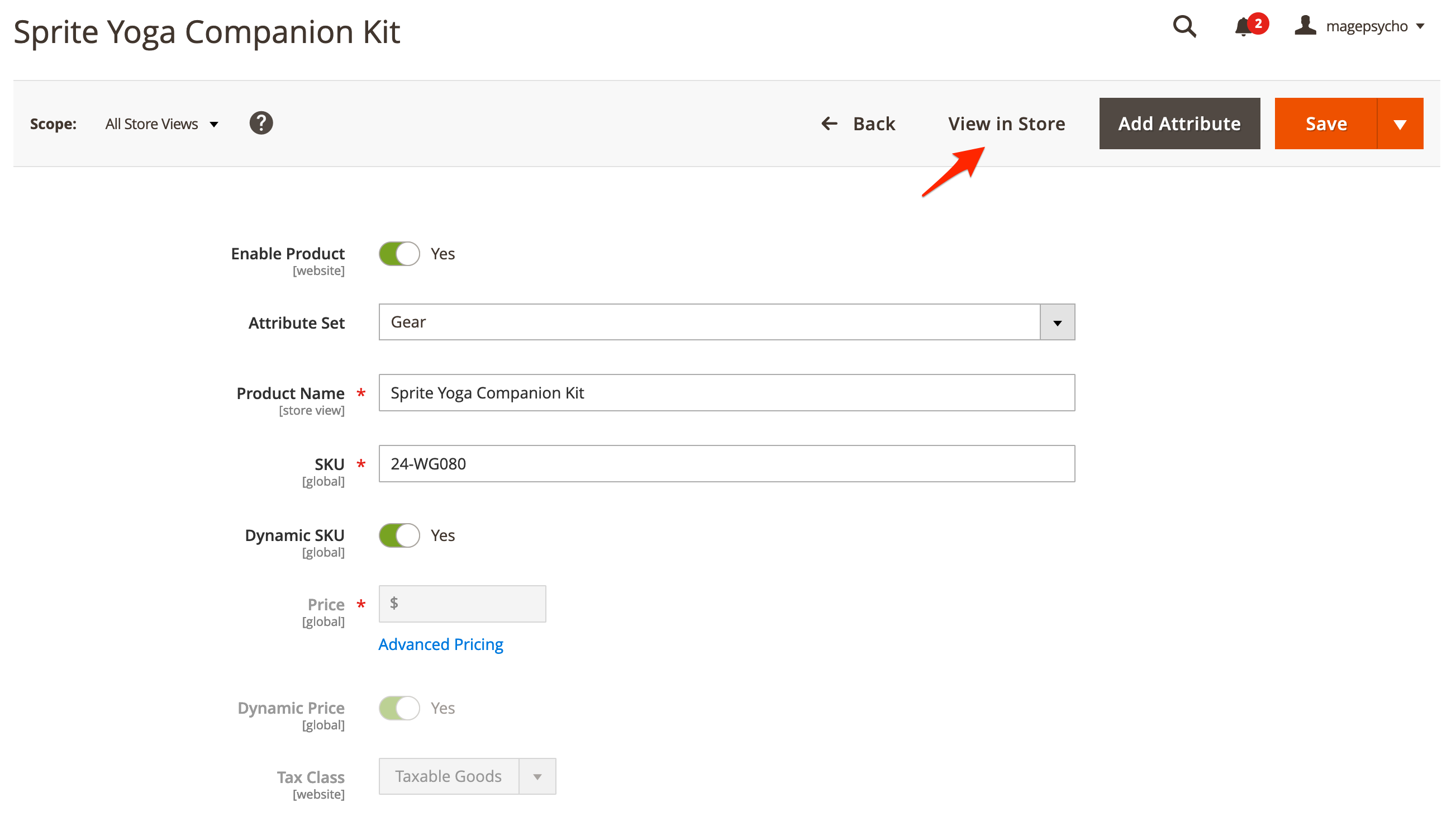
* Preview product page in the storefront (as per store) from Admin's product edit page
* Preview category page in the storefront (as per store) from Admin's category edit page
* Visit the product page directly via SKU in the URL (with the configurable prefix)
### Feature Highlights
#### Quick Preview for Catalogs
With this extension, store admin can quickly explore the product & category pages via related edit pages, as per store.
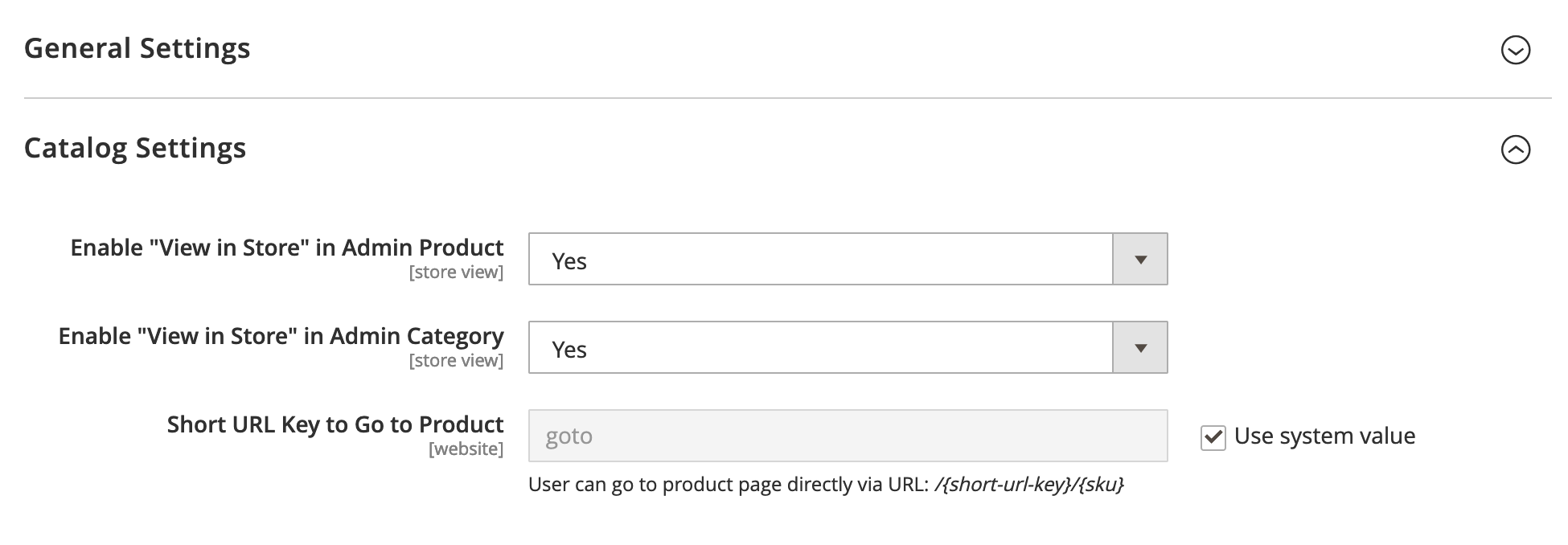
* Preview option can be turned off from settings
* Preview option is disabled if the product or category is not visible (disable or not visible individually)
#### Visit Product Page via SKU
Users can reach the product page directly via SKU in the URL.
* The prefix used in the URL can be configured from the extension settings.
* If SKU is not found or not visible, it will redirect to the search result page with SKU as the search-keyword.

### 🛠️ Installation
**Using Composer**
```
composer require magepsycho/magento2-gotocatalog
```
**Using modman**
```
modman init
modman clone git@github.com:MagePsycho/magento2-preview-visit-catalog.git
```
**Using Zip**
* Download the [Zip File](https://github.com/MagePsycho/magento2-preview-visit-catalog/archive/master.zip)
* Extract & upload the files to `/path/to/magento2/app/code/MagePsycho/GoToCatalog/`
After installation by either means, activate the extension by running following series of commands
```
php bin/magento module:enable MagePsycho_GoToCatalog --clear-static-content
php bin/magento setup:upgrade
```
1. Flush the store cache
```
php bin/magento cache:flush
```
1. Deploy static content - *in Production mode only*
```
rm -rf pub/static/* var/view_preprocessed/*
php bin/magento setup:static-content:deploy
```
1. Go to Admin > STORES > Configuration > MAGEPSYCHO > Go To Catalog > Here you can configure settings
### Live Demo:
* [Frontend Demo](http://m2default.mage-expo.com)
* [Backend Demo](http://m2default.mage-expo.com/admin_m2demo/?module=gotocatalog)
### Changelog
**Version 1.0.0 (2021-03-15)**
* Initial Release.
### Authors
- Raj KB [](https://twitter.com/rajkbnp)
### Contributors

### To Contribute
Any contribution to the development of `Magento 2 Preview/Visit Catalog` is highly welcome.
The best possibility to provide any code is to open a [pull request on GitHub](https://github.com/MagePsycho/magento2-preview-visit-catalog/pulls).
### Need Support?
If you encounter any problems or bugs, please create an issue on [GitHub](https://github.com/MagePsycho/magento2-preview-visit-catalog/issues).
Please [visit our store](https://www.magepsycho.com/extensions/magento-2.html) for more FREE / paid extensions OR [contact us](https://magepsycho.com/contact) for customization / development services.
## Recent Versions
| Version | Released |
|---|---|
| 1.0.0 | 2022-02-23 |
## Quality
Latest release (1.0.0) fails the Packagento QA pipeline. Verdicts below are per-cell (Magento line × PHP version) for the matrixed tools, and run-once for the static / security tiers.
### Compatibility
Each Magento line is installed on its supported PHP versions, then the module is built (DI compile + static-content deploy). Cells show passed / failed / untested; staircase gaps render as `–`.
| Magento | PHP 8.2 | PHP 8.3 | PHP 8.4 | PHP 8.5 |
|---|---|---|---|---|
| 2.4.7 | Pass | Pass | – | – |
| 2.4.8 | – | Pass | 1 | – |
| 2.4.9 | – | – | 1 | 1 |
### Code Quality
Advisory checks against the module's source. Never affect the Compatibility verdict — a phpcs finding can't make a module incompatible.
#### Static Analysis
Coding standards (phpcs), mess detection (phpmd), copy-pasted code (cpd), PHP cross-version compatibility, composer.json validity. Each runs once for the whole module.
| Tool | Status | Findings | Summary |
|---|---|---|---|
| PHPCS | Warning | 82 | 82 warnings (ruleset: Magento2) — 61 auto-fixable with phpcbf |
| PHPMD | Warning | 7 | 7 rule violations (IfStatementAssignment:6, UnusedFormalParameter:1) |
| Cpd | Pass | 0 | |
| Composer validate | Info | 1 | valid; 1 advisory note (composer validate --strict) |
#### PHPStan
Type-checks the module against a real Magento install. Re-runs per Magento + PHP version because resolvable symbols differ between releases.
| Magento | PHP 8.2 | PHP 8.3 | PHP 8.4 | PHP 8.5 |
|---|---|---|---|---|
| 2.4.7 | 22 | 22 | – | – |
| 2.4.8 | – | 23 | 26 | – |
| 2.4.9 | – | – | 26 | 26 |
### Tests
Unit and integration suites run per Magento + PHP cell. Test failures speak to the module's behaviour, not its compatibility with a line, so they're reported here separately.
#### Unit Tests
| Magento | PHP 8.2 | PHP 8.3 | PHP 8.4 | PHP 8.5 |
|---|---|---|---|---|
| 2.4.7 | N/A | N/A | – | – |
| 2.4.8 | – | N/A | N/A | – |
| 2.4.9 | – | – | N/A | N/A |
#### Integration Tests
| Magento | PHP 8.2 | PHP 8.3 | PHP 8.4 | PHP 8.5 |
|---|---|---|---|---|
| 2.4.7 | N/A | N/A | – | – |
| 2.4.8 | – | N/A | N/A | – |
| 2.4.9 | – | – | N/A | N/A |
### Security
Dependency-advisory audit (composer audit) plus a source malware scan. A malware detection fails the version outright.
| Tool | Status | Findings | Summary |
|---|---|---|---|
| Composer audit | Pass | 0 | |
| Malware scan | Pass | 0 | |
## Licence and pricing
Free. A licence is still minted on checkout and bound to your project for Composer access — no payment step.
Refundable within 14 days of first purchase via https://packagento.com/account/refunds/.
## Install via Claude Code or any MCP client
The Packagento MCP server can run the licence + project + Composer steps above in one tool call:
```
purchase_and_install_packages(
composer_names=["magepsycho/magento2-gotocatalog"],
project_id="proj_xxx"
)
```
This handles cart, checkout, licence minting, project activation, and writes auth.json credentials. Connect a client with `claude mcp add packagento https://mcp.packagento.com`. Full setup at https://packagento.com/docs/mcp-setup.
## Vendor
magepsycho is a Magento 2 vendor on Packagento. See https://packagento.com/magepsycho.md for their full catalogue.