# jajuma/awesomehyva
> This Magento 2 extension allows using Font Awesome 5 icons with Hyvä Themes
`composer require jajuma/awesomehyva`
Canonical URL: https://packagento.com/jajuma/awesomehyva
## At a glance
- **Vendor**: jajuma (https://packagento.com/jajuma.md)
- **Latest version**: 2.1.8 — released 2026-06-02
- **Pricing**: Free
- **Package type**: Magento 2 module
- **Status**: active, accepting new buyers
## Installation
Packagento is licence-gated, so even free packages need a licence on a project before Composer can resolve them.
1. **Sign in or create an account** at https://packagento.com/customer/account/.
2. **Add the package to your account.** Open https://packagento.com/jajuma/awesomehyva and complete the free checkout. A licence is minted automatically.
3. **Create or pick a project, then activate the licence on it.**
- Projects represent the Magento installs you deploy to. Manage them at https://packagento.com/projects/.
- Activate the new licence on the project you'll deploy this package to. Activation is what generates the Composer credentials scoped to that project.
4. **Add the project credentials to your Magento codebase.**
Grab the project's public + private key from https://packagento.com/projects/ (open the project, then its Credentials tab), and add them to `auth.json`:
```json
{
"http-basic": {
"packagento.com": {
"username": "ppk_live_...",
"password": "psk_live_..."
}
}
}
```
Add the Packagento Composer repository to `composer.json`:
```json
{
"repositories": [
{ "type": "composer", "url": "https://packagento.com" }
]
}
```
5. **Install and apply.**
```bash
composer require jajuma/awesomehyva:*
bin/magento setup:upgrade
bin/magento setup:di:compile
bin/magento cache:flush
```
## What it does
This Magento 2 extension allows using Font Awesome 5 icons with Hyvä Themes
## README
 Awesome Hyvä extension by [JaJuMa](https://www.jajuma.de/de/jajuma-shop/online-shop-mit-magento-2-und-hyva-themes) allows using [Font Awesome 5](https://fontawesome.com/v5/search?m=free) & [Font Awesome 6](https://fontawesome.com/search?m=free) icons as SVGs on Magento 2 & Mage-OS sites using [Hyvä Themes](https://www.jajuma.de/en/jajuma-shop/online-shop-with-magento-2-and-hyva-themes).
#### Compatible with
| Hyvä Themes |
Mage-OS |
Magento |
 |
 |
 |
|
### Features
Awesome Hyvä for Magento & Mage-OS with Hyvä Themes
* includes 3500+ icons:
* Font Awesome 5
* Solid Style Icons
* Regular Style Icons &
* Brands Icons
* Font Awesome 6
* Solid Style Icons
* Regular Style Icons &
* Brands Icons
* provides 6 ViewModels for adding icons in code
* allows adding Font Awesome Icons in CMS content from Backend.
### Further Info, Extension Description & Manual
* [Extension Website EN](https://www.jajuma.de/en/jajuma-develop/hyva-extensions/font-awesome-icons-for-hyva-themes-extension)
* [Extension Website DE](https://www.jajuma.de/de/jajuma-develop/hyva-extensions/font-awesome-icons-fuer-hyva-themes-extension)
### Demo
Font Awesome 5 & 6 SVG icons for Hyvä Themes Demo:
* [On Hyvä Theme with Magento](https://www.jajuma.de/en/jajuma-shop/demo-shop-with-magento-2-and-hyva-themes)
* [On Hyvä Theme with Mage-OS](https://www.jajuma.de/en/jajuma-shop/demo-shop-with-mage-os-and-hyva-themes)
### Icon List
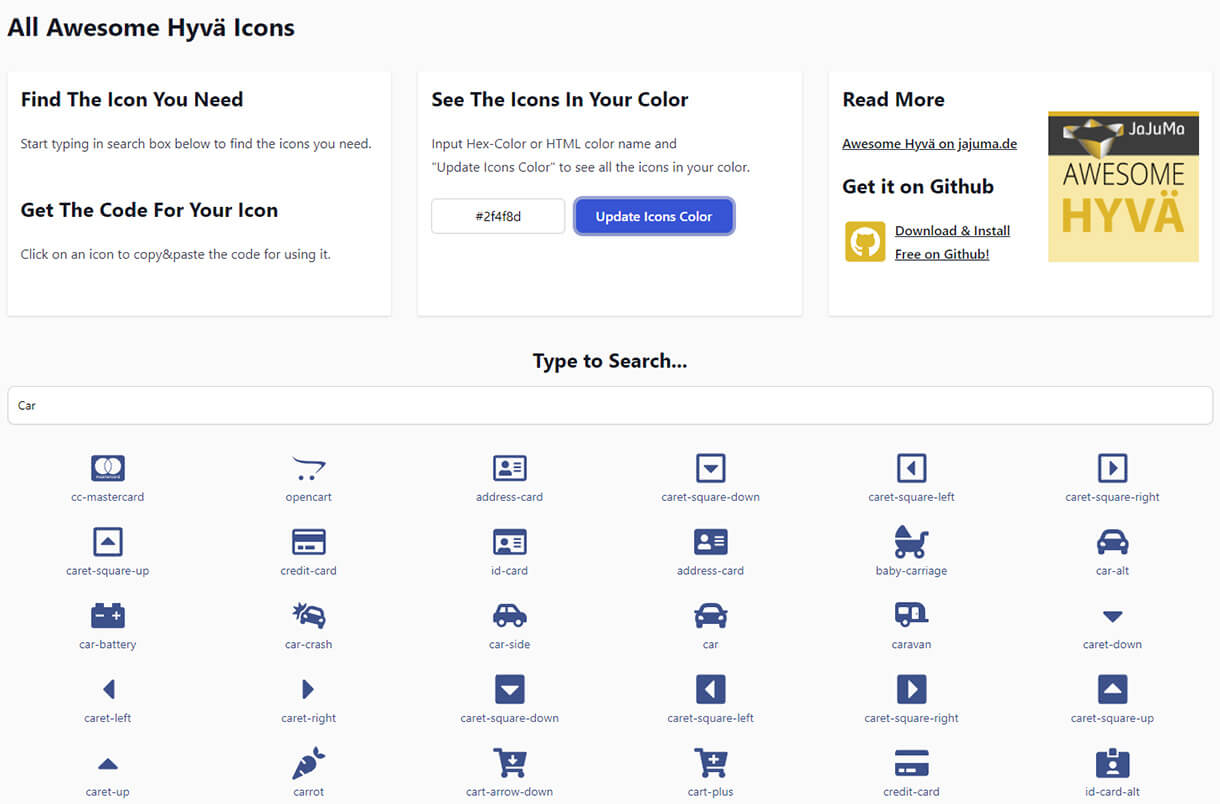
List view and detail view with all included icons for copy & paste the code to use the icons in your project:
* [Demo & List of all included icons Font Awesome v5](https://www.jajuma.de/en/font-awesome-icons-for-hyva-themes-extension/demo-icon-list-font-awesome-5)
* [Demo & List of all included icons Font Awesome v6](https://www.jajuma.de/en/font-awesome-icons-for-hyva-themes-extension/demo-icon-list-font-awesome-6)
 ### Installation
Install via composer as any other Magento extension from github:
```
composer require jajuma/awesomehyva
```
or get it from [Extension Website](https://www.jajuma.de/en/jajuma-develop/hyva-extensions/font-awesome-icons-for-hyva-themes-extension)
for manual installation in `app/code/` as any other Magento extension.
:warning: Version 2.0.0+ requires Hyvä Theme Version >=1.1.12
### Using Font Awesome icons in Hyvä Themes with JaJuMa "Awesome Hyvä" module
#### How to use Font Awesome icons in Hyvä Themes in view models
JaJuMa "Awesome Hyvä" module provides 6 view models:
* For Font Awesome v5:
* `AwesomeiconsSolid`
* `AwesomeiconsRegular`
* `AwesomeiconsBrands`
* For Font Awesome v6:
* `Awesomeicons6Solid`
* `Awesomeicons6Regular`
* `Awesomeicons6Brands`
Require one of the view models in your template:
* For Font Awesome v5:
```
/** @var \Jajuma\AwesomeHyva\ViewModel\AwesomeiconsSolid $awesomeiconsSolid */
$awesomeiconsSolid = $viewModels->require(\Jajuma\AwesomeHyva\ViewModel\AwesomeiconsSolid::class);
```
```
/** @var \Jajuma\AwesomeHyva\ViewModel\AwesomeiconsRegular $awesomeiconsRegular */
$awesomeiconsRegular = $viewModels->require(\Jajuma\AwesomeHyva\ViewModel\AwesomeiconsRegular::class);
```
```
/** @var \Jajuma\AwesomeHyva\ViewModel\AwesomeiconsBrands $awesomeiconsBrands */
$awesomeiconsBrands = $viewModels->require(\Jajuma\AwesomeHyva\ViewModel\AwesomeiconsBrands::class);
```
* For Font Awesome v6:
```
/** @var \Jajuma\AwesomeHyva\ViewModel\Awesomeicons6Solid $awesomeicons6Solid */
$awesomeicons6Solid = $viewModels->require(\Jajuma\AwesomeHyva\ViewModel\Awesomeicons6Solid::class);
```
```
/** @var \Jajuma\AwesomeHyva\ViewModel\Awesomeicons6Regular $awesomeicons6Regular */
$awesomeicons6Regular = $viewModels->require(\Jajuma\AwesomeHyva\ViewModel\Awesomeicons6Regular::class);
```
```
/** @var \Jajuma\AwesomeHyva\ViewModel\Awesomeicons6Brands $awesomeicons6Brands */
$awesomeicons6Brands = $viewModels->require(\Jajuma\AwesomeHyva\ViewModel\Awesomeicons6Brands::class);
```
Then render the icons like this:
```
addressBookHtml('text-red-100', 24, 24) ?>
```
```
addressBookHtml('text-red-100', 24, 24) ?>
```
* The method name is the camel cased icon name, followed by Html.
* In an IDE you should have autocompletion for all available methods.
* The parameters are optional, and change the class (in single quotes) followed by 2 values for width and height attributes of the SVG element.
* It is recommended to set all of them, so that the images are not rendered in huge sizes if CSS fails to load.
or you may also pass additional attributes like this as an array:
```
addressBookHtml('text-red-100', 24, 24, ['style'=>'position:relative']) ?>
```
```
addressBookHtml('text-red-100', 24, 24, ['style'=>'position:relative']) ?>
```
_(README truncated for .md surface. Full README on https://packagento.com/jajuma/awesomehyva.)_
## Recent Versions
| Version | Released |
|---|---|
| 2.1.8 | 2026-06-02 |
| 2.1.7 | 2026-04-20 |
| 2.1.6 | 2024-07-12 |
| 2.1.5 | 2023-11-08 |
| 2.1.4 | 2023-06-02 |
| 2.1.3 | 2023-01-23 |
| 2.1.2 | 2022-07-12 |
| 2.1.1 | 2022-05-17 |
| 2.1.0 | 2022-02-25 |
| 2.0.1 | 2022-02-10 |
Showing 10 of 13 versions. Full release history on https://packagento.com/jajuma/awesomehyva.
## Dependencies
### Require
| Package | Constraint |
|---|---|
| hyva-themes/magento2-theme-module | >=1.1.12 |
## Quality
Latest release (2.1.8) fails the Packagento QA pipeline. Verdicts below are per-cell (Magento line × PHP version) for the matrixed tools, and run-once for the static / security tiers.
### Compatibility
Each Magento line is installed on its supported PHP versions, then the module is built (DI compile + static-content deploy). Cells show passed / failed / untested; staircase gaps render as `–`.
| Magento | PHP 8.2 | PHP 8.3 | PHP 8.4 | PHP 8.5 |
|---|---|---|---|---|
| 2.4.7 | not tested | not tested | – | – |
| 2.4.8 | – | not tested | not tested | – |
| 2.4.9 | – | – | not tested | not tested |
### Code Quality
Advisory checks against the module's source. Never affect the Compatibility verdict — a phpcs finding can't make a module incompatible.
#### Static Analysis
Coding standards (phpcs), mess detection (phpmd), copy-pasted code (cpd), PHP cross-version compatibility, composer.json validity. Each runs once for the whole module.
| Tool | Status | Findings | Summary |
|---|---|---|---|
| PHPCS | Fail | 746 | 1 error, 745 warnings (ruleset: Magento2) — 3 auto-fixable with phpcbf |
| PHPMD | Pass | 0 | |
| Cpd | Pass | 0 | |
| Composer validate | Info | 2 | valid; 2 advisory notes (composer validate --strict) |
#### PHPStan
Type-checks the module against a real Magento install. Re-runs per Magento + PHP version because resolvable symbols differ between releases.
| Magento | PHP 8.2 | PHP 8.3 | PHP 8.4 | PHP 8.5 |
|---|---|---|---|---|
| 2.4.7 | Error | Error | – | – |
| 2.4.8 | – | Error | Error | – |
| 2.4.9 | – | – | Error | Error |
### Tests
Unit and integration suites run per Magento + PHP cell. Test failures speak to the module's behaviour, not its compatibility with a line, so they're reported here separately.
#### Unit Tests
| Magento | PHP 8.2 | PHP 8.3 | PHP 8.4 | PHP 8.5 |
|---|---|---|---|---|
| 2.4.7 | N/A | N/A | – | – |
| 2.4.8 | – | N/A | N/A | – |
| 2.4.9 | – | – | N/A | N/A |
#### Integration Tests
| Magento | PHP 8.2 | PHP 8.3 | PHP 8.4 | PHP 8.5 |
|---|---|---|---|---|
| 2.4.7 | N/A | N/A | – | – |
| 2.4.8 | – | N/A | N/A | – |
| 2.4.9 | – | – | N/A | N/A |
### Security
Dependency-advisory audit (composer audit) plus a source malware scan. A malware detection fails the version outright.
| Tool | Status | Findings | Summary |
|---|---|---|---|
| Composer audit | N/A | 0 | no resolvable dependency tree to audit — Your requirements could not be resolved to an installable set of packages. Problem 1 |
| Malware scan | Pass | 0 | |
## Licence and pricing
Free. A licence is still minted on checkout and bound to your project for Composer access — no payment step.
Refundable within 14 days of first purchase via https://packagento.com/account/refunds/.
## Install via Claude Code or any MCP client
The Packagento MCP server can run the licence + project + Composer steps above in one tool call:
```
purchase_and_install_packages(
composer_names=["jajuma/awesomehyva"],
project_id="proj_xxx"
)
```
This handles cart, checkout, licence minting, project activation, and writes auth.json credentials. Connect a client with `claude mcp add packagento https://mcp.packagento.com`. Full setup at https://packagento.com/docs/mcp-setup.
## Vendor
jajuma is a Magento 2 vendor on Packagento. See https://packagento.com/jajuma.md for their full catalogue.
### Installation
Install via composer as any other Magento extension from github:
```
composer require jajuma/awesomehyva
```
or get it from [Extension Website](https://www.jajuma.de/en/jajuma-develop/hyva-extensions/font-awesome-icons-for-hyva-themes-extension)
for manual installation in `app/code/` as any other Magento extension.
:warning: Version 2.0.0+ requires Hyvä Theme Version >=1.1.12
### Using Font Awesome icons in Hyvä Themes with JaJuMa "Awesome Hyvä" module
#### How to use Font Awesome icons in Hyvä Themes in view models
JaJuMa "Awesome Hyvä" module provides 6 view models:
* For Font Awesome v5:
* `AwesomeiconsSolid`
* `AwesomeiconsRegular`
* `AwesomeiconsBrands`
* For Font Awesome v6:
* `Awesomeicons6Solid`
* `Awesomeicons6Regular`
* `Awesomeicons6Brands`
Require one of the view models in your template:
* For Font Awesome v5:
```
/** @var \Jajuma\AwesomeHyva\ViewModel\AwesomeiconsSolid $awesomeiconsSolid */
$awesomeiconsSolid = $viewModels->require(\Jajuma\AwesomeHyva\ViewModel\AwesomeiconsSolid::class);
```
```
/** @var \Jajuma\AwesomeHyva\ViewModel\AwesomeiconsRegular $awesomeiconsRegular */
$awesomeiconsRegular = $viewModels->require(\Jajuma\AwesomeHyva\ViewModel\AwesomeiconsRegular::class);
```
```
/** @var \Jajuma\AwesomeHyva\ViewModel\AwesomeiconsBrands $awesomeiconsBrands */
$awesomeiconsBrands = $viewModels->require(\Jajuma\AwesomeHyva\ViewModel\AwesomeiconsBrands::class);
```
* For Font Awesome v6:
```
/** @var \Jajuma\AwesomeHyva\ViewModel\Awesomeicons6Solid $awesomeicons6Solid */
$awesomeicons6Solid = $viewModels->require(\Jajuma\AwesomeHyva\ViewModel\Awesomeicons6Solid::class);
```
```
/** @var \Jajuma\AwesomeHyva\ViewModel\Awesomeicons6Regular $awesomeicons6Regular */
$awesomeicons6Regular = $viewModels->require(\Jajuma\AwesomeHyva\ViewModel\Awesomeicons6Regular::class);
```
```
/** @var \Jajuma\AwesomeHyva\ViewModel\Awesomeicons6Brands $awesomeicons6Brands */
$awesomeicons6Brands = $viewModels->require(\Jajuma\AwesomeHyva\ViewModel\Awesomeicons6Brands::class);
```
Then render the icons like this:
```
addressBookHtml('text-red-100', 24, 24) ?>
```
```
addressBookHtml('text-red-100', 24, 24) ?>
```
* The method name is the camel cased icon name, followed by Html.
* In an IDE you should have autocompletion for all available methods.
* The parameters are optional, and change the class (in single quotes) followed by 2 values for width and height attributes of the SVG element.
* It is recommended to set all of them, so that the images are not rendered in huge sizes if CSS fails to load.
or you may also pass additional attributes like this as an array:
```
addressBookHtml('text-red-100', 24, 24, ['style'=>'position:relative']) ?>
```
```
addressBookHtml('text-red-100', 24, 24, ['style'=>'position:relative']) ?>
```
_(README truncated for .md surface. Full README on https://packagento.com/jajuma/awesomehyva.)_
## Recent Versions
| Version | Released |
|---|---|
| 2.1.8 | 2026-06-02 |
| 2.1.7 | 2026-04-20 |
| 2.1.6 | 2024-07-12 |
| 2.1.5 | 2023-11-08 |
| 2.1.4 | 2023-06-02 |
| 2.1.3 | 2023-01-23 |
| 2.1.2 | 2022-07-12 |
| 2.1.1 | 2022-05-17 |
| 2.1.0 | 2022-02-25 |
| 2.0.1 | 2022-02-10 |
Showing 10 of 13 versions. Full release history on https://packagento.com/jajuma/awesomehyva.
## Dependencies
### Require
| Package | Constraint |
|---|---|
| hyva-themes/magento2-theme-module | >=1.1.12 |
## Quality
Latest release (2.1.8) fails the Packagento QA pipeline. Verdicts below are per-cell (Magento line × PHP version) for the matrixed tools, and run-once for the static / security tiers.
### Compatibility
Each Magento line is installed on its supported PHP versions, then the module is built (DI compile + static-content deploy). Cells show passed / failed / untested; staircase gaps render as `–`.
| Magento | PHP 8.2 | PHP 8.3 | PHP 8.4 | PHP 8.5 |
|---|---|---|---|---|
| 2.4.7 | not tested | not tested | – | – |
| 2.4.8 | – | not tested | not tested | – |
| 2.4.9 | – | – | not tested | not tested |
### Code Quality
Advisory checks against the module's source. Never affect the Compatibility verdict — a phpcs finding can't make a module incompatible.
#### Static Analysis
Coding standards (phpcs), mess detection (phpmd), copy-pasted code (cpd), PHP cross-version compatibility, composer.json validity. Each runs once for the whole module.
| Tool | Status | Findings | Summary |
|---|---|---|---|
| PHPCS | Fail | 746 | 1 error, 745 warnings (ruleset: Magento2) — 3 auto-fixable with phpcbf |
| PHPMD | Pass | 0 | |
| Cpd | Pass | 0 | |
| Composer validate | Info | 2 | valid; 2 advisory notes (composer validate --strict) |
#### PHPStan
Type-checks the module against a real Magento install. Re-runs per Magento + PHP version because resolvable symbols differ between releases.
| Magento | PHP 8.2 | PHP 8.3 | PHP 8.4 | PHP 8.5 |
|---|---|---|---|---|
| 2.4.7 | Error | Error | – | – |
| 2.4.8 | – | Error | Error | – |
| 2.4.9 | – | – | Error | Error |
### Tests
Unit and integration suites run per Magento + PHP cell. Test failures speak to the module's behaviour, not its compatibility with a line, so they're reported here separately.
#### Unit Tests
| Magento | PHP 8.2 | PHP 8.3 | PHP 8.4 | PHP 8.5 |
|---|---|---|---|---|
| 2.4.7 | N/A | N/A | – | – |
| 2.4.8 | – | N/A | N/A | – |
| 2.4.9 | – | – | N/A | N/A |
#### Integration Tests
| Magento | PHP 8.2 | PHP 8.3 | PHP 8.4 | PHP 8.5 |
|---|---|---|---|---|
| 2.4.7 | N/A | N/A | – | – |
| 2.4.8 | – | N/A | N/A | – |
| 2.4.9 | – | – | N/A | N/A |
### Security
Dependency-advisory audit (composer audit) plus a source malware scan. A malware detection fails the version outright.
| Tool | Status | Findings | Summary |
|---|---|---|---|
| Composer audit | N/A | 0 | no resolvable dependency tree to audit — Your requirements could not be resolved to an installable set of packages. Problem 1 |
| Malware scan | Pass | 0 | |
## Licence and pricing
Free. A licence is still minted on checkout and bound to your project for Composer access — no payment step.
Refundable within 14 days of first purchase via https://packagento.com/account/refunds/.
## Install via Claude Code or any MCP client
The Packagento MCP server can run the licence + project + Composer steps above in one tool call:
```
purchase_and_install_packages(
composer_names=["jajuma/awesomehyva"],
project_id="proj_xxx"
)
```
This handles cart, checkout, licence minting, project activation, and writes auth.json credentials. Connect a client with `claude mcp add packagento https://mcp.packagento.com`. Full setup at https://packagento.com/docs/mcp-setup.
## Vendor
jajuma is a Magento 2 vendor on Packagento. See https://packagento.com/jajuma.md for their full catalogue.