# faonni/module-tracking-link
> Extension add Tracking Url in Shipment Email.
`composer require faonni/module-tracking-link`
Canonical URL: https://packagento.com/faonni/module-tracking-link
## At a glance
- **Vendor**: faonni (https://packagento.com/faonni.md)
- **Latest version**: 2.0.10 — released 2021-09-09
- **Pricing**: Free
- **Package type**: Magento 2 module
- **Status**: active, accepting new buyers
## Installation
Packagento is licence-gated, so even free packages need a licence on a project before Composer can resolve them.
1. **Sign in or create an account** at https://packagento.com/customer/account/.
2. **Add the package to your account.** Open https://packagento.com/faonni/module-tracking-link and complete the free checkout. A licence is minted automatically.
3. **Create or pick a project, then activate the licence on it.**
- Projects represent the Magento installs you deploy to. Manage them at https://packagento.com/projects/.
- Activate the new licence on the project you'll deploy this package to. Activation is what generates the Composer credentials scoped to that project.
4. **Add the project credentials to your Magento codebase.**
Grab the project's public + private key from https://packagento.com/projects/ (open the project, then its Credentials tab), and add them to `auth.json`:
```json
{
"http-basic": {
"packagento.com": {
"username": "ppk_live_...",
"password": "psk_live_..."
}
}
}
```
Add the Packagento Composer repository to `composer.json`:
```json
{
"repositories": [
{ "type": "composer", "url": "https://packagento.com" }
]
}
```
5. **Install and apply.**
```bash
composer require faonni/module-tracking-link:*
bin/magento setup:upgrade
bin/magento setup:di:compile
bin/magento cache:flush
```
## What it does
Extension add Tracking Url in Shipment Email.
## README
[](https://packagist.org/packages/faonni/module-tracking-link)
[](https://packagist.org/packages/faonni/module-tracking-link)
Extension add Tracking Url in Shipment Email.
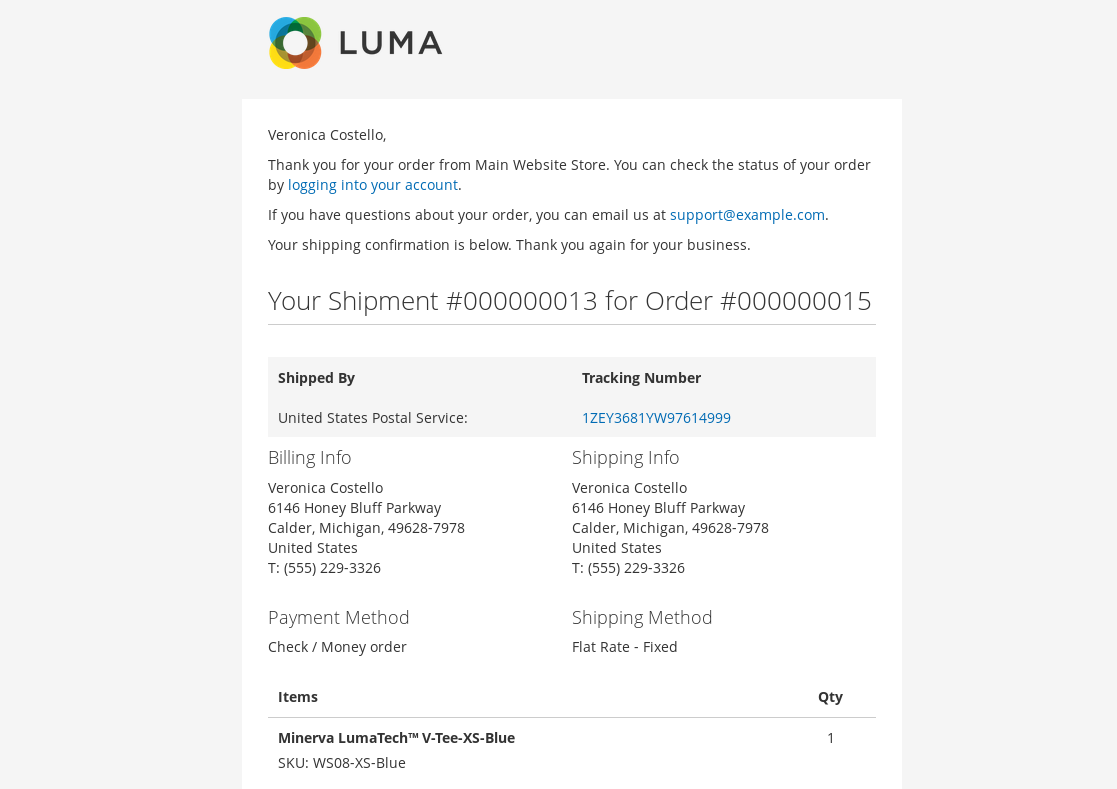
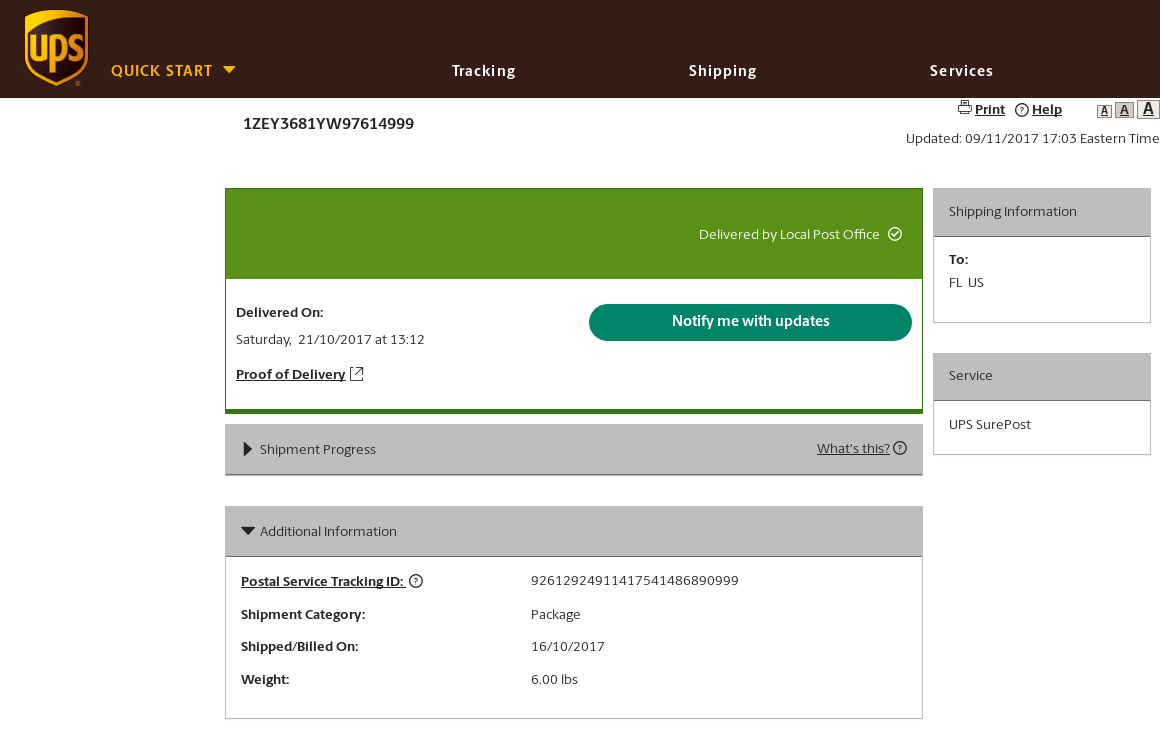
Native shipment email doesn’t include a clickable tracking number link, just plain text one. The customer has to copy and then go to the courier site to get the tracking information. The extension make the tracking number a clickable link that will bring them to the carriers site and display the tracking information.
The extension supports all couriers which support shipping tracking.
### Compatibility
Magento CE(EE) 2.0.x, 2.1.x, 2.2.x, 2.3.x, 2.4.x
### Install
##### Install via Composer (recommend)
1. Go to Magento2 root folder
2. Enter following commands to install module:
For Magento CE(EE) 2.0.x, 2.1.x, 2.2.x, 2.3.x
```bash
composer require faonni/module-tracking-link:2.0.*
```
For Magento CE(EE) 2.4.x
```bash
composer require faonni/module-tracking-link:2.4.*
```
Wait while dependencies are updated.
##### Manual Installation
1. Create a folder {Magento root}/app/code/Faonni/TrackingLink
2. Download the corresponding latest version
3. Copy the unzip content to the folder ({Magento root}/app/code/Faonni/TrackingLink)
##### Completion of installation
1. Go to Magento2 root folder
2. Enter following commands:
```bash
php bin/magento setup:upgrade
php bin/magento setup:di:compile
php bin/magento setup:static-content:deploy (optional)
```
#### Configuration
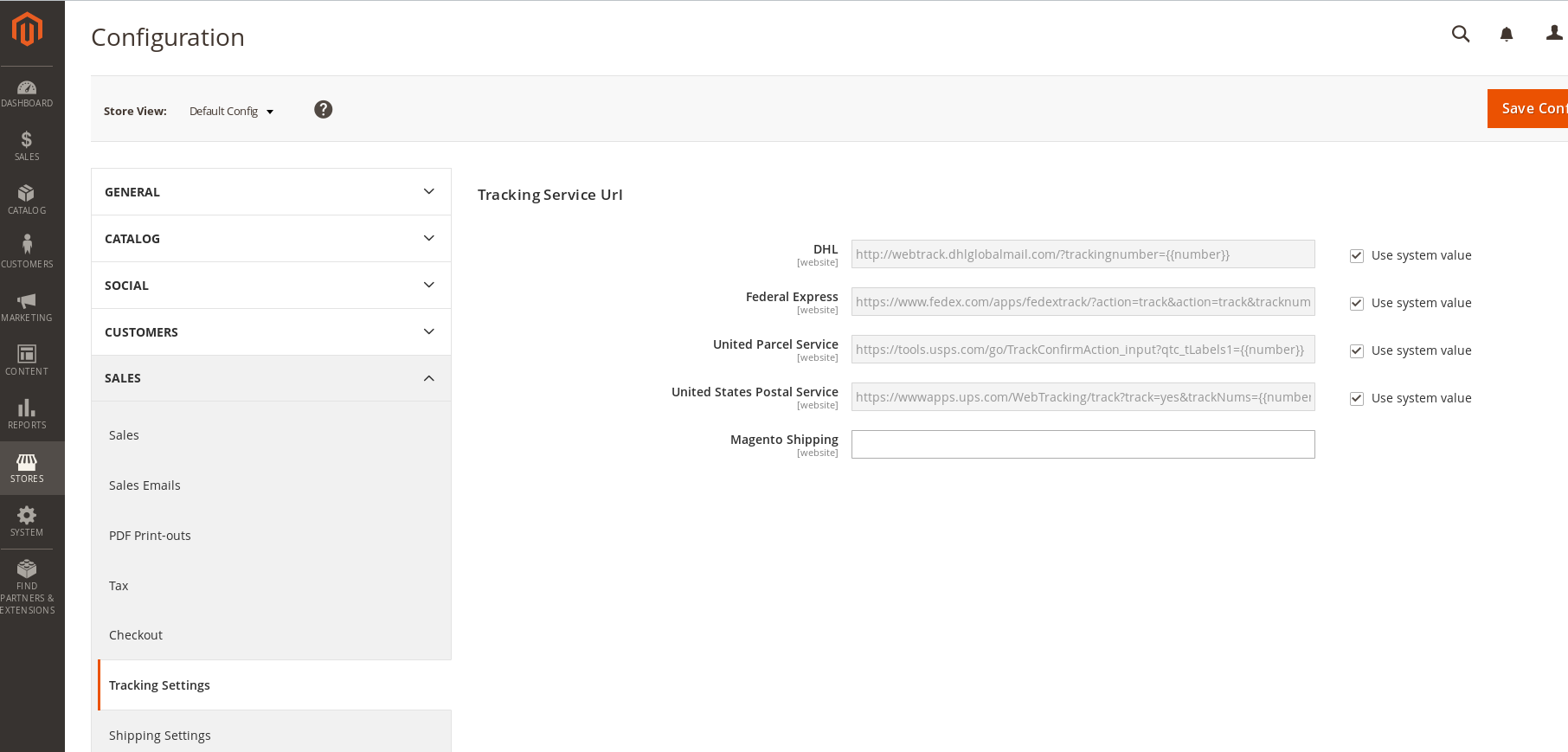
In the Magento Admin Panel go to *Stores > Configuration > Sales > Tracking Settings > Tracking Service Url*.
 ### Usage
##### Shipment Email
### Usage
##### Shipment Email
 ##### Service Tracking Page
 ### Uninstall
##### Remove database data
This works only with modules defined as Composer packages.
1. Go to Magento2 root folder
2. Enter following commands to remove database data:
```bash
php bin/magento module:uninstall -r Faonni_TrackingLink
##### Remove Extension
1. Go to Magento2 root folder
2. Enter following commands to remove:
```bash
composer remove faonni/module-tracking-link
```
##### Completion of uninstall
1. Go to Magento2 root folder
2. Enter following commands:
```bash
php bin/magento setup:upgrade
php bin/magento setup:di:compile
php bin/magento setup:static-content:deploy (optional)
## Recent Versions
| Version | Released |
|---|---|
| 2.0.10 | 2021-09-09 |
| 2.4.1 | 2021-09-09 |
| 2.4.0 | 2020-09-28 |
| 2.0.9 | 2019-05-19 |
| 2.0.8 | 2018-12-17 |
| 2.0.7 | 2018-10-10 |
| 2.0.6 | 2018-06-07 |
| 2.0.5 | 2018-02-03 |
| 2.0.4 | 2018-01-11 |
| 2.0.3 | 2017-12-13 |
Showing 10 of 12 versions. Full release history on https://packagento.com/faonni/module-tracking-link.
## Dependencies
### Require
| Package | Constraint |
|---|---|
| magento/module-email | 100.0.*\|100.1.*\|100.2.*\|101.0.* |
## Licence and pricing
Free. A licence is still minted on checkout and bound to your project for Composer access — no payment step.
Refundable within 14 days of first purchase via https://packagento.com/account/refunds/.
## Install via Claude Code or any MCP client
The Packagento MCP server can run the licence + project + Composer steps above in one tool call:
```
purchase_and_install_packages(
composer_names=["faonni/module-tracking-link"],
project_id="proj_xxx"
)
```
This handles cart, checkout, licence minting, project activation, and writes auth.json credentials. Connect a client with `claude mcp add packagento https://mcp.packagento.com`. Full setup at https://packagento.com/docs/mcp-setup.
## Vendor
faonni is a Magento 2 vendor on Packagento. See https://packagento.com/faonni.md for their full catalogue.
### Uninstall
##### Remove database data
This works only with modules defined as Composer packages.
1. Go to Magento2 root folder
2. Enter following commands to remove database data:
```bash
php bin/magento module:uninstall -r Faonni_TrackingLink
##### Remove Extension
1. Go to Magento2 root folder
2. Enter following commands to remove:
```bash
composer remove faonni/module-tracking-link
```
##### Completion of uninstall
1. Go to Magento2 root folder
2. Enter following commands:
```bash
php bin/magento setup:upgrade
php bin/magento setup:di:compile
php bin/magento setup:static-content:deploy (optional)
## Recent Versions
| Version | Released |
|---|---|
| 2.0.10 | 2021-09-09 |
| 2.4.1 | 2021-09-09 |
| 2.4.0 | 2020-09-28 |
| 2.0.9 | 2019-05-19 |
| 2.0.8 | 2018-12-17 |
| 2.0.7 | 2018-10-10 |
| 2.0.6 | 2018-06-07 |
| 2.0.5 | 2018-02-03 |
| 2.0.4 | 2018-01-11 |
| 2.0.3 | 2017-12-13 |
Showing 10 of 12 versions. Full release history on https://packagento.com/faonni/module-tracking-link.
## Dependencies
### Require
| Package | Constraint |
|---|---|
| magento/module-email | 100.0.*\|100.1.*\|100.2.*\|101.0.* |
## Licence and pricing
Free. A licence is still minted on checkout and bound to your project for Composer access — no payment step.
Refundable within 14 days of first purchase via https://packagento.com/account/refunds/.
## Install via Claude Code or any MCP client
The Packagento MCP server can run the licence + project + Composer steps above in one tool call:
```
purchase_and_install_packages(
composer_names=["faonni/module-tracking-link"],
project_id="proj_xxx"
)
```
This handles cart, checkout, licence minting, project activation, and writes auth.json credentials. Connect a client with `claude mcp add packagento https://mcp.packagento.com`. Full setup at https://packagento.com/docs/mcp-setup.
## Vendor
faonni is a Magento 2 vendor on Packagento. See https://packagento.com/faonni.md for their full catalogue.