# buckaroo/magento2
> Buckaroo Magento 2 extension
`composer require buckaroo/magento2`
Canonical URL: https://packagento.com/buckaroo/magento2
## At a glance
- **Vendor**: buckaroo (https://packagento.com/buckaroo.md)
- **Latest version**: v2.5.1 — released 2026-06-19
- **Pricing**: Free
- **Package type**: Magento 2 module
- **Status**: active, accepting new buyers
## Installation
Packagento is licence-gated, so even free packages need a licence on a project before Composer can resolve them.
1. **Sign in or create an account** at https://packagento.com/customer/account/.
2. **Add the package to your account.** Open https://packagento.com/buckaroo/magento2 and complete the free checkout. A licence is minted automatically.
3. **Create or pick a project, then activate the licence on it.**
- Projects represent the Magento installs you deploy to. Manage them at https://packagento.com/projects/.
- Activate the new licence on the project you'll deploy this package to. Activation is what generates the Composer credentials scoped to that project.
4. **Add the project credentials to your Magento codebase.**
Grab the project's public + private key from https://packagento.com/projects/ (open the project, then its Credentials tab), and add them to `auth.json`:
```json
{
"http-basic": {
"packagento.com": {
"username": "ppk_live_...",
"password": "psk_live_..."
}
}
}
```
Add the Packagento Composer repository to `composer.json`:
```json
{
"repositories": [
{ "type": "composer", "url": "https://packagento.com" }
]
}
```
5. **Install and apply.**
```bash
composer require buckaroo/magento2:*
bin/magento setup:upgrade
bin/magento setup:di:compile
bin/magento cache:flush
```
## What it does
Buckaroo Magento 2 extension
## README

## Buckaroo Magento 2 Payments Plugin
### Index
- [About](#about)
- [Requirements](#requirements)
- [Installation](#installation)
- [Upgrade](#upgrade)
- [Configuration](#configuration)
- [Additional Plugins](#additional-plugins)
- [Contribute](#contribute)
- [Versioning](#versioning)
- [Additional information](#additional-information)
---
### About
Magento is an e-commerce platform owned by Adobe. There are two versions: Magento Open Source, the free, open source version written in PHP, and Magento Commerce, the paid cloud version.
More than 250,000 merchants around the world use the Magento platform.
The Buckaroo Payments Plugin ([Dutch](https://docs.buckaroo.io/docs/nl/magento-20) or [English](https://docs.buckaroo.io/docs/magento-20)) for Magento 2 enables a ready-to-sell payment gateway. You can choose from popular online payment methods in The Netherlands, Belgium, France, Germany and globally.
Start accepting payments within a few minutes.
### Requirements
To use the Buckaroo plugin, please be aware of the following minimum requirements:
- A Buckaroo account ([Dutch](https://www.buckaroo.nl/start) or [English](https://www.buckaroo.eu/solutions/request-form))
- Magento version Magento 2.4.6 up to 2.4.8
- PHP 8.0, 8.1, 8.2, 8.3, 8.4
### Installation
We recommend you to install the Buckaroo Magento 2 Payments plugin with composer. It is easy to install, update and maintain.
**Run the following commands in the Magento 2 root folder:**
```
composer require buckaroo/magento2
php bin/magento module:enable Buckaroo_Magento2
php bin/magento setup:upgrade
php bin/magento setup:di:compile
php bin/magento setup:static-content:deploy
```
### Upgrade
**You can also update the Buckaroo plugin with composer.
To do this, please run the following commands in your Magento 2 root folder:**
```
composer update buckaroo/magento2:2.5.1
php bin/magento setup:upgrade
php bin/magento setup:di:compile
php bin/magento setup:static-content:deploy
```
#### Run compile if your store in Production mode:
````
php bin/magento setup:di:compile
````
### Configuration
For the configuration of the plugin, please refer to our [Dutch](https://docs.buckaroo.io/docs/nl/magento-2) or [English](https://docs.buckaroo.io/v1/docs/magento-2) support website.
You will find all the necessary information there.
But if you still have some unanswered questions, then please contact our [technical support team](mailto:support@buckaroo.nl).
### Additional plugins
The Buckaroo Magento 2 plugin can be extended with the following modules:
[Hyvä React Checkout
module](https://github.com/buckaroo-it/Magento2_Hyva) | [Hyvä Checkout
module](https://github.com/buckaroo-it/Magento2_Hyva_Checkout) | [GraphQL
module](https://github.com/buckaroo-it/Magento2_GraphQL) |
:-------------------------:|:-------------------------:|:-------------------------:|
[ ](https://github.com/buckaroo-it/Magento2_Hyva) | [
 ](https://github.com/buckaroo-it/Magento2_Hyva_Checkout) | [
 ](https://github.com/buckaroo-it/Magento2_GraphQL) |
### Contribute
We really appreciate it when developers contribute to improve the Buckaroo plugins.
](https://github.com/buckaroo-it/Magento2_GraphQL) |
### Contribute
We really appreciate it when developers contribute to improve the Buckaroo plugins.
If you want to contribute as well, then please follow our [Contribution Guidelines](CONTRIBUTING.md).
### Versioning
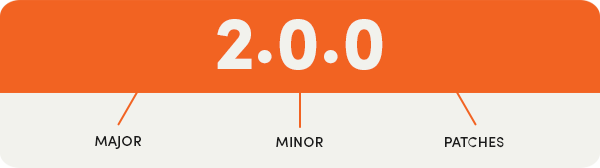
- **MAJOR:** Breaking changes that require additional testing/caution.
- **MINOR:** Changes that should not have a big impact.
- **PATCHES:** Bug and hotfixes only.
### Additional information
- **Knowledge base & FAQ:** Available in [Dutch](https://docs.buckaroo.io/docs/nl/magento-2) or [English](https://docs.buckaroo.io/docs/magento-2).
- **Support:** https://docs.buckaroo.io
- **Contact:** [support@buckaroo.nl](mailto:support@buckaroo.nl) or [+31 (0)30 711 50 50](tel:+310307115050)
Please note:
This file has been prepared with the greatest possible care and is subject to language and/or spelling errors.
## Recent Versions
| Version | Released |
|---|---|
| v2.5.1 | 2026-06-19 |
| v1.56.3 | 2026-05-25 |
| 2.5.0 | 2026-05-18 |
| 2.4.1 | 2026-05-08 |
| 2.4.0 | 2026-03-30 |
| 1.56.2 | 2026-03-04 |
| 1.56.1 | 2026-02-26 |
| 1.56.0 | 2026-02-05 |
| 2.3.1 | 2026-01-19 |
| 2.3.0 | 2026-01-12 |
Showing 10 of 108 versions. Full release history on https://packagento.com/buckaroo/magento2.
## Dependencies
### Require
| Package | Constraint |
|---|---|
| buckaroo/sdk | ^1.23.2 |
| ext-curl | * |
| ext-json | * |
| ext-pcre | * |
| laminas/laminas-validator | ^2.13 \|\| ^3.0 |
| magento/framework | >=103.0.0 |
| magento/module-backend | ^102.0 |
| magento/module-catalog | ^104.0 |
| magento/module-catalog-inventory | ^100.4 |
| magento/module-checkout | ^100.4 |
| magento/module-config | ^101.2 |
| magento/module-configurable-product | ^100.4 |
| magento/module-customer | ^103.0 |
| magento/module-directory | ^100.4 |
| magento/module-eav | ^102.1 |
| magento/module-email | ^101.1 |
| magento/module-media-storage | ^100.4 |
| magento/module-payment | >=100.3.3 |
| magento/module-quote | ^101.2 |
| magento/module-sales | ^103.0 |
| magento/module-sales-rule | ^101.2 |
| magento/module-store | ^101.1 |
| magento/module-tax | ^100.4 |
| magento/module-ui | ^101.2 |
| monolog/monolog | ^2.9 \|\| ^3.0 |
| php | ^8.1 \|\| ^8.2 \|\| ^8.3 \|\| ^8.4 |
| psr/log | ^2.0 \|\| ^3.0 |
### Require (dev)
| Package | Constraint |
|---|---|
| magento/magento-coding-standard | ^40 |
| php-webdriver/webdriver | ^1.1 |
| phpmd/phpmd | ^2.15 |
| phpstan/phpstan | ^1.10 |
| phpunit/phpunit | ^9.5 \|\| ^10.5 |
| squizlabs/php_codesniffer | ^3.7 |
### Replace
| Package | Constraint |
|---|---|
| buckaroo/magento2secondchance | * |
### Suggest
| Package | Constraint |
|---|---|
| buckaroo/magento2secondchance | No longer needed – remove it |
## Licence and pricing
Free. A licence is still minted on checkout and bound to your project for Composer access — no payment step.
Refundable within 14 days of first purchase via https://packagento.com/account/refunds/.
## Install via Claude Code or any MCP client
The Packagento MCP server can run the licence + project + Composer steps above in one tool call:
```
purchase_and_install_packages(
composer_names=["buckaroo/magento2"],
project_id="proj_xxx"
)
```
This handles cart, checkout, licence minting, project activation, and writes auth.json credentials. Connect a client with `claude mcp add packagento https://mcp.packagento.com`. Full setup at https://packagento.com/docs/mcp-setup.
## Vendor
buckaroo is a Magento 2 vendor on Packagento. See https://packagento.com/buckaroo.md for their full catalogue.