The export core is a part of the full Import and Export solution. Install together with the Import Core and Import\Export Core to see the full scope of data transfer features between multiple platforms This free package has the same code and architecture as the original paid Import and Export for Magento 2 extension but with the core options only. The package can be used for manual data exporting. See the full scope of automatization features and ready-made entities available in the paid version in this demo or book a live demo with the Amasty team to get a consultation in real-time.
 The paid version has Lite, Pro and Premium packages. Visit our website to discover pricing plans available. A free package is a part of the Lite version of the full Import and Export for Magento 2 extension, but without ready-made entities for migration.Export Core is a multipurpose tool for data transferring from Magento 2. The solution has nothing in common with the native Magento import and export since it has a brand new architecture and code structure. Keep in mind that a free core does not include ready-made entities (e.g. Orders, Products) but the code structure lets you develop compatibility with any entity you need.
This package lets you:
To install the package, run the following commands:
composer require amasty/module-export-corephp bin/magento setup:upgradephp bin/magento setup:di:compile php bin/magento setup:static-content:deploy (your locale)See more details in the Composer User Guide.
To export data, you need to create the required entity or entities (e.g. products, orders, customers) first. Let’s see how it works in the free version using the example of the ‘Order’ entity.
Navigate to the Export tab. Here you can choose the entity to export. For instance, we can export order items.
When the required entity is chosen, proceed to the configuration.
It is possible to export files in an XML or CSV format.
If you choose a CSV file, you can also add:
To configure file settings correctly, please explore the requirements of the platform you are going to transfer data to.
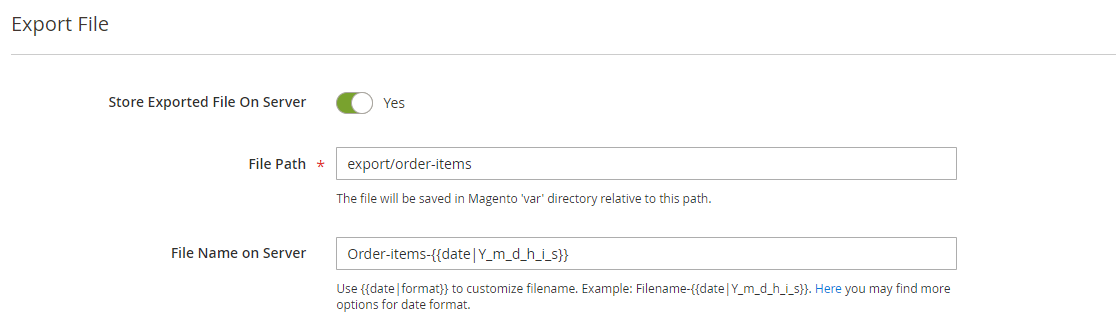
Name your file. You can also set a regular expression to fill in the date automatically.
When the configuration is finished, you’ll be able to download a ready file right from the interface. But, in addition to this, you can send the file to the local server.
 _(README truncated for .md surface. Full README on https://packagento.com/amasty/module-export-core.)_ ## Recent Versions | Version | Released | |---|---| | 1.14.1 | 2025-11-10 | | 1.12.0 | 2025-02-03 | | 1.10.0 | 2024-02-26 | | 1.9.1 | 2023-12-01 | | 1.9.0 | 2023-08-11 | | 1.8.2 | 2023-06-30 | | 1.8.1 | 2023-04-28 | | 1.8.0 | 2023-03-28 | | 1.6.7 | 2022-11-09 | ## Dependencies ### Require | Package | Constraint | |---|---| | amasty/base | >=1.21.0 | | amasty/module-import-export-core | >=1.4.2 | | php | >=7.4 | ## Quality Latest release (1.14.1) passes the Packagento QA pipeline. Verdicts below are per-cell (Magento line × PHP version) for the matrixed tools, and run-once for the static / security tiers. ### Compatibility Each Magento line is installed on its supported PHP versions, then the module is built (DI compile + static-content deploy). Cells show passed / failed / untested; staircase gaps render as `–`. | Magento | PHP 8.2 | PHP 8.3 | PHP 8.4 | PHP 8.5 | |---|---|---|---|---| | 2.4.7 | not tested | not tested | – | – | | 2.4.8 | – | not tested | not tested | – | | 2.4.9 | – | – | not tested | not tested | ### Code Quality Advisory checks against the module's source. Never affect the Compatibility verdict — a phpcs finding can't make a module incompatible. #### Static Analysis Coding standards (phpcs), mess detection (phpmd), copy-pasted code (cpd), PHP cross-version compatibility, composer.json validity. Each runs once for the whole module. | Tool | Status | Findings | Summary | |---|---|---|---| | PHPCS | Warning | 1 | 1 warning (ruleset: Magento2) | | PHPMD | Warning | 137 | 137 rule violations (IfStatementAssignment:46, MissingImport:45, UnusedFormalParameter:11, UndefinedVariable:9, UnusedLocalVariable:7) | | Cpd | Pass | 0 | | | Composer validate | Info | 3 | valid; 3 advisory notes (composer validate --strict) | #### PHPStan Type-checks the module against a real Magento install. Re-runs per Magento + PHP version because resolvable symbols differ between releases. | Magento | PHP 8.2 | PHP 8.3 | PHP 8.4 | PHP 8.5 | |---|---|---|---|---| | 2.4.7 | Error | Error | – | – | | 2.4.8 | – | Error | Error | – | | 2.4.9 | – | – | Error | Error | ### Tests Unit and integration suites run per Magento + PHP cell. Test failures speak to the module's behaviour, not its compatibility with a line, so they're reported here separately. #### Unit Tests | Magento | PHP 8.2 | PHP 8.3 | PHP 8.4 | PHP 8.5 | |---|---|---|---|---| | 2.4.7 | N/A | N/A | – | – | | 2.4.8 | – | N/A | N/A | – | | 2.4.9 | – | – | N/A | N/A | #### Integration Tests | Magento | PHP 8.2 | PHP 8.3 | PHP 8.4 | PHP 8.5 | |---|---|---|---|---| | 2.4.7 | Error | Error | – | – | | 2.4.8 | – | Error | Error | – | | 2.4.9 | – | – | Error | Error | ### Security Dependency-advisory audit (composer audit) plus a source malware scan. A malware detection fails the version outright. | Tool | Status | Findings | Summary | |---|---|---|---| | Composer audit | N/A | 0 | no resolvable dependency tree to audit — Your requirements could not be resolved to an installable set of packages. Problem 1 | | Malware scan | Pass | 0 | | ## Licence and pricing Free. A licence is still minted on checkout and bound to your project for Composer access — no payment step. Refundable within 14 days of first purchase via https://packagento.com/account/refunds/. ## Install via Claude Code or any MCP client The Packagento MCP server can run the licence + project + Composer steps above in one tool call: ``` purchase_and_install_packages( composer_names=["amasty/module-export-core"], project_id="proj_xxx" ) ``` This handles cart, checkout, licence minting, project activation, and writes auth.json credentials. Connect a client with `claude mcp add packagento https://mcp.packagento.com`. Full setup at https://packagento.com/docs/mcp-setup. ## Vendor amasty is a Magento 2 vendor on Packagento. See https://packagento.com/amasty.md for their full catalogue.